Activity 1.11: Asking Two Things at Once

Activity 1.11
Asking Two Things at Once
Key Concepts
and, or, not
Fixing the Stuck Ball
Which One You Actually Meant
A Promise From Session 9
A ball that starts outside the window gets stuck vibrating at the wall, forever.
A Promise From Session 9
A ball that starts outside the window gets stuck vibrating at the wall, forever.
Two decisions undoing each other, sixty times a second, and no error at all.
Today you fix it, and the fix is four words.
Three New Words
print(true and false)print(true or false)print(not true)Three New Words
print(true and false)print(true or false)print(not true)falsetruefalseThey take booleans and produce a boolean. Same kind of value in, same kind out.
What Each One Means
- and
- True only when both sides are true.
- or
- True when either side is true, including both.
- not
- Flips one value.
truebecomesfalse.
or in a program is not the or in "soup or salad". Both is allowed.
Every Case, on One Slide
| a | b | a and b | a or b |
|---|---|---|---|
| true | true | true | true |
| true | false | false | true |
| false | true | false | true |
| false | false | false | false |
Four rows. That is the entire definition, and there is nothing else to learn about them.
The Sides Are Usually Comparisons
print(5 > 3 and 2 > 1)print(5 > 3 or 2 > 9)print(not (5 > 3))truetruefalseEach comparison produces a boolean first. Then and looks at the two answers.
Now the Stuck Ball
if x > 800 - radius then speedX = -speedXendThis asks is it past the wall? A ball that starts past the wall answers yes on every single frame.
Now the Stuck Ball
if x > 800 - radius and speedX > 0 then speedX = -speedXendThis asks is it past the wall and still heading that way?
Once it has turned around, the second half is false, so it stops flipping. The ball flies back in.
What You Are Building
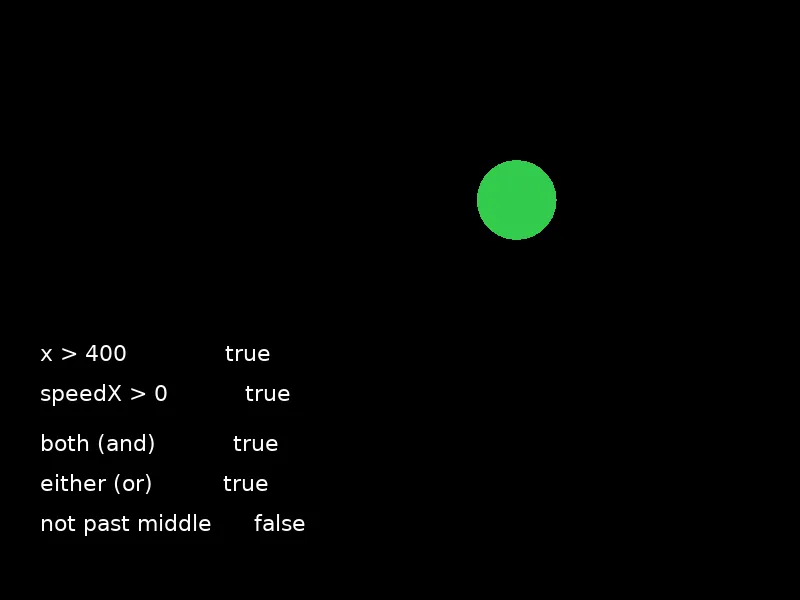
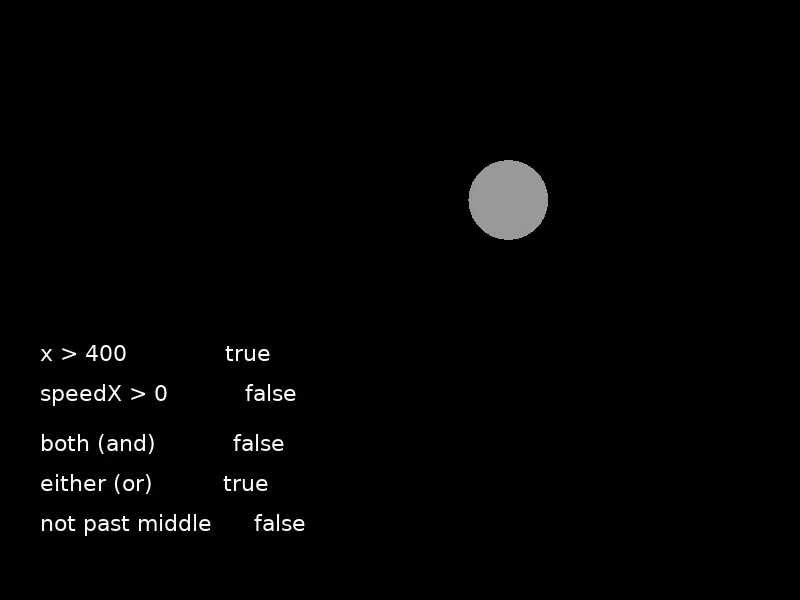
Same position, different direction. The and disagrees with the or.
Today's Objectives
- Use
and,orandnot - Read a truth table
- Fix a bug that a single condition cannot fix
- Tell which of
andorora problem needs
Key Terms
- Logical operator
and,orandnot. They combine booleans.- Compound condition
- A condition built from more than one comparison.
- Truth table
- Every combination of inputs, with the answer for each.
'F' → Fullscreen
Build
Task 1: Fill In the Table
Copy template-console to 1-11-logic. Fill in the truth table on your sheet first, then write the twelve lines that check it:
print(true and true)print(true and false)print(false and true)print(false and false)Then the same four for or, and print(not true) and print(not false).
Ten lines, ten answers, and you should already know all of them. Mark any you got wrong.
Task 2: Fix the Stuck Ball
Copy 1-09-bounce to 1-11-bounce. First reproduce the bug: set the starting x to 900 and run it. Nothing appears.
Now add four words:
function love.update(dt) x = x + speedX * dt
if x > 800 - radius and speedX > 0 then speedX = -speedX end
if x < radius and speedX < 0 then speedX = -speedX endendRun it again. The ball flies in from off-screen and bounces normally forever.
Task 3: Watch All Three
Put the starting x back to 100 and replace love.draw with a readout:
function love.draw() if x > 400 and speedX > 0 then love.graphics.setColor(0.2, 0.8, 0.3) else love.graphics.setColor(0.6, 0.6, 0.6) end love.graphics.circle("fill", x, y, radius)
love.graphics.setColor(1, 1, 1) love.graphics.setFont(font) love.graphics.print("x > 400 " .. tostring(x > 400), 40, 340) love.graphics.print("speedX > 0 " .. tostring(speedX > 0), 40, 380) love.graphics.print("both (and) " .. tostring(x > 400 and speedX > 0), 40, 430) love.graphics.print("either (or) " .. tostring(x > 400 or speedX > 0), 40, 470) love.graphics.print("not past middle " .. tostring(not (x > 400)), 40, 510)endWatch it for a full round trip. Find the moment when the top two lines disagree, and write down what each of the bottom three says at that moment.
Task 4: Swap the and for an or
Change the color condition, and only that one:
if x > 400 or speedX > 0 thenThe ball is now green for three quarters of its round trip. Work out which quarter it is still gray for, and write down why.
or is a much weaker demand than and. Most of the time, one of two things is true.
Challenge (Optional): In the Box
Give the ball a speedY so it bounces around the whole window, then turn it a different color only when it is in the middle square — between 300 and 500 across and between 200 and 400 down.
That is four comparisons joined by three ands. Write it on your sheet before you type it.
Challenge (Optional): Say It With not
Rewrite your middle-square condition so it says the same thing using not and or instead of and.
Test that both versions behave identically, then say which one you would rather read in six months.
Same Idea, Exam Notation
Three words, in capitals, and they work exactly as they do in Lua.
if lives > 0 and score >= 100 then    print("Next level")end
if lives == 0 or timeLeft == 0 then    print("Game over")end
if not paused then print("Running")endIF(lives > 0 AND score ≥ 100){ DISPLAY("Next level")}
IF(lives = 0 OR timeLeft = 0){ DISPLAY("Game over")}
IF(NOT paused){ DISPLAY("Running")}| Meaning | Lua | Exam notation |
|---|---|---|
| Both | and | AND |
| Either | or | OR |
| The opposite | not | NOT |
The truth tables are identical, so anything you worked out today is true on the exam as well. The differences are all in the pieces you already know — = for equality and ≥ for greater-or-equal inside the conditions.
lives == 0 or timeLeft == 0 becomes lives = 0 OR timeLeft = 0. Two operators change in one line, and the one people miss is the second.Checkpoint
- The truth table on your sheet was filled in before running anything
1-11-bouncerecovers from a start position of 900- The readout shows all three operators changing as the ball moves
- You can say when
andis true butoris not — and when it is the other way round
Reflection
Answer the following questions before submitting your work.
- The stuck ball could not be fixed by adding another
if. Explain what the old condition was actually asking, what the new one asks, and why only the second one works. - Swapping
andfororin one line changed almost nothing on screen for most of the trip. Explain why a wrong logical operator is harder to notice than a wrong comparison. - Describe a rule from outside programming — a school rule, a game rule, an entry requirement — that needs
and, and one that needsor. Say how you can tell them apart from the wording.
Submit
Submit the required files to the appropriate dropbox.