Activity 1.12: The Crossing

Activity 1.12
The Crossing
Key Concepts
Nothing New Today
One Decision, Many Pictures
Testing Every Branch
What You Are Building
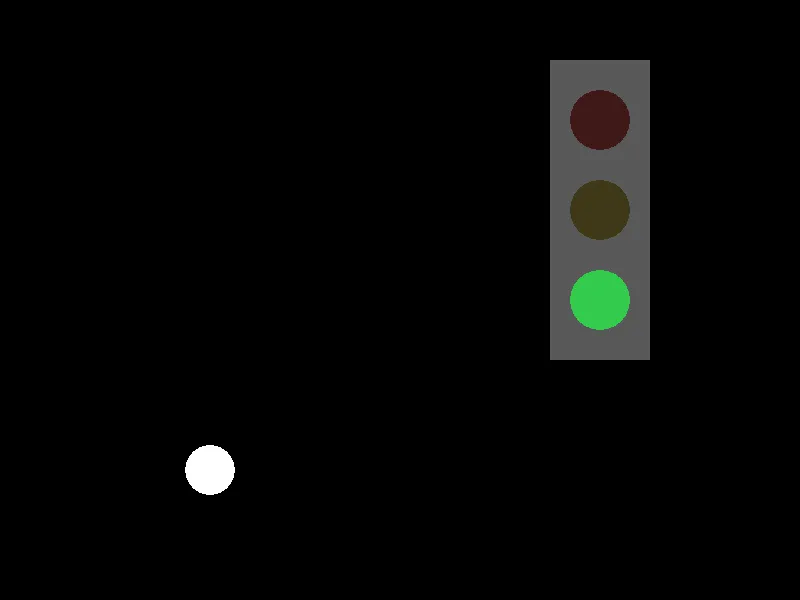
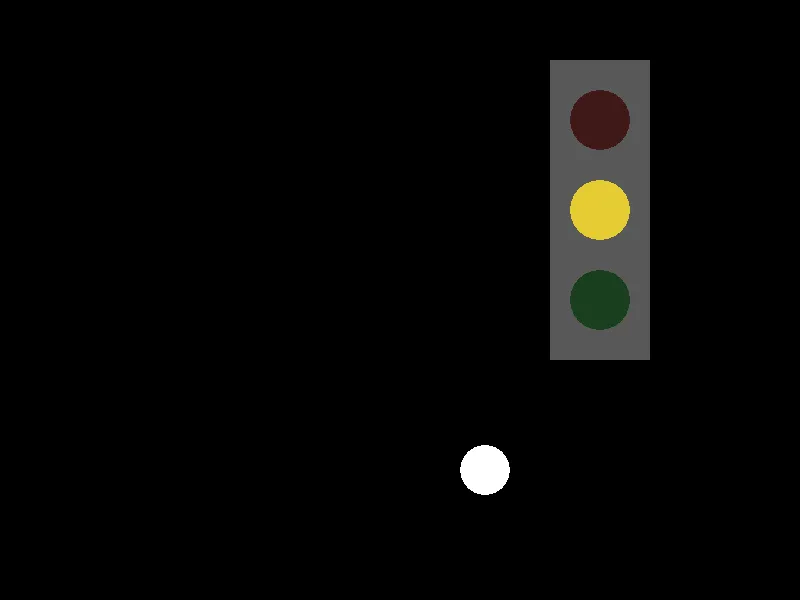
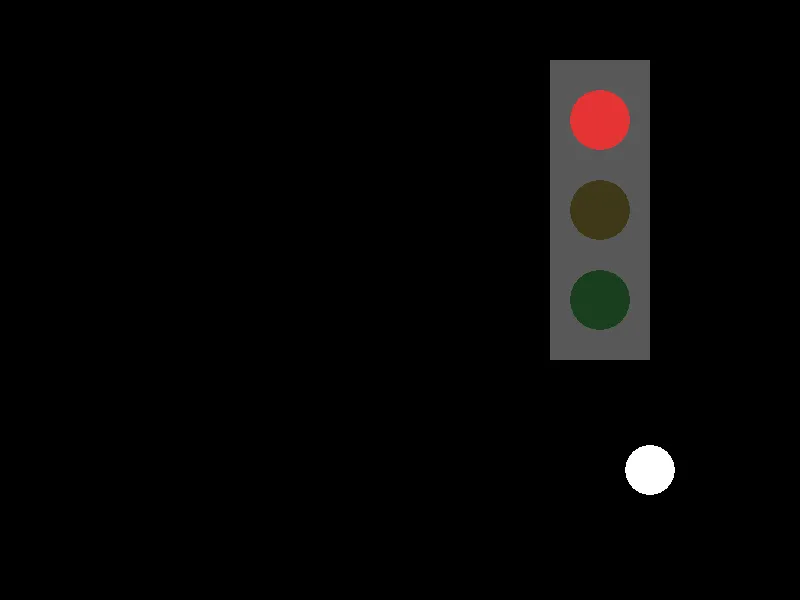
Your signal from session 3, now reacting to something.
No New Ideas
Motion, comparisons, elseif, and — all of it from the last five sessions.
Putting five sessions together is the work.
Decide Once, Draw Three Times
local lamp = "green"
if ballX > signalX - 100 and ballX < signalX + 100 then    lamp = "red"elseif ballX > signalX - 250 and speedX > 0 then    lamp = "yellow"end
Decide Once, Draw Three Times
local lamp = "green"
if ballX > signalX - 100 and ballX < signalX + 100 then    lamp = "red"elseif ballX > signalX - 250 and speedX > 0 then    lamp = "yellow"end
One chain works out which lamp is lit. Then three separate decisions each ask am I the lit one?
Deciding and drawing are different jobs. Doing them separately is what keeps this readable.
Each Lamp Asks the Same Question
if lamp == "red" then love.graphics.setColor(0.9, 0.2, 0.2)else love.graphics.setColor(0.25, 0.1, 0.1)endlove.graphics.circle("fill", signalX, signalY, 30)Bright if it is the lit one, nearly black if it is not. All three lamps are always drawn — only their colors change.
Comparing Text
if lamp == "red" then== works on text too, and the quotes matter. lamp holds the word red, not a color.
A misspelling here is silent: no error, and one lamp that never lights.
Test Every Branch
- Ball far away, moving toward the signal
- Ball approaching, inside 250
- Ball directly under it
- Ball past it, moving away
- Ball far away, moving away
Five situations, three lamps. One of them is easy to miss.
Today's Objectives
- Combine motion, chains and compound conditions in one program
- Separate deciding from drawing
- Compare text with
== - Test that every branch can happen
Key Terms
- State
- What is currently true about the program — here, which lamp is lit.
- Branch coverage
- Checking that every branch of your decisions can actually run.
- String comparison
- Using
==on text instead of numbers.
'F' → Fullscreen
Build
You are combining two programs you have already written: the bouncing ball, and the traffic signal from session 3. The signal now responds to where the ball is.
Task 1: Plan the Rules on Paper
Before you open VS Code. On your sheet, write the three rules in plain English — when is it red, when is it yellow, when is it green?
Then mark on a line from 0 to 800 where the signal sits and where each rule takes over. Two of the rules need to know which direction the ball is going. Say which two, and why.
Task 2: The Ball and the Signal, Not Talking
Copy template-game to 1-12-crossing. Start with the variables:
local ballX = 100local ballY = 470local radius = 25local speedX = 220
local signalX = 600local signalY = 120local gap = 90Then the movement, which is last session's fixed version:
function love.update(dt) ballX = ballX + speedX * dt
if ballX > 800 - radius and speedX > 0 then speedX = -speedX end
if ballX < radius and speedX < 0 then speedX = -speedX endendDraw the signal body and three lamps in fixed colors, plus the ball. Run it and get that working before any lamp changes. A bouncing ball and a signal that ignores it.
Task 3: Work Out Which Lamp
At the top of love.draw, decide before you draw anything:
local lamp = "green"
if ballX > signalX - 100 and ballX < signalX + 100 then lamp = "red"elseif ballX > signalX - 250 and speedX > 0 then lamp = "yellow"endThen give each lamp its own if / else, bright or dim:
function love.draw() local lamp = "green"
if ballX > signalX - 100 and ballX < signalX + 100 then lamp = "red" elseif ballX > signalX - 250 and speedX > 0 then lamp = "yellow" end
love.graphics.setColor(0.35, 0.35, 0.35) love.graphics.rectangle("fill", signalX - 50, signalY - 60, 100, 300)
if lamp == "red" then love.graphics.setColor(0.9, 0.2, 0.2) else love.graphics.setColor(0.25, 0.1, 0.1) end love.graphics.circle("fill", signalX, signalY, 30)
if lamp == "yellow" then love.graphics.setColor(0.9, 0.8, 0.2) else love.graphics.setColor(0.25, 0.22, 0.1) end love.graphics.circle("fill", signalX, signalY + gap, 30)
if lamp == "green" then love.graphics.setColor(0.2, 0.8, 0.3) else love.graphics.setColor(0.1, 0.25, 0.12) end love.graphics.circle("fill", signalX, signalY + gap + gap, 30)
love.graphics.setColor(1, 1, 1) love.graphics.circle("fill", ballX, ballY, radius)endTask 4: Test Every Branch
Watch a full round trip and record which lamp is lit in each of the five situations from the slides. One of them behaves in a way you might not expect.
| Where the ball is | Which way it is going | Lamp |
|---|---|---|
| Far left (x under 350) | Right | |
| Approaching (x about 400) | Right | |
| Under the signal | Right | |
| Past it (x about 750) | Right | |
| Approaching (x about 400) | Left |
Compare rows 2 and 5. The ball is in the same place both times and the signal does something different. Write down what the program is using to tell them apart.
Then look hard at row 4. The ball has already gone past the signal and is heading away from it, and the lamp is still yellow. The rules do exactly what they say; they just do not say what a person would mean. Write down a rule that would fix it.
Task 5: Make One Rule Your Own
Change one of the three rules and test it again. Some options:
- Make the red zone narrower, so red is a shorter moment
- Make yellow work in both directions
- Add a fourth state for when the ball is stopped — set
speedXto0to test it
Whatever you change, write the new rule on your sheet in English first and test all five situations again afterward.
Challenge (Optional): Break It on Purpose
Misspell one of the lamp names — change lamp = "yellow" to lamp = "yelow" and leave the comparison alone.
No error. Nothing crashes. Describe exactly what you see, and explain why this kind of mistake is harder to find than a misspelled variable name.
Challenge (Optional): Two Balls
Add a second ball with its own position and speed. The signal should go red if either ball is under it, and yellow if either is approaching.
The conditions get long. Work out on paper what "either ball is under it" means as a single condition before you type it.
Checkpoint
- The three rules were written in English on the sheet first
1-12-crossinghas a bouncing ball and a signal that responds to it- All five test situations are recorded
- One rule has been changed and retested
- The lamp is decided once, above the drawing, rather than three times inside it
Reflection
Answer the following questions before submitting your work.
- The lamp is worked out once at the top of
love.drawand then used three times. Describe what the program would look like if each lamp worked out the rules for itself, and say which version you would rather change later. - Two of your test rows put the ball in the same place and got different lamps. Explain what the program is using to tell those two situations apart, and why a position alone is not enough.
- Misspelling a lamp name produced no error at all, while misspelling a variable name in session 3 produced one immediately. Explain the difference, and say what that means for how carefully you have to test text comparisons.
Submit
Submit the required files to the appropriate dropbox.