Activity 1.14: Touching, and Remembering

Activity 1.14
Touching, and Remembering
Key Concepts
Overlap Is Four Comparisons
Counting Something Once
Remembering Last Frame
What You Are Building
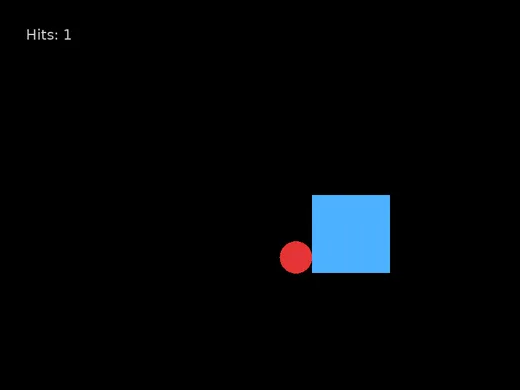
A ball, a block you drive, and a number that only goes up when it should.
How Does a Program Know Two Things Touch?
It does not look at the picture.
It compares numbers — the same coordinates it used to draw them.
Overlap, One Direction at a Time
Across: the ball's right edge is past the block's left edge and its left edge is before the block's right edge.
Overlap, One Direction at a Time
Across: the ball's right edge is past the block's left edge and its left edge is before the block's right edge.
Down: the same two questions with y.
All four must be true. Any one false and they miss.
Which Is One Condition
local overlapping = ballX + radius > blockX and ballX - radius < blockX + blockW and ballY + radius > blockY and ballY - radius < blockY + blockHFour comparisons, three ands, broken across lines so a person can read it. Lua does not care where the line ends.
Now Count the Hits
if overlapping then hits = hits + 1endNow Count the Hits
if overlapping then hits = hits + 1end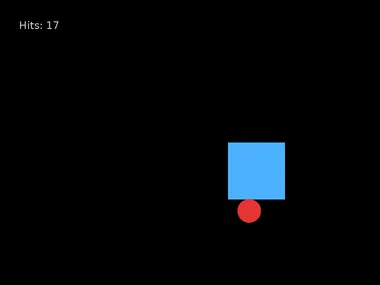
One touch. Seventeen hits.
Because It Is Asked Every Frame
The ball is overlapping for a few dozen frames — anywhere from a fifth of a second to two thirds, depending on the angle — and the condition is true in every one of them.
The program is right. The question is wrong. You did not want is it touching — you wanted did it just start touching.
So Remember Last Frame
if overlapping and not touching then    hits = hits + 1end
touching = overlapping
So Remember Last Frame
if overlapping and not touching then    hits = hits + 1end
touching = overlapping
Count only when it is touching now and was not touching before.
The last line is the whole trick: after deciding, store today's answer so the next frame can compare against it.
That Variable Is State
touching holds nothing you can see. It exists only so the program can compare now against then.
Every score, every life counter, every pause button in every game is a variable like this one.
Today's Objectives
- Test whether two rectangles overlap
- Explain why the test needs all four comparisons
- Count an event once instead of once per frame
- Keep a variable whose only job is to remember
Key Terms
- Collision detection
- Working out whether two things overlap by comparing their coordinates.
- State
- A variable that records something the program needs to remember.
- Counter
- A variable that goes up when something happens.
- Edge
- The moment a condition changes from false to true.
'F' → Fullscreen
Build
Task 1: A Ball and a Block
Copy template-game to 1-14-hits. Start with the variables:
local ballX = 100local ballY = 150local radius = 25local speedX = 260local speedY = 180
local blockX = 480local blockY = 300local blockW = 120local blockH = 120local speed = 300
local hits = 0local touching = falseIn love.update, bounce the ball off all four walls — this is session 11's version, with the direction check:
ballX = ballX + speedX * dtballY = ballY + speedY * dt
if ballX > 800 - radius and speedX > 0 then speedX = -speedXend
if ballX < radius and speedX < 0 then speedX = -speedXend
if ballY > 600 - radius and speedY > 0 then speedY = -speedYend
if ballY < radius and speedY < 0 then speedY = -speedYendThen add the four arrow-key questions from last session so you can drive the block, and clamp it to the window. Draw both shapes and run it. Get this working before anything notices anything.
Task 2: Do They Overlap?
At the bottom of love.update:
local overlapping = ballX + radius > blockX and ballX - radius < blockX + blockW and ballY + radius > blockY and ballY - radius < blockY + blockHThen draw the ball red when overlapping is true and white when it is not. Drive the block into the ball and check that the color changes at exactly the right moment on all four sides.
ballX + radius is the ball's right edge, and blockX is the block's left edge. If the first is not past the second, they cannot be touching, whatever the other three say.Task 3: Count the Hits, Badly
Add a counter the obvious way:
if overlapping then hits = hits + 1endDraw "Hits: " .. hits in the corner and touch the ball once.
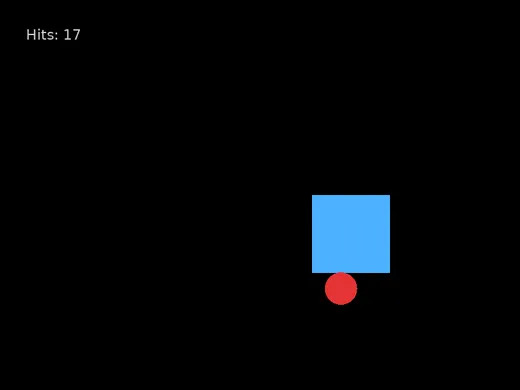
Write down the number you get from a single touch. Then touch it again, more briefly, and write down that number too. The two will not match, and neither of them is one.
Task 4: Count the Hits, Properly
Change three lines:
if overlapping and not touching then hits = hits + 1end
touching = overlappingNow draw the ball red when touching is true instead of overlapping:
function love.draw() love.graphics.setColor(0.3, 0.7, 1) love.graphics.rectangle("fill", blockX, blockY, blockW, blockH)
if touching then love.graphics.setColor(0.9, 0.2, 0.2) else love.graphics.setColor(1, 1, 1) end love.graphics.circle("fill", ballX, ballY, radius)
love.graphics.setColor(0.8, 0.8, 0.8) love.graphics.setFont(font) love.graphics.print("Hits: " .. hits, 40, 40)endOne touch, one hit. Hold the ball against the block by chasing it and confirm the number does not climb while they stay in contact.
touching = overlapping has to come after the if. Put it first and touching is already up to date when the if asks, so the count never moves at all.Task 5: Test It Honestly
Four situations, and predict each before you try it:
| What you do | Hits should go up by |
|---|---|
| Touch once and move away | |
| Hold contact for five seconds | |
| Touch, move away, touch again | |
| Sit still while the ball passes through you twice |
Challenge (Optional): Break It on Purpose
Swap the last two lines so touching = overlapping runs before the if.
The counter never moves. No error, and the collision still works — the ball still turns red. Explain on your sheet what touching holds at the moment the if asks about it.
Challenge (Optional): Something Happens on the Hit
Make the hit do more than count. Pick one:
- The ball speeds up by 10% every time it is hit
- The block shrinks by 5 pixels every hit, and the game ends when it is gone
- Three hits and the ball changes color permanently
All three need the guarded version. With the counting bug, the ball would reach the speed of light in about a second.
Checkpoint
1-14-hitshas a bouncing ball and a block you can drive- The ball turns red exactly while the two overlap
- One touch adds exactly one hit, however long it lasts
- You wrote down the number a single touch produced before the fix
- All four test predictions are recorded
Reflection
Answer the following questions before submitting your work.
- The overlap test needs all four comparisons joined by
and. Describe a position where three of them are true, the fourth is false, and the shapes are clearly not touching. - One touch counted as twenty-something hits, and nothing was broken. Explain the difference between the question the code asked and the question you meant to ask.
touchingis never drawn and holds nothing a player could see. Explain what job it does, and describe one thing in a game you have played that must work the same way.
Submit
Submit the required files to the appropriate dropbox.