Activity 1.17: Loops Inside Loops

Activity 1.17
Loops Inside Loops
Key Concepts
A Loop Is Just a Block
The Inner One Finishes First
Two Counters Make a Grid
What You Are Building
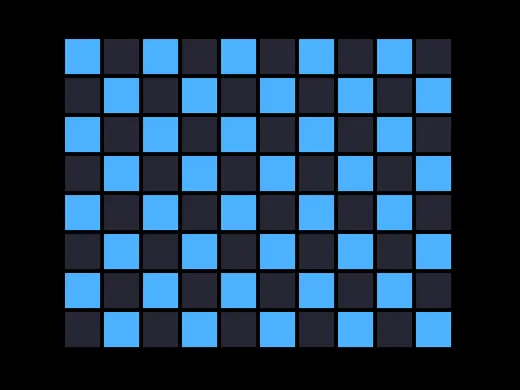
Eighty squares. Two loops and one rectangle.
Nothing New Today
A loop repeats a block. A loop is a block.
So a loop can go inside a loop, the same way an if went inside love.draw.
Two Counters
for row = 1, 3 do for col = 1, 4 do print(row .. ", " .. col) endendTwo Counters
for row = 1, 3 do for col = 1, 4 do print(row .. ", " .. col) endend1, 11, 21, 31, 42, 12, 22, 32, 43, 13, 23, 33, 4Read the Output, Not the Code
row stays at 1 while col runs all the way from 1 to 4. Then row becomes 2 and col starts over.
The inner loop finishes completely on every single pass of the outer one.
Twelve Lines From Two Loops
3 rows × 4 columns = 12.
Change the outer to 100 and the inner to 100 and you have ten thousand passes from four lines of code.
Which is worth knowing before you type it.
Why This Belongs on a Canvas
Twelve lines of 1, 3 in a terminal is a wall of text you have to decode.
The same two loops on a screen make a grid you can see at a glance.
Position From Two Counters
100 + (col - 1) * sizePosition From Two Counters
100 + (col - 1) * sizecol starts at 1, and the first square should be at the left edge, not one square in.
col - 1 turns 1, 2, 3 into 0, 1, 2.
Nearly every grid you ever write has this subtraction in it.
And a Checkerboard Is One Condition
if (row + col) % 2 == 0 then% from session 5, in the middle of two loops. Neighboring squares always differ by one, so they always land on different colors.
Today's Objectives
- Put one loop inside another
- Say which counter changes fastest
- Work out how many passes a nested loop makes
- Draw a grid from two counters
Key Terms
- Nested loop
- A loop written inside another loop.
- Outer loop
- The one that changes slowest. Usually the rows.
- Inner loop
- The one that finishes completely on every pass of the outer.
- Grid
- Rows and columns, addressed by two numbers.
'F' → Fullscreen
Build
Task 1: See the Order
Copy template-console to 1-17-order:
for row = 1, 3 do for col = 1, 4 do print(row .. ", " .. col) endend1, 11, 21, 31, 42, 12, 22, 32, 43, 13, 23, 33, 4Before you run it, write down how many lines you expect. Then run it and count.
Now swap the two loop headers so col is on the outside:
for col = 1, cols do for row = 1, rows doSame twelve lines, different order. Write down what changed and what did not.
Task 2: A Grid
Copy template-game to 1-17-grid:
local cols = 10local rows = 8local size = 60
function love.draw() for row = 1, rows do for col = 1, cols do love.graphics.rectangle("fill", 100 + (col - 1) * size, 60 + (row - 1) * size, size - 6, size - 6) end endendRun it. Eighty squares from one rectangle line.
col * size instead of (col - 1) * size. The whole grid shifts one square right and the last column falls off the edge. Put it back, and remember the subtraction — you will need it for the rest of the year.Then change rows and cols and watch the grid resize. Work out the largest grid that still fits before you try it.
Task 3: Checkerboard
Add one decision inside the inner loop:
for row = 1, rows do for col = 1, cols do if (row + col) % 2 == 0 then love.graphics.setColor(0.3, 0.7, 1) else love.graphics.setColor(0.15, 0.15, 0.2) end
love.graphics.rectangle("fill", 100 + (col - 1) * size, 60 + (row - 1) * size, size - 6, size - 6) endendWork out why row + col and not just col. Try it with only col and write down what you get instead.
Task 4: Count the Work
Fill this in from your own program, without running anything:
| rows | cols | Rectangles drawn | Per second, at 60 frames |
|---|---|---|---|
| 8 | 10 | ||
| 20 | 20 | ||
| 100 | 100 |
The last row is why nested loops are the first thing anyone checks when a program is slow.
Task 5: Your Own Grid
Pick at least two:
- Color each square by its row, so the grid fades top to bottom
- Make squares grow larger toward the bottom right, using both counters
- Draw circles instead, and leave every third one out
- Make the checkerboard's colors swap when you press space
Challenge (Optional): Multiplication Table
Back in the terminal, print a full times table with io.write so each row stays on one line, and print() with nothing in it to end the row.
io.write is the one from session 4 that does not add a new line. That is exactly why it is the right tool here.
Challenge (Optional): Triangle
Make the inner loop's end depend on the outer counter: for col = 1, row do.
The grid becomes a triangle. Work out how many squares it draws for 8 rows, and say why it is not 64.
Checkpoint
1-17-orderprinted twelve lines, and you recorded what swapping the loops changed1-17-griddraws a checkerboard from one rectangle line- Changing
rowsorcolsresizes the grid correctly, with no square off the edge - The task 4 table is filled in
- Two of the task 5 variations are done
Reflection
Answer the following questions before submitting your work.
- Swapping the two loop headers produced the same twelve lines in a different order. Explain which counter changes fastest and why, and say what the grid would look like if you swapped them there too.
- A 100 by 100 grid draws ten thousand rectangles every frame, from four lines of code. Explain how a program can be very short and very slow at the same time.
- The position uses
col - 1rather thancol. Explain what goes wrong without the subtraction, and say what you would change instead if you wanted the grid to start 100 pixels from the left.
Submit
Submit the required files to the appropriate dropbox.