Activity 1.21: Making Your Own Box

Activity 1.21
Making Your Own Box
Key Concepts
You Have Been Writing These Since Day Two
Naming a Piece of Work
Parameters
What You Are Building
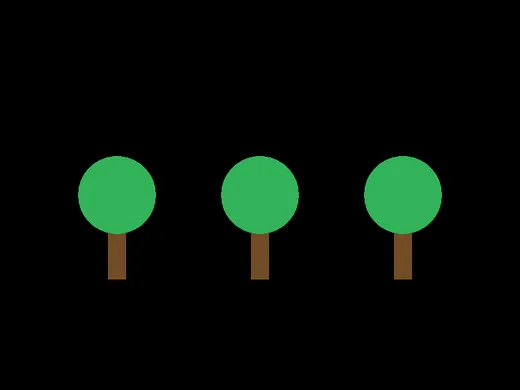
Three trees. One description of a tree.
Look at This Again
function love.draw()
end
Look at This Again
function love.draw()
end
You have typed that in every graphics program since session 2 and nobody has ever told you what the first word means.
Today is that day.
function Means: Here Is Some Work, With a Name
love.draw is a name the engine knows to look for. You put work under it, and the engine runs it.
Nothing stops you from making your own names.
Those ones the engine has never heard of, so you have to run them.
The Problem
love.graphics.setColor(0.45, 0.3, 0.15)love.graphics.rectangle("fill", 166, 320, 28, 110)love.graphics.setColor(0.2, 0.7, 0.35)love.graphics.circle("fill", 180, 300, 60)
love.graphics.setColor(0.45, 0.3, 0.15)love.graphics.rectangle("fill", 386, 320, 28, 110)love.graphics.setColor(0.2, 0.7, 0.35)love.graphics.circle("fill", 400, 300, 60)
The Problem
love.graphics.setColor(0.45, 0.3, 0.15)love.graphics.rectangle("fill", 166, 320, 28, 110)love.graphics.setColor(0.2, 0.7, 0.35)love.graphics.circle("fill", 180, 300, 60)
love.graphics.setColor(0.45, 0.3, 0.15)love.graphics.rectangle("fill", 386, 320, 28, 110)love.graphics.setColor(0.2, 0.7, 0.35)love.graphics.circle("fill", 400, 300, 60)
Two trees, eight lines, and four numbers that have to agree with each other.
Now change the trunk color on both.
The Shape
local function name(parameters)
end
Same three parts as every box you have met: a word, a name, and a block.
One Tree, Described Once
local function drawTree(x, y)    love.graphics.setColor(0.45, 0.3, 0.15)    love.graphics.rectangle("fill", x - 14, y, 28, 110)
    love.graphics.setColor(0.2, 0.7, 0.35)    love.graphics.circle("fill", x, y - 20, 60)end
One Tree, Described Once
local function drawTree(x, y)    love.graphics.setColor(0.45, 0.3, 0.15)    love.graphics.rectangle("fill", x - 14, y, 28, 110)
    love.graphics.setColor(0.2, 0.7, 0.35)    love.graphics.circle("fill", x, y - 20, 60)end
x and y are parameters — blanks in the description, filled in later.
Every number inside is measured from them.
Then Say It Three Times
function love.draw() drawTree(180, 320) drawTree(400, 320) drawTree(620, 320)endThen Say It Three Times
function love.draw() drawTree(180, 320) drawTree(400, 320) drawTree(620, 320)end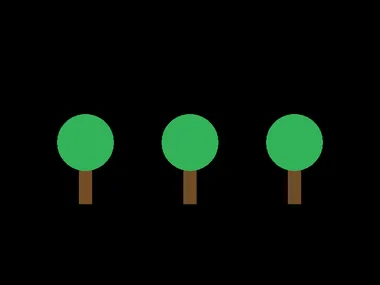
Two Different Moments
- Defining
- Writing down what a tree is. Nothing happens.
- Calling
- Saying
drawTree(180, 320). Now something happens.
A definition on its own draws nothing at all. This surprises everybody once.
Which Is Why the Order Matters
function love.draw()    drawTree(180, 320)end
local function drawTree(x, y)endError: main.lua:2: attempt to call global 'drawTree' (a nil value)Lua reads the file top to bottom. Define it above the place you use it.
Same message as session 3's misspelled variable, for the same reason: a name nobody has made yet is nil.
Today's Objectives
- Write a function of your own
- Give it parameters and use them
- Call it more than once
- Say the difference between defining and calling
Key Terms
- Function
- A named piece of work.
- Parameter
- A blank in the description, named in the definition.
- Argument
- The value you put in the blank when you call it.
- Call
- Saying the name, with parentheses, to make it run.
- Procedure
- The exam's word for a function.
'F' → Fullscreen
Build
Task 1: One Tree
Copy template-game to 1-21-trees. Write the definition first, then one call:
local function drawTree(x, y) love.graphics.setColor(0.45, 0.3, 0.15) love.graphics.rectangle("fill", x - 14, y, 28, 110)
love.graphics.setColor(0.2, 0.7, 0.35) love.graphics.circle("fill", x, y - 20, 60)end
function love.draw() drawTree(180, 320) drawTree(400, 320) drawTree(620, 320)endRun it with only the first call, and check the tree is where you expect. Then comment out the call and run it again.
Task 2: Three Trees
Put all three calls back and run it. Then change the trunk color in one place and confirm all three change.
Count what is on your sheet: how many lines describe a tree, and how many trees are on the screen.
Task 3: Trees in a Loop
A call is a statement, so it can go anywhere a statement goes — including inside a loop:
function love.draw() for i = 1, 5 do drawTree(i * 130, 320) endendFive trees, one call. Then draw the trees at the positions in a table, using the traversal from last session.
Task 4: Break It on Purpose (Required)
Leave one argument out:
drawTree(180)Error: main.lua:3: bad argument #3 to 'rectangle' (number expected, got nil)Lua did not say "you forgot an argument." It filled the blank with nil and complained later, inside the function. Write down which line the error names, and which line the mistake was on.
Now put four arguments in instead of two. Write down what happens — it is not what the last experiment would lead you to expect, and the two together say something about how careful Lua is being on your behalf.
Task 5: Your Own Function
Write a second function that draws something else — a house, a star, a robot, a flower. Requirements:
- It takes at least two parameters
- Every position inside is measured from them
- You call it at least three times
- Moving one call moves the whole thing, with nothing left behind
That last one is the test. If part of your house stays put when you move it, a number in there is not measured from the parameters.
Challenge (Optional): A Whole Scene
Build a scene from your two functions plus a third, and draw it all from tables of positions. The whole of love.draw should be a few loops and nothing else.
Same Idea, Exam Notation
The exam calls this a procedure, and it is one of the two things the Create Task is graded on.
local function drawTree(x, y)
end
drawTree(180, 320)PROCEDURE drawTree(x, y){
}
drawTree(180, 320)| Lua | Exam notation | |
|---|---|---|
| Define it | local function drawTree(x, y) | PROCEDURE drawTree(x, y) |
| Hold the block | end | { … } |
| Call it | drawTree(180, 320) | drawTree(180, 320) |
The call is written identically. Only the definition differs, and only in its first line and its braces.
Checkpoint
1-21-treesdraws three trees from one definition- Changing the trunk color in one place changed all three
- You saw what a definition with no call draws
- Both experiments from task 4 are written down
- Your own function moves as one piece when you change its arguments
Reflection
Answer the following questions before submitting your work.
- You have been writing
function love.draw()since session 2 without knowing what the first word meant. Explain what it actually means, and say what is different about the functions you wrote today. - Defining a function drew nothing; calling it drew a tree. Explain the difference in your own words, and describe what a program with twenty definitions and no calls would do.
- Leaving out an argument produced an error inside the function rather than at the call. Explain why, and connect it to something else this quarter that behaved the same way.
Submit
Submit the required files to the appropriate dropbox.