Activity 1.3: Naming Your Numbers

Activity 1.3
Naming Your Numbers
Key Concepts
A Name for a Value
Change It Once, Change It Everywhere
Doing Arithmetic With a Name
Where We Left Off
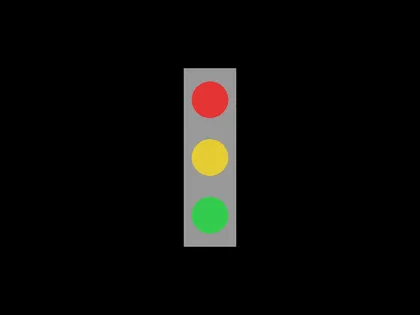
Where We Left Off
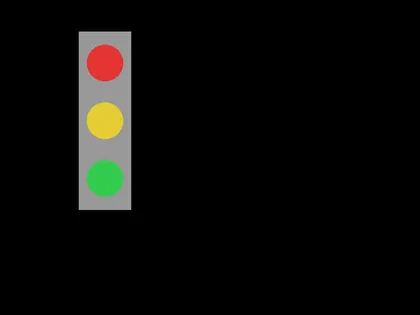
Same shapes, moved. Today that is a two-number change, not an eight-number change.
The Problem With Yesterday's Program
love.graphics.circle("fill", 400, 190, 35)love.graphics.circle("fill", 400, 300, 35)love.graphics.circle("fill", 400, 410, 35)The Problem With Yesterday's Program
love.graphics.circle("fill", 400, 190, 35)love.graphics.circle("fill", 400, 300, 35)love.graphics.circle("fill", 400, 410, 35)To move the signal sideways you edit every one of those 400s, plus the rectangle.
Miss one and the picture comes apart.
Give the Number a Name
local lightX = 400
love.graphics.circle("fill", lightX, 190, 35)love.graphics.circle("fill", lightX, 300, 35)love.graphics.circle("fill", lightX, 410, 35)
One place to change. That is the whole idea.
What That Line Does
local lightX = 400- local
- Make a new name.
- lightX
- The name. You choose it.
- =
- Put the value on the right into the name on the left.
- 400
- The value.
Reading It Right to Left
= is not the equals sign from math class.
It does not say two things are the same. It says put this value in this name, and the arrow only points one way.
Which Is Why This Is Legal
local score = 0score = score + 10Which Is Why This Is Legal
local score = 0score = score + 10In math, score = score + 10 is nonsense. Here it means: work out the right side, then put the answer back in the name.
score is now 10. The second line does not need local — the name already exists.
Names Can Do Arithmetic
love.graphics.circle("fill", lightX, lightY + gap, radius)The engine never sees lightY + gap. It gets the answer — one number, worked out first.
Above the Box, Not Inside It
local lightX = 400local lightY = 190local radius = 35local gap = 110These four lines go at the top of the file, above love.draw.
They run once, when the program starts. Everything in the box runs 60 times a second.
Naming Things Is Not Decoration
lightX tells the next reader what 400 meant. x1 does not, and the next reader is you in November.
On the Create Task you explain your own code from memory. Names are most of how that goes.
Today's Objectives
- Create a variable and give it a value
- Use a variable where a number used to be
- Change a picture by changing one line
- Do arithmetic with a variable
Key Terms
- Variable
- A name that holds a value.
- local
- The word that makes a new variable in Lua.
- Assignment
- Putting a value into a variable, written with
=. - Reassignment
- Putting a different value into a variable that already exists.
- Hardcoded
- A raw number typed straight into the program.
'F' → Fullscreen
Build
Task 1: One Circle, Three Names
Copy template-game and rename the copy 1-03-circle. Replace what is inside love.draw so the file looks like this:
local circleX = 400local circleY = 300local radius = 40
function love.draw() love.graphics.circle("fill", circleX, circleY, radius)endRun it. A white circle in the middle. Now change one line and run again:
local circleX = 150Then try changing radius, and then circleY. Run after each one.
love.draw, not inside it. Keep love.keypressed at the bottom of the file, unchanged, so Escape still closes the window.Task 2: Name the Signal's Numbers
Copy your 1-02-signal folder and rename the copy 1-03-signal. Add four variables above love.draw:
local lightX = 400local lightY = 190local radius = 35local gap = 110Now replace the numbers inside the box with those names. The rectangle needs arithmetic, because it is placed by its corner and the lights are placed by their centers:
local lightX = 400local lightY = 190local radius = 35local gap = 110
function love.draw() love.graphics.setColor(0.6, 0.6, 0.6) love.graphics.rectangle("fill", lightX - 50, lightY - 60, 100, 340)
love.graphics.setColor(0.9, 0.2, 0.2) love.graphics.circle("fill", lightX, lightY, radius)
love.graphics.setColor(0.9, 0.8, 0.2) love.graphics.circle("fill", lightX, lightY + gap, radius)
love.graphics.setColor(0.2, 0.8, 0.3) love.graphics.circle("fill", lightX, lightY + gap + gap, radius)endRun it. The picture should look exactly like it did last session. Nothing changed on screen, and that is how you know you did it right.
Task 3: Move the Whole Thing
Change two lines, and only those two:
local lightX = 200local lightY = 120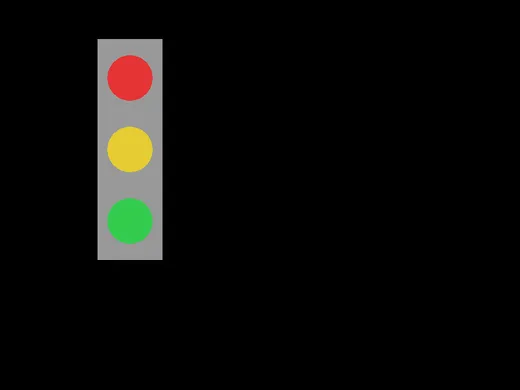
Four shapes moved, and you touched two numbers. Now set gap to 80 and radius to 25 and see what happens.
Put lightX and lightY back to 400 and 190 before you submit, or leave the signal wherever you like it — but write down which you chose.
Challenge (Optional): Break It on Purpose
Change one variable name in the red light's line so it no longer matches the one at the top of the file — a lower case x instead of a capital one:
love.graphics.setColor(0.9, 0.2, 0.2) love.graphics.circle("fill", lightx, lightY, radius)The window turns blue and shows this. Press Escape to dismiss it:
Error: main.lua:11: bad argument #2 to 'circle' (number expected, got nil)Lua did not say "there is no such variable." It said the circle got nil where it wanted a number. Write down what you think nil means, then fix the spelling.
A name you never made is not an error in Lua. It is a name holding nothing, and you find out later, somewhere else.
Challenge (Optional): One Number, Whole Scene
Copy your 1-02-scene from last session to 1-03-scene and rebuild it so that one variable moves the entire drawing and one more variable changes its size. Every shape has to be positioned from those two.
Same Idea, Exam Notation
The exam does not use Lua. It uses its own written notation, and you get a booklet of it on exam day. Assignment is the first thing on that sheet.
local lightX = 400local gap = 110
lightX = lightX + 50print(lightX)lightX ← 400gap ← 110
lightX ← lightX + 50DISPLAY(lightX)An arrow instead of an equals sign
| Lua | Exam notation | |
|---|---|---|
| Make a variable | local lightX = 400 | lightX ← 400 |
| Change it | lightX = lightX + 50 | lightX ← lightX + 50 |
| Show it | print(lightX) | DISPLAY(lightX) |
There is no local. The arrow makes the variable the first time you use it, and changes it every time after.
= means "is equal to". It is a question, not an instruction — the thing Lua writes as ==. Assignment is always the arrow, and comparison is always =. They never overlap, so a line with an arrow in it is always storing something.You will meet = as a comparison properly at session 8. For now, notice that the exam kept them apart and Lua did not.
Checkpoint
1-03-circledraws one circle from three variables1-03-signalpositions every shape from a variable — the only raw numbers left inlove.draware colors, the rectangle's width and height, and the two offsets- Changing
lightXalone moves all four shapes - Every variable is declared above the box, not inside it
Reflection
Answer the following questions before submitting your work.
- In task 2 the picture looked identical before and after your changes. Explain what you actually gained, given that a person looking at the screen could not tell you had done anything.
score = score + 10would be false in math class. Explain what it means in a program, in your own words, and say whatscoreholds afterward if it held 40 before.- You misspelled a variable name on purpose and the error message talked about
nilinstead of about spelling. Say why you think Lua reported it that way, and where the mistake actually was.
Submit
Submit the required files to the appropriate dropbox.