Activity 1.8: True or False

Activity 1.8
True or False
Key Concepts
A Third Kind of Value
Six Ways to Compare
Watching a Comparison Change
What You Are Building
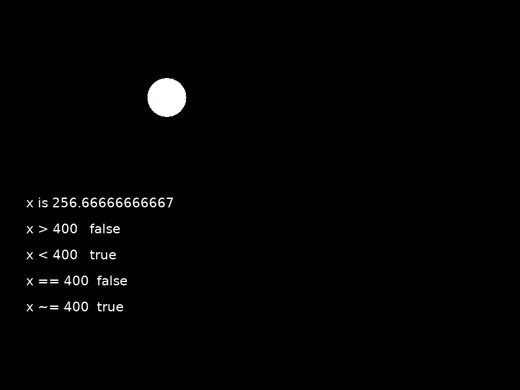
Four questions about the same circle, answered sixty times a second.
Ask a Question, Get an Answer
print(5 > 3)print(5 < 3)print(type(5 > 3))Ask a Question, Get an Answer
print(5 > 3)print(5 < 3)print(type(5 > 3))truefalsebooleantrue and false are values, like numbers and text. A comparison produces one.
You Have Met Three Kinds of Value
- number
16,3.4,-200- string
"Ada", and anything typed at a prompt- boolean
trueandfalse. There are no others.
A boolean is not the word "true". It is not in quotes.
The Six Comparisons
print(5 == 5)print(5 ~= 5)print(5 >= 5)print(5 <= 4)The Six Comparisons
print(5 == 5)print(5 ~= 5)print(5 >= 5)print(5 <= 4)truefalsetruefalseTwo Of Them Are Not Obvious
- ==
- Is equal to. Two equals signs. One would mean assignment, which is a different thing entirely.
- ~=
- Is not equal to. Lua spells it with a tilde, not an exclamation mark.
= puts a value in. == asks a question. Mixing them up is the classic beginner bug in every language.
Comparisons Are Not Just for Fixed Numbers
Your circle's x changes sixty times a second, so x > 400 has a different answer at different moments.
That is the whole reason the next session can do anything interesting.
One Rule Before You Start
love.graphics.print(x > 400, 40, 340)One Rule Before You Start
love.graphics.print(x > 400, 40, 340)Error: main.lua:14: bad argument #1 to 'print' (string expected, got boolean)love.graphics.print draws text, and a boolean is not text. Wrap it in tostring().
And One Warning
print(0.1 + 0.2)print(0.1 + 0.2 == 0.3)And One Warning
print(0.1 + 0.2)print(0.1 + 0.2 == 0.3)0.3falseIt printed 0.3 and then said 0.3 is not 0.3. Decimals are stored approximately.
Practical rule: never ask == about a decimal that has been calculated. Ask > or < instead. The full story is session 33.
Today's Objectives
- Say what a boolean is and name the two values
- Use all six comparison operators
- Tell
=and==apart - Show a comparison changing as a shape moves
Key Terms
- Boolean
- A value that is either
trueorfalse. - Comparison operator
- A symbol that asks a question about two values and produces a boolean.
- ==
- Is equal to. Not the same as
=. - ~=
- Is not equal to.
- tostring
- Turns any value into text so it can be printed.
'F' → Fullscreen
Build
Task 1: Ask Six Questions
Copy template-console to 1-08-compare. Write these six lines, and predict every answer before you run it:
print(7 > 7)print(7 >= 7)print(7 < 10)print(7 <= 3)print(7 == 7)print(7 ~= 7)Record all six on your sheet, with your predictions beside them. The first two are the pair worth thinking about.
Task 2: The Decimal Warning
Add two more lines to the same file:
print(0.1 + 0.2)print(0.1 + 0.2 == 0.3)0.3falseWrite both results down. One line prints 0.3 and the next says it is not 0.3. You do not need to know why yet. You need to know not to trust == on a calculated decimal.
Task 3: Watch a Comparison Change
Copy your moving circle from 1-07-move to 1-08-readout and add the readout:
local x = 100local speed = 200local font = love.graphics.newFont(20)
function love.update(dt) x = x + speed * dtend
function love.draw() love.graphics.setFont(font) love.graphics.circle("fill", x, 150, 30)
love.graphics.print("x is " .. x, 40, 300) love.graphics.print("x > 400 " .. tostring(x > 400), 40, 340) love.graphics.print("x < 400 " .. tostring(x < 400), 40, 380) love.graphics.print("x == 400 " .. tostring(x == 400), 40, 420) love.graphics.print("x ~= 400 " .. tostring(x ~= 400), 40, 460)endRun it and watch the words change as the circle crosses. Write down what happens to each of the four lines, and at what point.
love.graphics.newFont(20) just makes the text big enough to read. It goes at the top with the other variables, because building a font sixty times a second is wasteful even though it would work.Task 4: Ask Your Own Questions
Replace the four comparisons with four of your own. At least one has to use >= or <=, and at least one has to compare x against another variable rather than a fixed number.
Try x > 800 - radius — the question "has it reached the right edge?" Next session does something about the answer.
Challenge (Optional): Break It on Purpose
Take the tostring off one of the readout lines:
love.graphics.print(x > 400, 40, 340)Error: main.lua:14: bad argument #1 to 'print' (string expected, got boolean)Read the message carefully. It says exactly what it wanted and exactly what it got. Write down both, then put tostring back.
Challenge (Optional): Two Circles
Add a second circle with its own x and its own speed, and print tostring(x1 > x2). Start them so the answer changes partway through, and work out in advance how many seconds it will take.
Same Idea, Exam Notation
Comparisons on the exam produce the same two values, and four of the six operators are written exactly as Lua writes them.
local past = x > 400local exact = x == 400local different = x ~= 400past ← x > 400exact ← x = 400different ← x ≠ 400| Question | Lua | Exam notation |
|---|---|---|
| Greater than | a > b | a > b |
| Less than | a < b | a < b |
| Greater or equal | a >= b | a ≥ b |
| Less or equal | a <= b | a ≤ b |
| Is equal to | a == b | a = b |
| Is not equal to | a ~= b | a ≠ b |
=, which in Lua means assignment. And it uses a real ≠ sign where Lua uses ~=.The exam gets away with a single = because assignment is always the arrow. Nothing is ambiguous: a line with ← stores, a line with = asks.
Reading is the skill being tested here. You will never type ≠ in this course — you will read it on a screen in May and have to know it is not something new.
Checkpoint
- Six comparison results recorded, with predictions
- Both decimal results from task 2 written down
1-08-readoutshows four comparisons changing as the circle moves- One of your own comparisons uses another variable, not a fixed number
Reflection
Answer the following questions before submitting your work.
x = 400andx == 400differ by one character and do completely different things. Explain both, and say what would happen to your moving circle if you used the wrong one in the readout.- Your program printed
0.3and then reported that0.1 + 0.2is not0.3. You do not know why yet. Describe the rule you are going to follow because of it. - A comparison had a different answer at different moments without any line of your code changing. Explain how that is possible.
Submit
Submit the required files to the appropriate dropbox.