Bonus Project: Breakout

What This Is
Fifty bricks, one ball, and a paddle you are not fast enough for. It is Pong with something to knock down, and it is the last project of the quarter because it needs every tool you have: tables to hold the bricks, a loop to test them, and functions so the whole thing fits on a screen you can read.
This is extra credit and it is optional. Nothing later in the course depends on it. It exists because you finished early, or because you want to build something you can show somebody.
Before You Start
You need everything through session 23. Tables, loops, collision, functions with parameters, and functions that hand a value back.
Nothing here is new. Every call in this project is one you have already used — what is new is how much of it there is at once. This is the project where writing functions stops being a lesson and starts being self-defense.
Do Pong first if you have not. A paddle, a ball, and bouncing are all easier to get right without fifty bricks in the way, and you can copy most of it across.
Copy template-game and rename it bp-breakout. No new files, no libraries, nothing to install.
Build It
Five stages, and the whole file is printed at the end of every one. Run it after each stage — a stage that works is worth more than three stages you cannot test.
Type it rather than pasting it. The reading you do on the way is the whole point, and pasting skips all of it. When something breaks, the listing at the end of the stage is what your file should look like.
1. Paddle and ball
A paddle near the bottom moved with Left and Right, clamped to the window. A ball with an x, a y, and a direction on each axis. Bounce it off the left, right and top walls, and off the paddle.
If the ball goes past the bottom, take a life and put it back in the middle. You now have a one-player Pong, and it already runs.
The whole file after stage 1:
local paddleX = 350local paddleY = 560local paddleW = 110local paddleH = 14
local ballX = 400local ballY = 430local ballDX = 230local ballDY = -280local ballR = 8
local lives = 3
function love.update(dt) if love.keyboard.isDown("left") then paddleX = paddleX - 500 * dt end
if love.keyboard.isDown("right") then paddleX = paddleX + 500 * dt end
if paddleX < 0 then paddleX = 0 end
if paddleX + paddleW > 800 then paddleX = 800 - paddleW end
ballX = ballX + ballDX * dt ballY = ballY + ballDY * dt
if ballX - ballR < 0 or ballX + ballR > 800 then ballDX = -ballDX end
if ballY - ballR < 0 then ballDY = -ballDY end
local onPaddle = ballX + ballR > paddleX and ballX - ballR < paddleX + paddleW and ballY + ballR > paddleY and ballY - ballR < paddleY + paddleH
if onPaddle and ballDY > 0 then ballDY = -ballDY end
if ballY > 620 then lives = lives - 1 ballX = 400 ballY = 430 ballDY = -280 endend
function love.draw() love.graphics.setColor(1, 1, 1) love.graphics.rectangle("fill", paddleX, paddleY, paddleW, paddleH) love.graphics.circle("fill", ballX, ballY, ballR)end
function love.keypressed(key) if key == "escape" then love.event.quit() endend2. One function you will use six times
Everything in this game is a rectangle the ball might be touching. Write that once:
local function overlapsBall(x, y, w, h) return ballX + ballR > x and ballX - ballR < x + w and ballY + ballR > y and ballY - ballR < y + hendNote what it does not take: the ball. It reads the ball's position from the variables at the top of the file, and takes only the thing being tested. That is a deliberate choice, it makes every call short, and it is also the reason this function could not be moved into another program unchanged. Worth knowing which trade you made.
Use it for the paddle straight away. If the paddle still works, the function is right and fifty bricks will not surprise you.
The whole file after stage 2:
local paddleX = 350local paddleY = 560local paddleW = 110local paddleH = 14
local ballX = 400local ballY = 430local ballDX = 230local ballDY = -280local ballR = 8
local lives = 3
local function overlapsBall(x, y, w, h) return ballX + ballR > x and ballX - ballR < x + w and ballY + ballR > y and ballY - ballR < y + hend
function love.update(dt) if love.keyboard.isDown("left") then paddleX = paddleX - 500 * dt end
if love.keyboard.isDown("right") then paddleX = paddleX + 500 * dt end
if paddleX < 0 then paddleX = 0 end
if paddleX + paddleW > 800 then paddleX = 800 - paddleW end
ballX = ballX + ballDX * dt ballY = ballY + ballDY * dt
if ballX - ballR < 0 or ballX + ballR > 800 then ballDX = -ballDX end
if ballY - ballR < 0 then ballDY = -ballDY end
if overlapsBall(paddleX, paddleY, paddleW, paddleH) and ballDY > 0 then ballDY = -ballDY end
if ballY > 620 then lives = lives - 1 ballX = 400 ballY = 430 ballDY = -280 endend
function love.draw() love.graphics.setColor(1, 1, 1) love.graphics.rectangle("fill", paddleX, paddleY, paddleW, paddleH) love.graphics.circle("fill", ballX, ballY, ballR)end
function love.keypressed(key) if key == "escape" then love.event.quit() endend3. Build the wall
Four tables, filled by nested loops — x, y, row and whether it is still there:
local function makeBricks() for row = 1, ROWS do for col = 1, COLS do table.insert(brickX, 44 + (col - 1) * (BW + 8)) table.insert(brickY, 60 + (row - 1) * (BH + 8)) table.insert(brickRow, row) table.insert(brickAlive, true) end endend10 columns of 64 pixels with 8-pixel gaps is 712 wide, so 44 either side centers it in an 800-pixel window. Work that out rather than nudging the number until it looks right — when you change the brick count later, arithmetic survives and nudging does not.
Draw them, all one color, and stop. Fifty rectangles on screen and the ball passing straight through them is a correct stage 3.
The whole file after stage 3:
local COLS = 10local ROWS = 5local BW = 64local BH = 24
local paddleX = 350local paddleY = 560local paddleW = 110local paddleH = 14
local ballX = 400local ballY = 430local ballDX = 230local ballDY = -280local ballR = 8
local brickX = {}local brickY = {}local brickRow = {}local brickAlive = {}
local score = 0local lives = 3
local function makeBricks() for row = 1, ROWS do for col = 1, COLS do table.insert(brickX, 44 + (col - 1) * (BW + 8)) table.insert(brickY, 60 + (row - 1) * (BH + 8)) table.insert(brickRow, row) table.insert(brickAlive, true) end endend
local function overlapsBall(x, y, w, h) return ballX + ballR > x and ballX - ballR < x + w and ballY + ballR > y and ballY - ballR < y + hend
makeBricks()
function love.update(dt) if love.keyboard.isDown("left") then paddleX = paddleX - 500 * dt end
if love.keyboard.isDown("right") then paddleX = paddleX + 500 * dt end
if paddleX < 0 then paddleX = 0 end
if paddleX + paddleW > 800 then paddleX = 800 - paddleW end
ballX = ballX + ballDX * dt ballY = ballY + ballDY * dt
if ballX - ballR < 0 or ballX + ballR > 800 then ballDX = -ballDX end
if ballY - ballR < 0 then ballDY = -ballDY end
if overlapsBall(paddleX, paddleY, paddleW, paddleH) and ballDY > 0 then ballDY = -ballDY end
if ballY > 620 then lives = lives - 1 ballX = 400 ballY = 430 ballDY = -280 endend
function love.draw() for i = 1, #brickX do if brickAlive[i] then love.graphics.setColor(0.5, 0.6, 0.9) love.graphics.rectangle("fill", brickX[i], brickY[i], BW, BH) end end
love.graphics.setColor(1, 1, 1) love.graphics.rectangle("fill", paddleX, paddleY, paddleW, paddleH) love.graphics.circle("fill", ballX, ballY, ballR)end
function love.keypressed(key) if key == "escape" then love.event.quit() endend4. Break them
for i = 1, #brickX do if brickAlive[i] and overlapsBall(brickX[i], brickY[i], BW, BH) then brickAlive[i] = false ballDY = -ballDY score = score + 1 endendBricks are never deleted from the table. They are marked dead, and both the drawing loop and this one skip them. Removing them would renumber everything after them mid-loop, which is a genuinely nasty bug and one you do not need today.
ballDY flips twice and the ball carries on as though nothing happened — two bricks gone, no bounce. Play until you see it, then decide how to fix it. Stopping after the first hit is the easy way; working out whether the ball hit the side or the face of the brick is the real way.The whole file after stage 4:
local COLS = 10local ROWS = 5local BW = 64local BH = 24
local paddleX = 350local paddleY = 560local paddleW = 110local paddleH = 14
local ballX = 400local ballY = 430local ballDX = 230local ballDY = -280local ballR = 8
local brickX = {}local brickY = {}local brickRow = {}local brickAlive = {}
local score = 0local lives = 3
local function makeBricks() for row = 1, ROWS do for col = 1, COLS do table.insert(brickX, 44 + (col - 1) * (BW + 8)) table.insert(brickY, 60 + (row - 1) * (BH + 8)) table.insert(brickRow, row) table.insert(brickAlive, true) end endend
local function overlapsBall(x, y, w, h) return ballX + ballR > x and ballX - ballR < x + w and ballY + ballR > y and ballY - ballR < y + hend
makeBricks()
function love.update(dt) if love.keyboard.isDown("left") then paddleX = paddleX - 500 * dt end
if love.keyboard.isDown("right") then paddleX = paddleX + 500 * dt end
if paddleX < 0 then paddleX = 0 end
if paddleX + paddleW > 800 then paddleX = 800 - paddleW end
ballX = ballX + ballDX * dt ballY = ballY + ballDY * dt
if ballX - ballR < 0 or ballX + ballR > 800 then ballDX = -ballDX end
if ballY - ballR < 0 then ballDY = -ballDY end
if overlapsBall(paddleX, paddleY, paddleW, paddleH) and ballDY > 0 then ballDY = -ballDY end
for i = 1, #brickX do if brickAlive[i] and overlapsBall(brickX[i], brickY[i], BW, BH) then brickAlive[i] = false ballDY = -ballDY score = score + 1 end end
if ballY > 620 then lives = lives - 1 ballX = 400 ballY = 430 ballDY = -280 endend
function love.draw() for i = 1, #brickX do if brickAlive[i] then love.graphics.setColor(0.5, 0.6, 0.9) love.graphics.rectangle("fill", brickX[i], brickY[i], BW, BH) end end
love.graphics.setColor(1, 1, 1) love.graphics.rectangle("fill", paddleX, paddleY, paddleW, paddleH) love.graphics.circle("fill", ballX, ballY, ballR)end
function love.keypressed(key) if key == "escape" then love.event.quit() endend5. Color by row
local function rowColor(row) if row == 1 then return 0.95, 0.35, 0.35 elseif row == 2 then return 0.95, 0.65, 0.3 elseif row == 3 then return 0.95, 0.9, 0.35 elseif row == 4 then return 0.4, 0.9, 0.5 else return 0.4, 0.7, 0.95 endendA function that takes a row and hands back three numbers, which setColor takes directly. Session 22 said a function returns a value; it can return several, and this is the tidiest use of that you will meet all quarter.
The Whole Program
Every stage above, finished and in one piece. This is the exact file the picture below came from — nothing is left out and nothing is abbreviated.
local COLS = 10local ROWS = 5local BW = 64local BH = 24
local paddleX = 350local paddleY = 560local paddleW = 110local paddleH = 14
local ballX = 400local ballY = 430local ballDX = 230local ballDY = -280local ballR = 8
local brickX = {}local brickY = {}local brickRow = {}local brickAlive = {}
local score = 0local lives = 3
local function makeBricks() for row = 1, ROWS do for col = 1, COLS do table.insert(brickX, 44 + (col - 1) * (BW + 8)) table.insert(brickY, 60 + (row - 1) * (BH + 8)) table.insert(brickRow, row) table.insert(brickAlive, true) end endend
local function overlapsBall(x, y, w, h) return ballX + ballR > x and ballX - ballR < x + w and ballY + ballR > y and ballY - ballR < y + hend
local function rowColor(row) if row == 1 then return 0.95, 0.35, 0.35 elseif row == 2 then return 0.95, 0.65, 0.3 elseif row == 3 then return 0.95, 0.9, 0.35 elseif row == 4 then return 0.4, 0.9, 0.5 else return 0.4, 0.7, 0.95 endend
makeBricks()
function love.update(dt) if love.keyboard.isDown("left") then paddleX = paddleX - 500 * dt end
if love.keyboard.isDown("right") then paddleX = paddleX + 500 * dt end
if paddleX < 0 then paddleX = 0 end
if paddleX + paddleW > 800 then paddleX = 800 - paddleW end
ballX = ballX + ballDX * dt ballY = ballY + ballDY * dt
if ballX - ballR < 0 or ballX + ballR > 800 then ballDX = -ballDX end
if ballY - ballR < 0 then ballDY = -ballDY end
if overlapsBall(paddleX, paddleY, paddleW, paddleH) and ballDY > 0 then ballDY = -ballDY end
for i = 1, #brickX do if brickAlive[i] and overlapsBall(brickX[i], brickY[i], BW, BH) then brickAlive[i] = false ballDY = -ballDY score = score + 1 end end
if ballY > 620 then lives = lives - 1 ballX = 400 ballY = 430 ballDY = -280 endend
function love.draw() for i = 1, #brickX do if brickAlive[i] then love.graphics.setColor(rowColor(brickRow[i])) love.graphics.rectangle("fill", brickX[i], brickY[i], BW, BH) end end
love.graphics.setColor(1, 1, 1) love.graphics.rectangle("fill", paddleX, paddleY, paddleW, paddleH) love.graphics.circle("fill", ballX, ballY, ballR)end
function love.keypressed(key) if key == "escape" then love.event.quit() endendWhat Success Looks Like
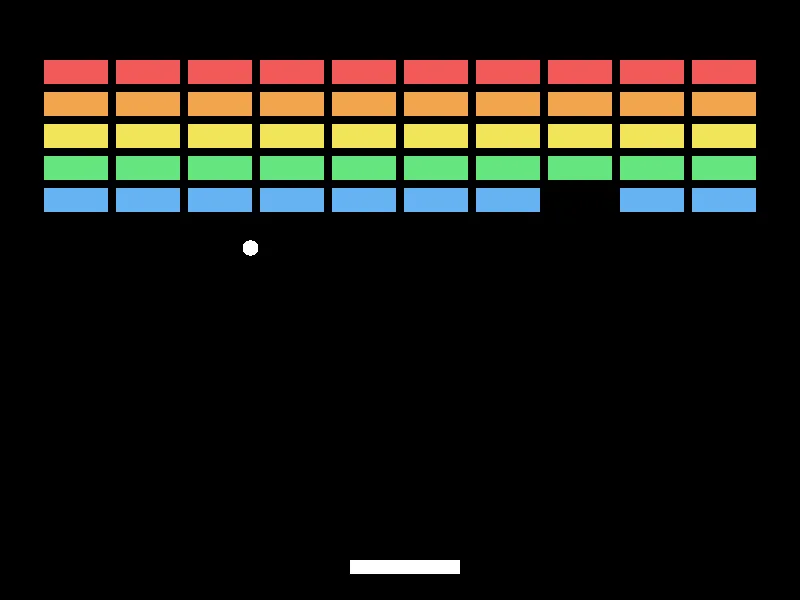
Five rows, ten columns, one brick already gone and the ball on its way back down. The colors come from one function and one number — the row the brick was built in, stored at the same index as its position.
Then Make It Yours
- Fix the double-hit. The warning above. Start by stopping after the first brick, then decide whether that is good enough.
- Steer with the paddle. Bounce the ball off at an angle that depends on where it hit — edges send it wide, the middle sends it straight. This is the single change that turns it from a demo into a game, because it makes the player responsible for where the ball goes.
- Win. Count the live bricks. At zero, say so. A loop and a counter.
- Bricks worth different amounts. The row is already stored. Top rows score more, and the score is worth drawing.
- Bricks that take two hits. Store a number instead of a true or false, and draw the damaged ones darker.
- Speed up as the wall clears. Then find out whether that makes it better or just annoying. There is a right answer and it is not obvious.
The walkthrough is not the submission. Getting the program running earns the credit; what you change afterward is what makes it worth reading. Hand in the folder and a sentence saying what you added, or what broke and what you did about it.