Bonus Project: Dodger

What This Is
A game that gets harder until you lose. You slide left and right along the bottom of the screen. Something falls at you. You dodge it, and the next one comes faster. Three lives, and then it is over.
This is extra credit and it is optional. Nothing later in the course depends on it. It exists because you finished early, or because you want to build something you can show somebody.
Before You Start
You need everything through session 16. Motion, collision as a condition, math.random, and a counting loop. Every one of those is used, and the counting loop is what draws your lives.
Nothing here is new. This project is built entirely out of things you already have, which is the point of putting it at session 16 — it is the first place a real game is reachable with no new tools at all.
Copy template-game and rename it bp-dodger. No new files, no libraries, nothing to install.
Build It
Five stages, and the whole file is printed at the end of every one. Run it after each stage — a stage that works is worth more than three stages you cannot test.
Type it rather than pasting it. The reading you do on the way is the whole point, and pasting skips all of it. When something breaks, the listing at the end of the stage is what your file should look like.
1. A player you can steer
A wide, short rectangle near the bottom. Move it with Left and Right. You want the kind of key check that keeps working while the key is held:
if love.keyboard.isDown("left") then playerX = playerX - playerSpeed * dtendThen stop it leaving the screen. Two conditions, one per side, and the right-hand one uses playerX + playerW rather than playerX.
The whole file after stage 1:
local playerX = 370local playerY = 540local playerW = 60local playerH = 20local playerSpeed = 400
function love.update(dt) if love.keyboard.isDown("left") then playerX = playerX - playerSpeed * dt end
if love.keyboard.isDown("right") then playerX = playerX + playerSpeed * dt end
if playerX < 0 then playerX = 0 end
if playerX + playerW > 800 then playerX = 800 - playerW endend
function love.draw() love.graphics.setColor(0.3, 0.9, 0.5) love.graphics.rectangle("fill", playerX, playerY, playerW, playerH)end
function love.keypressed(key) if key == "escape" then love.event.quit() endend2. One block, falling
Variables for the block's x, y, size and speed. Add the speed to y every frame. Start it above the top of the window — blockY = -50 — so it slides into view rather than appearing.
The whole file after stage 2:
math.randomseed(os.time())
local playerX = 370local playerY = 540local playerW = 60local playerH = 20local playerSpeed = 400
local blockX = math.random(0, 750)local blockY = -50local blockW = 50local blockH = 50local blockSpeed = 200
function love.update(dt) if love.keyboard.isDown("left") then playerX = playerX - playerSpeed * dt end
if love.keyboard.isDown("right") then playerX = playerX + playerSpeed * dt end
if playerX < 0 then playerX = 0 end
if playerX + playerW > 800 then playerX = 800 - playerW end
blockY = blockY + blockSpeed * dtend
function love.draw() love.graphics.setColor(0.3, 0.9, 0.5) love.graphics.rectangle("fill", playerX, playerY, playerW, playerH)
love.graphics.setColor(0.95, 0.35, 0.3) love.graphics.rectangle("fill", blockX, blockY, blockW, blockH)end
function love.keypressed(key) if key == "escape" then love.event.quit() endend3. Send it round again
When the block goes past the bottom, you dodged it. Score a point, put it back at the top at a new random x, and make the next one faster:
if blockY > 600 then score = score + 1 blockSpeed = blockSpeed + 15 blockY = -50 blockX = math.random(0, 750)endThat one line is the entire game design. Without it you have a thing that falls; with it you have something that eventually beats you, which is what makes people play again.
math.randomseed(os.time()) at the very top of the file, once. Without it your blocks fall in the identical pattern every single run, which is a strange thing to discover twenty minutes in.The whole file after stage 3:
math.randomseed(os.time())
local playerX = 370local playerY = 540local playerW = 60local playerH = 20local playerSpeed = 400
local blockX = math.random(0, 750)local blockY = -50local blockW = 50local blockH = 50local blockSpeed = 200
local score = 0local lives = 3
function love.update(dt) if love.keyboard.isDown("left") then playerX = playerX - playerSpeed * dt end
if love.keyboard.isDown("right") then playerX = playerX + playerSpeed * dt end
if playerX < 0 then playerX = 0 end
if playerX + playerW > 800 then playerX = 800 - playerW end
blockY = blockY + blockSpeed * dt
if blockY > 600 then score = score + 1 blockSpeed = blockSpeed + 15 blockY = -50 blockX = math.random(0, 750) endend
function love.draw() love.graphics.setColor(0.3, 0.9, 0.5) love.graphics.rectangle("fill", playerX, playerY, playerW, playerH)
love.graphics.setColor(0.95, 0.35, 0.3) love.graphics.rectangle("fill", blockX, blockY, blockW, blockH)end
function love.keypressed(key) if key == "escape" then love.event.quit() endend4. Getting hit
Four things have to be true at once for two rectangles to be touching, and this is session 14's condition with different variable names. Write all four, joined with and. When it is true, take a life and send the block back to the top.
Test it by standing still and letting one hit you. If your lives drop by three at once, the block is still overlapping you on the next frame — which means you took the life but forgot to move the block.
The whole file after stage 4:
math.randomseed(os.time())
local playerX = 370local playerY = 540local playerW = 60local playerH = 20local playerSpeed = 400
local blockX = math.random(0, 750)local blockY = -50local blockW = 50local blockH = 50local blockSpeed = 200
local score = 0local lives = 3
function love.update(dt) if love.keyboard.isDown("left") then playerX = playerX - playerSpeed * dt end
if love.keyboard.isDown("right") then playerX = playerX + playerSpeed * dt end
if playerX < 0 then playerX = 0 end
if playerX + playerW > 800 then playerX = 800 - playerW end
blockY = blockY + blockSpeed * dt
local hit = blockX < playerX + playerW and blockX + blockW > playerX and blockY < playerY + playerH and blockY + blockH > playerY
if hit then lives = lives - 1 blockY = -50 blockX = math.random(0, 750) end
if blockY > 600 then score = score + 1 blockSpeed = blockSpeed + 15 blockY = -50 blockX = math.random(0, 750) endend
function love.draw() love.graphics.setColor(0.3, 0.9, 0.5) love.graphics.rectangle("fill", playerX, playerY, playerW, playerH)
love.graphics.setColor(0.95, 0.35, 0.3) love.graphics.rectangle("fill", blockX, blockY, blockW, blockH)end
function love.keypressed(key) if key == "escape" then love.event.quit() endend5. Show the score and the lives
No text needed. Draw the score as a bar whose width is the score times twenty, and the lives as a row of squares:
for i = 1, lives do love.graphics.rectangle("fill", 740 - (i - 1) * 30, 20, 20, 20)endThat is a counting loop doing real work. Three lives draws three squares, one life draws one, and you never wrote an if to decide which.
The Whole Program
Every stage above, finished and in one piece. This is the exact file the picture below came from — nothing is left out and nothing is abbreviated.
math.randomseed(os.time())
local playerX = 370local playerY = 540local playerW = 60local playerH = 20local playerSpeed = 400
local blockX = math.random(0, 750)local blockY = -50local blockW = 50local blockH = 50local blockSpeed = 200
local score = 0local lives = 3
function love.update(dt) if love.keyboard.isDown("left") then playerX = playerX - playerSpeed * dt end
if love.keyboard.isDown("right") then playerX = playerX + playerSpeed * dt end
if playerX < 0 then playerX = 0 end
if playerX + playerW > 800 then playerX = 800 - playerW end
blockY = blockY + blockSpeed * dt
local hit = blockX < playerX + playerW and blockX + blockW > playerX and blockY < playerY + playerH and blockY + blockH > playerY
if hit then lives = lives - 1 blockY = -50 blockX = math.random(0, 750) end
if blockY > 600 then score = score + 1 blockSpeed = blockSpeed + 15 blockY = -50 blockX = math.random(0, 750) endend
function love.draw() love.graphics.setColor(0.3, 0.9, 0.5) love.graphics.rectangle("fill", playerX, playerY, playerW, playerH)
love.graphics.setColor(0.95, 0.35, 0.3) love.graphics.rectangle("fill", blockX, blockY, blockW, blockH)
love.graphics.setColor(0.3, 0.9, 0.5) love.graphics.rectangle("fill", 20, 20, score * 20, 14)
love.graphics.setColor(0.95, 0.85, 0.2) for i = 1, lives do love.graphics.rectangle("fill", 740 - (i - 1) * 30, 20, 20, 20) endend
function love.keypressed(key) if key == "escape" then love.event.quit() endendWhat Success Looks Like
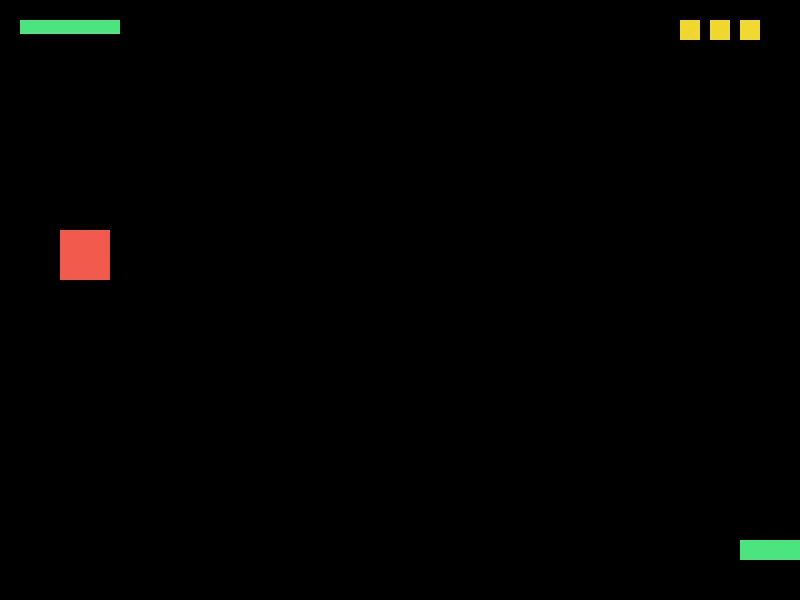
Five dodges so far, three lives left, and the sixth block on its way down — noticeably faster than the first one was. The green bar at the top left is the score, and it grows a notch every time a block gets past you.
Then Make It Yours
- End the game. At zero lives, stop everything and show something that says so. A variable called
alivethat the update checks first is the cheapest way. - Restart on a key press. Set everything back to its starting value in one place. If that turns out to be annoying, that is session 21 telling you what functions are for.
- Add a second block. A whole second set of variables. Then a third. Stop at three and notice how bad this is getting — session 18 is the fix, and doing it the painful way first is why the fix will make sense.
- Make it fair. Right now the speed goes up forever and the game becomes impossible in a way that feels cheap rather than hard. Cap it, or make the block narrower as it speeds up, and decide which feels better by playing it.
- Something worth catching. A second falling shape, a different color, that gives a life back instead of taking one.
The walkthrough is not the submission. Getting the program running earns the credit; what you change afterward is what makes it worth reading. Hand in the folder and a sentence saying what you added, or what broke and what you did about it.