Bonus Project: Conway's Game of Life

What This Is
Four rules, and then things start happening that nobody wrote. A grid of squares. Each one lives or dies based only on how many of its eight neighbors are alive. Out of that come shapes that hold still, shapes that blink, and shapes that walk across the screen — none of which appear anywhere in the code.
This is the hardest project on the list, and it is the only one that is not a game. It is also the one that most looks like computer science, which is why it is worth ten points.
This is extra credit and it is optional. Nothing later in the course depends on it.
Before You Start
You need everything through session 20. Tables, nested loops, and conditions joined with and and or. All of it, all at once — this project uses more of Quarter 1 than anything else on the list.
One idea here is new, and it is not a new function. The grid is two-dimensional and a table is a single list, so you flatten it:
grid[(row - 1) * COLS + col]Row 1 takes slots 1 to COLS, row 2 takes the next COLS, and so on. Write that line on paper with real numbers before you use it — row 3, column 5, with 40 columns, is slot 85. If you cannot get 85 by hand, the rest of this project will not go well.
Copy template-game and rename it bp-game-of-life. No new files, no libraries, nothing to install.
Build It
Five stages, and the whole file is printed at the end of every one. Run it after each stage — this project is much easier to debug in pieces than in one go, and much harder than average to debug at the end.
Type it rather than pasting it. The reading you do on the way is the whole point, and pasting skips all of it. When something breaks, the listing at the end of the stage is what your file should look like.
1. A grid you can see
Constants for COLS, ROWS and CELL — 40, 30 and 20 fill an 800 by 600 window exactly. Fill grid with COLS * ROWS zeros, then set a handful of them to 1 by hand and draw the live ones.
Nothing changes yet. If the squares you set by hand are in the places you expected, your index arithmetic is right and the hard part is behind you.
The whole file after stage 1:
math.randomseed(os.time())
local COLS = 40local ROWS = 30local CELL = 20
local grid = {}
for i = 1, COLS * ROWS do if math.random(1, 100) <= 25 then grid[i] = 1 else grid[i] = 0 endend
function love.draw() for row = 1, ROWS do for col = 1, COLS do if grid[(row - 1) * COLS + col] == 1 then love.graphics.setColor(0.4, 0.95, 0.6) love.graphics.rectangle( "fill", (col - 1) * CELL + 1, (row - 1) * CELL + 1, CELL - 2, CELL - 2 ) end end endend
function love.keypressed(key) if key == "escape" then love.event.quit() endend2. A clock
Life runs in generations, not frames. Sixty a second is far too fast to watch:
timer = timer + dt
if timer < STEP then    returnend
timer = 0
STEP = 0.12 is about eight generations a second, which is fast enough to feel alive and slow enough to follow.
The whole file after stage 2:
math.randomseed(os.time())
local COLS = 40local ROWS = 30local CELL = 20local STEP = 0.12
local grid = {}local timer = 0local steps = 0
for i = 1, COLS * ROWS do if math.random(1, 100) <= 25 then grid[i] = 1 else grid[i] = 0 endend
function love.update(dt) timer = timer + dt
if timer < STEP then return end
timer = 0 steps = steps + 1end
function love.draw() for row = 1, ROWS do for col = 1, COLS do if grid[(row - 1) * COLS + col] == 1 then love.graphics.setColor(0.4, 0.95, 0.6) love.graphics.rectangle( "fill", (col - 1) * CELL + 1, (row - 1) * CELL + 1, CELL - 2, CELL - 2 ) end end end
love.graphics.setColor(1, 1, 1) love.graphics.print("steps: " .. steps, 10, 10)end
function love.keypressed(key) if key == "escape" then love.event.quit() endend3. Count the neighbors
Two more loops inside the two you already have, going from −1 to 1 in each direction. That is nine squares, one of which is the cell itself:
local neighbors = 0
for dr = -1, 1 do    for dc = -1, 1 do        local r = row + dr        local c = col + dc        local skip = (dr == 0 and dc == 0)
if not skip and r >= 1 and r <= ROWS and c >= 1 and c <= COLS then neighbors = neighbors + grid[(r - 1) * COLS + c] end endendgrid[0] is nil, and adding nil to a number crashes three lines later with a message about the wrong thing. This is session 19, and it is the bug that will find you.The whole file after stage 3:
math.randomseed(os.time())
local COLS = 40local ROWS = 30local CELL = 20
local grid = {}local counts = {}
for i = 1, COLS * ROWS do if math.random(1, 100) <= 25 then grid[i] = 1 else grid[i] = 0 endend
function love.update(dt) for row = 1, ROWS do for col = 1, COLS do local neighbors = 0
for dr = -1, 1 do for dc = -1, 1 do local r = row + dr local c = col + dc local skip = (dr == 0 and dc == 0)
if not skip and r >= 1 and r <= ROWS and c >= 1 and c <= COLS then neighbors = neighbors + grid[(r - 1) * COLS + c] end end end
counts[(row - 1) * COLS + col] = neighbors end endend
function love.draw() for row = 1, ROWS do for col = 1, COLS do local i = (row - 1) * COLS + col
if grid[i] == 1 then love.graphics.setColor(0.4, 0.95, 0.6) love.graphics.rectangle( "fill", (col - 1) * CELL + 1, (row - 1) * CELL + 1, CELL - 2, CELL - 2 ) end
if counts[i] > 0 then love.graphics.setColor(1, 1, 1, 0.7) love.graphics.print( counts[i], (col - 1) * CELL + 6, (row - 1) * CELL + 3 ) end end endend
function love.keypressed(key) if key == "escape" then love.event.quit() endend4. The four rules, as two conditions
The rules everybody quotes are four sentences. Written down they collapse into two:
local here = grid[(row - 1) * COLS + col]local alive = 0
if here == 1 and (neighbors == 2 or neighbors == 3) then    alive = 1end
if here == 0 and neighbors == 3 then    alive = 1end
A live cell with 2 or 3 neighbors stays alive. A dead cell with exactly 3 comes alive. Everything else dies or stays dead, and that is what alive = 0 at the top already says.
The whole file after stage 4:
math.randomseed(os.time())
local COLS = 40local ROWS = 30local CELL = 20local STEP = 0.12
local grid = {}local timer = 0
for i = 1, COLS * ROWS do if math.random(1, 100) <= 25 then grid[i] = 1 else grid[i] = 0 endend
function love.update(dt) timer = timer + dt
if timer < STEP then return end
timer = 0
for row = 1, ROWS do for col = 1, COLS do local neighbors = 0
for dr = -1, 1 do for dc = -1, 1 do local r = row + dr local c = col + dc local skip = (dr == 0 and dc == 0)
if not skip and r >= 1 and r <= ROWS and c >= 1 and c <= COLS then neighbors = neighbors + grid[(r - 1) * COLS + c] end end end
local here = grid[(row - 1) * COLS + col] local alive = 0
if here == 1 and (neighbors == 2 or neighbors == 3) then alive = 1 end
if here == 0 and neighbors == 3 then alive = 1 end
grid[(row - 1) * COLS + col] = alive end endend
function love.draw() for row = 1, ROWS do for col = 1, COLS do if grid[(row - 1) * COLS + col] == 1 then love.graphics.setColor(0.4, 0.95, 0.6) love.graphics.rectangle( "fill", (col - 1) * CELL + 1, (row - 1) * CELL + 1, CELL - 2, CELL - 2 ) end end endend
function love.keypressed(key) if key == "escape" then love.event.quit() endend5. The trap: build a second grid
grid while you are reading it. Every generation has to be computed from the previous one all at once. Write results into a new table, and replace grid with it only when every cell is done.Get this wrong deliberately, once. Update in place and watch: everything smears down and to the right, because the cells you have already changed are being counted as neighbors by the cells you have not reached yet. It is a beautiful bug and it looks nothing like Life.
Then seed the grid randomly — about a quarter of the cells alive is a good soup — and watch it settle.
The Whole Program
Every stage above, finished and in one piece. This is the exact file the picture below came from — nothing is left out and nothing is abbreviated.
math.randomseed(os.time())
local COLS = 40local ROWS = 30local CELL = 20local STEP = 0.12
local grid = {}local timer = 0
for i = 1, COLS * ROWS do if math.random(1, 100) <= 25 then grid[i] = 1 else grid[i] = 0 endend
function love.update(dt) timer = timer + dt
if timer < STEP then return end
timer = 0
local nextGrid = {}
for row = 1, ROWS do for col = 1, COLS do local neighbors = 0
for dr = -1, 1 do for dc = -1, 1 do local r = row + dr local c = col + dc local skip = (dr == 0 and dc == 0)
if not skip and r >= 1 and r <= ROWS and c >= 1 and c <= COLS then neighbors = neighbors + grid[(r - 1) * COLS + c] end end end
local here = grid[(row - 1) * COLS + col] local alive = 0
if here == 1 and (neighbors == 2 or neighbors == 3) then alive = 1 end
if here == 0 and neighbors == 3 then alive = 1 end
nextGrid[(row - 1) * COLS + col] = alive end end
grid = nextGridend
function love.draw() for row = 1, ROWS do for col = 1, COLS do if grid[(row - 1) * COLS + col] == 1 then love.graphics.setColor(0.4, 0.95, 0.6) love.graphics.rectangle( "fill", (col - 1) * CELL + 1, (row - 1) * CELL + 1, CELL - 2, CELL - 2 ) end end endend
function love.keypressed(key) if key == "escape" then love.event.quit() endendWhat Success Looks Like
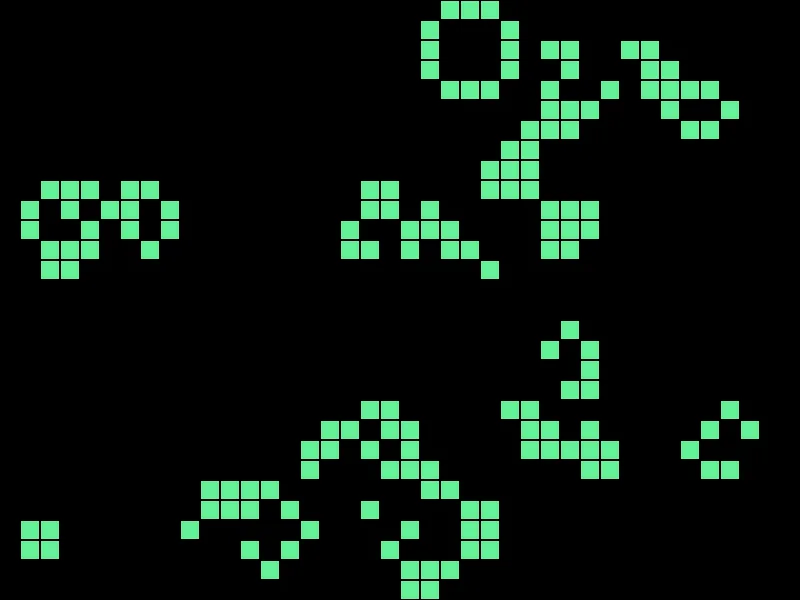
A random soup, a few seconds in. The 2 by 2 blocks and the rings are stable and will sit there forever. The loose diagonal chains are still resolving. None of those shapes are in the code — they are what two conditions do when you leave them running.
Then Make It Yours
- Draw with the mouse. Click a cell to toggle it. Turning screen coordinates into a row and a column is the index arithmetic from stage 1, backwards.
- Pause and step. Space to freeze, and a key that advances exactly one generation. This is worth more than any other item on this list, because it is the difference between watching Life and being able to check whether your rules are right.
- Build a glider. Five cells in the right arrangement walk diagonally across the grid forever. Look up the shape, place it by hand, and watch it leave.
- Wrap the edges. Make row 30's neighbors include row 1. The grid becomes a doughnut and gliders never fall off. This replaces your edge check with arithmetic, and
MODis how. - Age the cells. Color each live cell by how long it has been alive. Another table the same size as the grid.
- After session 21, refactor it. The neighbor count wants to be a function that takes a row and a column and hands back a number. Doing that to code you already have is the clearest possible demonstration of what functions are for.
The walkthrough is not the submission. Getting the program running earns the credit; what you change afterward is what makes it worth reading. Hand in the folder and a sentence saying what you added, or what broke and what you did about it.