Bonus Project: Pong

What This Is
A real two-player game, on one keyboard. Two paddles, a ball that speeds around the screen, and a score that goes up. It is the oldest video game worth building and it is still fun to play against someone sitting next to you.
This is extra credit and it is optional. Nothing later in the course depends on it. It exists because you finished early, or because you want to build something you can show somebody.
Before You Start
You need everything through session 14. Specifically: variables, love.update(dt), if statements, keyboard input, and collision as a condition. If you have not done session 14 yet, come back — you would be guessing, and that is not what this is for.
One thing here is new. Drawing text on the screen:
love.graphics.print(leftScore .. " " .. rightScore, 380, 30)love.graphics.print takes the text, then an x and a y. That is the whole thing. It is the same .. you already use to join text together.
Copy template-game and rename it bp-pong. No new files, no libraries, nothing to install.
Build It
Five stages, and the whole file is printed at the end of every one. Run it after each stage — a stage that works is worth more than three stages you cannot test.
Type it rather than pasting it. The reading you do on the way is the whole point, and pasting skips all of it. When something breaks, the listing at the end of the stage is what your file should look like.
1. Two paddles that move
Draw two tall thin rectangles, one near each side. Give each one a variable for its y position. Then move them: W and S for the left paddle, Up and Down for the right.
You need a kind of key check you have not used yet. love.keypressed fires once when a key goes down, which is wrong here — a paddle should keep moving while the key is held:
if love.keyboard.isDown("w") then leftY = leftY - 300 * dtendThat goes in love.update, and the dt is what makes the paddle move at the same speed on every computer.
The whole file after stage 1:
local leftY = 250local rightY = 250local paddleW = 16local paddleH = 100local paddleSpeed = 400
function love.update(dt) if love.keyboard.isDown("w") then leftY = leftY - paddleSpeed * dt end
if love.keyboard.isDown("s") then leftY = leftY + paddleSpeed * dt end
if love.keyboard.isDown("up") then rightY = rightY - paddleSpeed * dt end
if love.keyboard.isDown("down") then rightY = rightY + paddleSpeed * dt endend
function love.draw() love.graphics.setColor(1, 1, 1) love.graphics.rectangle("fill", 20, leftY, paddleW, paddleH) love.graphics.rectangle("fill", 764, rightY, paddleW, paddleH)end
function love.keypressed(key) if key == "escape" then love.event.quit() endend2. A ball that moves on its own
One variable for the ball's x, one for its y, and one for each direction it is traveling in — call them something like ballDX and ballDY. Every frame, add each direction to its position.
The whole file after stage 2:
local leftY = 250local rightY = 250local paddleW = 16local paddleH = 100local paddleSpeed = 400
local ballX = 400local ballY = 300local ballDX = 260local ballDY = 190local ballR = 9
function love.update(dt) if love.keyboard.isDown("w") then leftY = leftY - paddleSpeed * dt end
if love.keyboard.isDown("s") then leftY = leftY + paddleSpeed * dt end
if love.keyboard.isDown("up") then rightY = rightY - paddleSpeed * dt end
if love.keyboard.isDown("down") then rightY = rightY + paddleSpeed * dt end
ballX = ballX + ballDX * dt ballY = ballY + ballDY * dtend
function love.draw() love.graphics.setColor(1, 1, 1) love.graphics.rectangle("fill", 20, leftY, paddleW, paddleH) love.graphics.rectangle("fill", 764, rightY, paddleW, paddleH) love.graphics.circle("fill", ballX, ballY, ballR)end
function love.keypressed(key) if key == "escape" then love.event.quit() endend3. Bounce off the top and bottom
When the ball reaches an edge, flip the direction it is moving vertically:
if ballY < 10 then ballDY = -ballDYendThat minus sign is the whole trick. Going down becomes going up. Do the same at the bottom of the screen.
The whole file after stage 3:
local leftY = 250local rightY = 250local paddleW = 16local paddleH = 100local paddleSpeed = 400
local ballX = 400local ballY = 300local ballDX = 260local ballDY = 190local ballR = 9
function love.update(dt) if love.keyboard.isDown("w") then leftY = leftY - paddleSpeed * dt end
if love.keyboard.isDown("s") then leftY = leftY + paddleSpeed * dt end
if love.keyboard.isDown("up") then rightY = rightY - paddleSpeed * dt end
if love.keyboard.isDown("down") then rightY = rightY + paddleSpeed * dt end
ballX = ballX + ballDX * dt ballY = ballY + ballDY * dt
if ballY - ballR < 0 then ballY = ballR ballDY = -ballDY end
if ballY + ballR > 600 then ballY = 600 - ballR ballDY = -ballDY endend
function love.draw() love.graphics.setColor(1, 1, 1) love.graphics.rectangle("fill", 20, leftY, paddleW, paddleH) love.graphics.rectangle("fill", 764, rightY, paddleW, paddleH) love.graphics.circle("fill", ballX, ballY, ballR)end
function love.keypressed(key) if key == "escape" then love.event.quit() endend4. Bounce off the paddles
This is the hard one, and it is the reason this project comes after session 14. The ball bounces off the left paddle when two things are true at once: it has reached the paddle's x, and its y is between the top and bottom of that paddle. Flip ballDX when both hold.
Get this wrong in the easy way and the ball bounces off the whole left wall. That is worth seeing once before you fix it — it tells you exactly which half of the condition you are missing.
The whole file after stage 4:
local leftY = 250local rightY = 250local paddleW = 16local paddleH = 100local paddleSpeed = 400
local ballX = 400local ballY = 300local ballDX = 260local ballDY = 190local ballR = 9
function love.update(dt) if love.keyboard.isDown("w") then leftY = leftY - paddleSpeed * dt end
if love.keyboard.isDown("s") then leftY = leftY + paddleSpeed * dt end
if love.keyboard.isDown("up") then rightY = rightY - paddleSpeed * dt end
if love.keyboard.isDown("down") then rightY = rightY + paddleSpeed * dt end
ballX = ballX + ballDX * dt ballY = ballY + ballDY * dt
if ballY - ballR < 0 then ballY = ballR ballDY = -ballDY end
if ballY + ballR > 600 then ballY = 600 - ballR ballDY = -ballDY end
if ballX - ballR < 20 + paddleW and ballY > leftY and ballY < leftY + paddleH then ballDX = -ballDX end
if ballX + ballR > 764 and ballY > rightY and ballY < rightY + paddleH then ballDX = -ballDX endend
function love.draw() love.graphics.setColor(1, 1, 1) love.graphics.rectangle("fill", 20, leftY, paddleW, paddleH) love.graphics.rectangle("fill", 764, rightY, paddleW, paddleH) love.graphics.circle("fill", ballX, ballY, ballR)end
function love.keypressed(key) if key == "escape" then love.event.quit() endend5. Score
If the ball goes off the left side, the right player scores. Add one to their score, put the ball back in the middle, and keep playing. Draw both scores at the top with love.graphics.print.
The Whole Program
Every stage above, finished and in one piece. This is the exact file the picture below came from — nothing is left out and nothing is abbreviated.
local leftY = 250local rightY = 250local paddleW = 16local paddleH = 100local paddleSpeed = 400
local ballX = 400local ballY = 300local ballDX = 260local ballDY = 190local ballR = 9
local leftScore = 0local rightScore = 0
local function resetBall() ballX = 400 ballY = 300end
function love.update(dt) if love.keyboard.isDown("w") then leftY = leftY - paddleSpeed * dt end
if love.keyboard.isDown("s") then leftY = leftY + paddleSpeed * dt end
if love.keyboard.isDown("up") then rightY = rightY - paddleSpeed * dt end
if love.keyboard.isDown("down") then rightY = rightY + paddleSpeed * dt end
ballX = ballX + ballDX * dt ballY = ballY + ballDY * dt
if ballY - ballR < 0 then ballY = ballR ballDY = -ballDY end
if ballY + ballR > 600 then ballY = 600 - ballR ballDY = -ballDY end
if ballX - ballR < 20 + paddleW and ballY > leftY and ballY < leftY + paddleH then ballDX = -ballDX end
if ballX + ballR > 764 and ballY > rightY and ballY < rightY + paddleH then ballDX = -ballDX end
if ballX < 0 then rightScore = rightScore + 1 resetBall() end
if ballX > 800 then leftScore = leftScore + 1 resetBall() endend
function love.draw() love.graphics.setColor(1, 1, 1) love.graphics.rectangle("fill", 20, leftY, paddleW, paddleH) love.graphics.rectangle("fill", 764, rightY, paddleW, paddleH) love.graphics.circle("fill", ballX, ballY, ballR) love.graphics.print(leftScore .. " " .. rightScore, 380, 30)end
function love.keypressed(key) if key == "escape" then love.event.quit() endendWhat Success Looks Like
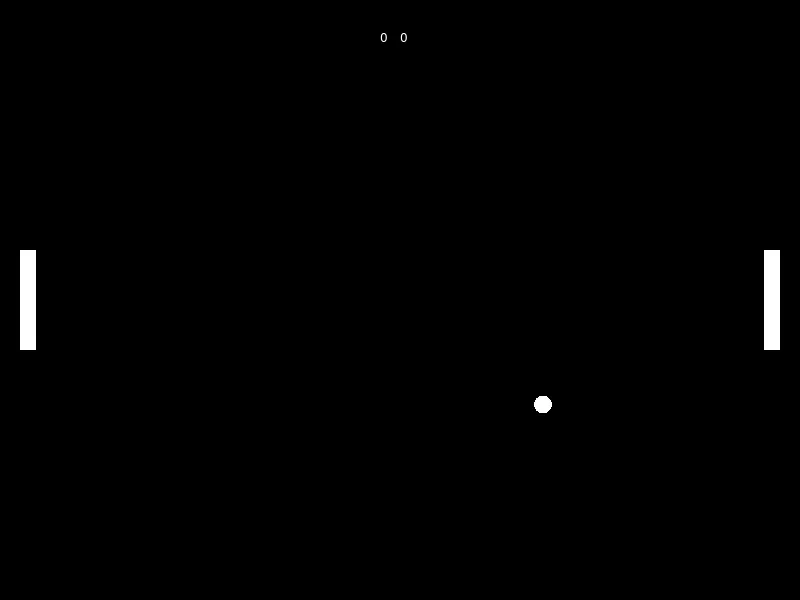
Both paddles move while their keys are held. The ball bounces off the top, the bottom, and both paddles, and the rally can go on as long as both players keep up. When someone misses, the score changes and the ball restarts in the middle.
Then Make It Yours
- Stop the paddles leaving the screen. Right now they slide straight off the top if you hold the key. One condition each.
- Speed the ball up on every hit. A rally that gets harder is a much better game than one that does not.
- Fix the sticky paddle. Hit the very edge of a paddle and the ball can flip direction several frames in a row, so it shudders instead of bouncing. Work out why, then fix it. This is a real bug in real games, and finding it yourself is worth more than the rest of this list.
- Play to eleven. Stop the game and say who won.
- Make it a one-player game. Move the right paddle toward the ball automatically. Then make it beatable, which is harder than making it good.
The walkthrough is not the submission. Getting the program running earns the credit; what you change afterward is what makes it worth reading. Hand in the folder and a sentence saying what you added, or what broke and what you did about it.