Bonus Project: Snake

What This Is
The game that came on every phone before phones were interesting. You steer a line around a grid, eating things. Every time you eat, you get longer, and the thing most likely to kill you becomes yourself.
This is extra credit and it is optional. Nothing later in the course depends on it. It exists because you finished early, or because you want to build something you can show somebody.
Before You Start
You need everything through session 20. Tables, going through a table, and math.random.
Two things here are new, and they are the two that make the whole game work:
table.insert(t, 1, value)- Puts a value at the front of the table and shifts everything else along. This is the exam's
INSERT, and it is how the snake grows a new head. table.remove(t)- Takes the last value off. This is the exam's
REMOVE, and it is how the tail catches up.
A snake is those two calls and nothing else. Add a head, drop the tail, and the whole body appears to move without a single segment being told to.
Copy template-game and rename it bp-snake. No new files, no libraries, nothing to install.
Build It
Five stages, and the whole file is printed at the end of every one. Run it after each stage — a stage that works is worth more than three stages you cannot test.
Type it rather than pasting it. The reading you do on the way is the whole point, and pasting skips all of it. When something breaks, the listing at the end of the stage is what your file should look like.
1. Think in cells, not pixels
Everything in this game lives on a grid. 40 columns, 30 rows, 20 pixels each. The snake's position is a column and a row, and you only turn that into pixels when you draw:
love.graphics.rectangle( "fill", (segX[i] - 1) * CELL + 1, (segY[i] - 1) * CELL + 1, CELL - 2, CELL - 2)The - 1 is there because column 1 draws at pixel 0, and the + 1 and - 2 leave a one-pixel gap so you can see the segments.
Start with segX = {5, 4, 3} and segY = {15, 15, 15}, and a loop that draws them. Three squares in a row. Nothing moves.
The whole file after stage 1:
local COLS = 40local ROWS = 30local CELL = 20
local segX = {5, 4, 3}local segY = {15, 15, 15}
local foodX = 20local foodY = 10
function love.draw() love.graphics.setColor(0.95, 0.4, 0.35) love.graphics.rectangle( "fill", (foodX - 1) * CELL, (foodY - 1) * CELL, CELL, CELL )
love.graphics.setColor(0.4, 0.9, 0.5) for i = 1, #segX do love.graphics.rectangle( "fill", (segX[i] - 1) * CELL + 1, (segY[i] - 1) * CELL + 1, CELL - 2, CELL - 2 ) endend
function love.keypressed(key) if key == "escape" then love.event.quit() endend2. A clock, and a direction
A snake does not slide, it steps. Use the same timer idea as any turn-based thing: add dt to a total, and when it passes 0.12, take one step and reset it.
Two variables, dirX and dirY, hold which way it is going — one of them is 1 or −1 and the other is 0. The new head is the old head plus the direction.
The whole file after stage 2:
local COLS = 40local ROWS = 30local CELL = 20local STEP = 0.12
local segX = {5, 4, 3}local segY = {15, 15, 15}
local dirX = 1local dirY = 0
local foodX = 20local foodY = 10
local timer = 0
function love.update(dt) timer = timer + dt
if timer < STEP then return end
timer = 0
segX[1] = segX[1] + dirX segY[1] = segY[1] + dirYend
function love.draw() love.graphics.setColor(0.95, 0.4, 0.35) love.graphics.rectangle( "fill", (foodX - 1) * CELL, (foodY - 1) * CELL, CELL, CELL )
love.graphics.setColor(0.4, 0.9, 0.5) for i = 1, #segX do love.graphics.rectangle( "fill", (segX[i] - 1) * CELL + 1, (segY[i] - 1) * CELL + 1, CELL - 2, CELL - 2 ) endend
function love.keypressed(key) if key == "escape" then love.event.quit() endend3. Move by growing and shrinking
This is the whole game and it is nine lines:
table.insert(segX, 1, newX)table.insert(segY, 1, newY)
if newX == foodX and newY == foodY then    foodX = math.random(1, COLS)    foodY = math.random(1, ROWS)else    table.remove(segX)    table.remove(segY)end
Always add a head. Only drop the tail if you did not eat. That single else is the difference between moving and growing, and there is no other growth code anywhere in the program.
else is in the wrong place.The whole file after stage 3:
math.randomseed(os.time())
local COLS = 40local ROWS = 30local CELL = 20local STEP = 0.12
local segX = {5, 4, 3}local segY = {15, 15, 15}
local dirX = 1local dirY = 0
local foodX = math.random(1, COLS)local foodY = math.random(1, ROWS)
local timer = 0
function love.update(dt) timer = timer + dt
if timer < STEP then return end
timer = 0
local newX = segX[1] + dirX local newY = segY[1] + dirY
table.insert(segX, 1, newX) table.insert(segY, 1, newY)
if newX == foodX and newY == foodY then foodX = math.random(1, COLS) foodY = math.random(1, ROWS) else table.remove(segX) table.remove(segY) endend
function love.draw() love.graphics.setColor(0.95, 0.4, 0.35) love.graphics.rectangle( "fill", (foodX - 1) * CELL, (foodY - 1) * CELL, CELL, CELL )
love.graphics.setColor(0.4, 0.9, 0.5) for i = 1, #segX do love.graphics.rectangle( "fill", (segX[i] - 1) * CELL + 1, (segY[i] - 1) * CELL + 1, CELL - 2, CELL - 2 ) endend
function love.keypressed(key) if key == "escape" then love.event.quit() endend4. Steering, and the reverse bug
if key == "up" and dirY == 0 then dirX = 0 dirY = -1endThe and dirY == 0 is not tidiness. Without it, a snake travelling down can be told to go up, which walks its head straight into its own neck and kills it instantly. Leave the check out once and try it — it is the fastest death in the project.
The whole file after stage 4:
math.randomseed(os.time())
local COLS = 40local ROWS = 30local CELL = 20local STEP = 0.12
local segX = {5, 4, 3}local segY = {15, 15, 15}
local dirX = 1local dirY = 0
local foodX = math.random(1, COLS)local foodY = math.random(1, ROWS)
local timer = 0
function love.update(dt) timer = timer + dt
if timer < STEP then return end
timer = 0
local newX = segX[1] + dirX local newY = segY[1] + dirY
table.insert(segX, 1, newX) table.insert(segY, 1, newY)
if newX == foodX and newY == foodY then foodX = math.random(1, COLS) foodY = math.random(1, ROWS) else table.remove(segX) table.remove(segY) endend
function love.draw() love.graphics.setColor(0.95, 0.4, 0.35) love.graphics.rectangle( "fill", (foodX - 1) * CELL, (foodY - 1) * CELL, CELL, CELL )
love.graphics.setColor(0.4, 0.9, 0.5) for i = 1, #segX do love.graphics.rectangle( "fill", (segX[i] - 1) * CELL + 1, (segY[i] - 1) * CELL + 1, CELL - 2, CELL - 2 ) endend
function love.keypressed(key) if key == "escape" then love.event.quit() end
if key == "left" and dirX == 0 then dirX = -1 dirY = 0 end
if key == "right" and dirX == 0 then dirX = 1 dirY = 0 end
if key == "up" and dirY == 0 then dirX = 0 dirY = -1 end
if key == "down" and dirY == 0 then dirX = 0 dirY = 1 endend5. Dying
Two ways, and they are different kinds of check:
- The wall. Four comparisons on the new head's column and row.
- Yourself. A loop over every segment, asking whether the new head lands on it:
for i = 1, #segX do if segX[i] == newX and segY[i] == newY then -- you ate yourself endendBoth send everything back to the starting three squares. Do that check before you insert the new head, or the head you are testing against is already in the table and every step is a collision.
The Whole Program
Every stage above, finished and in one piece. This is the exact file the picture below came from — nothing is left out and nothing is abbreviated.
math.randomseed(os.time())
local COLS = 40local ROWS = 30local CELL = 20local STEP = 0.12
local segX = {5, 4, 3}local segY = {15, 15, 15}
local dirX = 1local dirY = 0
local foodX = math.random(1, COLS)local foodY = math.random(1, ROWS)
local timer = 0
function love.update(dt) timer = timer + dt
if timer < STEP then return end
timer = 0
local newX = segX[1] + dirX local newY = segY[1] + dirY
if newX < 1 or newX > COLS or newY < 1 or newY > ROWS then segX = {5, 4, 3} segY = {15, 15, 15} dirX = 1 dirY = 0 return end
for i = 1, #segX do if segX[i] == newX and segY[i] == newY then segX = {5, 4, 3} segY = {15, 15, 15} dirX = 1 dirY = 0 return end end
table.insert(segX, 1, newX) table.insert(segY, 1, newY)
if newX == foodX and newY == foodY then foodX = math.random(1, COLS) foodY = math.random(1, ROWS) else table.remove(segX) table.remove(segY) endend
function love.draw() love.graphics.setColor(0.95, 0.4, 0.35) love.graphics.rectangle( "fill", (foodX - 1) * CELL, (foodY - 1) * CELL, CELL, CELL )
love.graphics.setColor(0.4, 0.9, 0.5) for i = 1, #segX do love.graphics.rectangle( "fill", (segX[i] - 1) * CELL + 1, (segY[i] - 1) * CELL + 1, CELL - 2, CELL - 2 ) endend
function love.keypressed(key) if key == "escape" then love.event.quit() end
if key == "left" and dirX == 0 then dirX = -1 dirY = 0 end
if key == "right" and dirX == 0 then dirX = 1 dirY = 0 end
if key == "up" and dirY == 0 then dirX = 0 dirY = -1 end
if key == "down" and dirY == 0 then dirX = 0 dirY = 1 endendWhat Success Looks Like
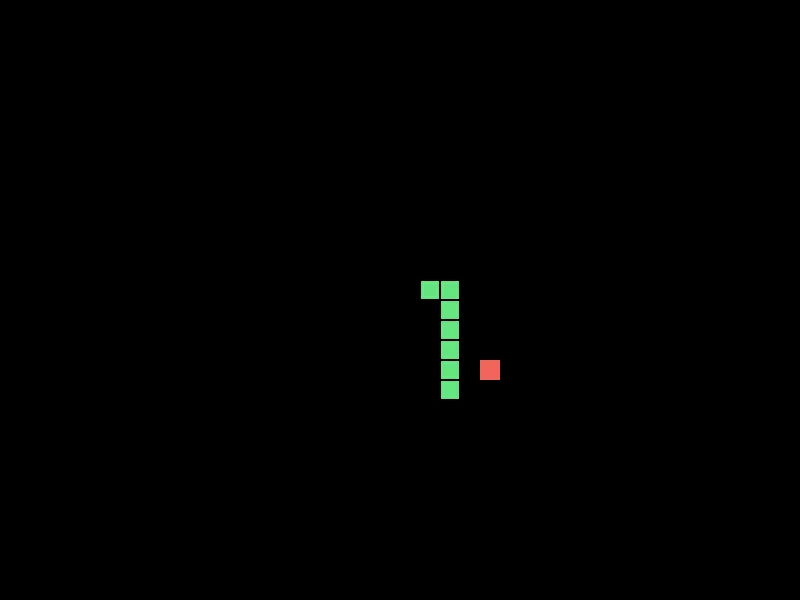
Eight segments after five meals, mid-turn. Notice the corner. Nothing in the code knows about corners — the bend is what happens when you add a head in a new direction and keep dropping the tail.
Then Make It Yours
- Score, and speed. Count the meals and shorten the step time as it goes up. A snake that gets faster is a much better game than one that only gets longer.
- Do not put food inside the snake. Right now it can appear under your own body, which is unwinnable and looks like a bug because it is one. Keep picking until the cell is empty. This is the most valuable fix on the list.
- A head that looks like a head. Draw segment 1 in a different color. One
ifinside the drawing loop. - Wrap instead of dying at the wall. Leave the right edge, come back on the left. Then decide which version you would rather play, and say why.
- Buffer the turn. Press two directions faster than one step and the first one is lost. Remember the next direction instead of applying it immediately. This is what makes commercial versions feel responsive, and it is one extra variable.
The walkthrough is not the submission. Getting the program running earns the credit; what you change afterward is what makes it worth reading. Hand in the folder and a sentence saying what you added, or what broke and what you did about it.