Bonus Project: Sprite Animation

What This Is
Everything you have drawn this quarter has been a rectangle or a circle. This is where that stops. You load a picture, cut four frames out of it, and show them one after another fast enough that a character appears to walk.
There is no game here. There is a character, a floor, and two keys. What you get is the technique every 2D game in existence is built on, which is worth more than another dodging game.
This is extra credit and it is optional. Nothing later in the course depends on it.
Before You Start
You need everything through session 23. Tables, loops, held-key input, and functions.
Get the sprite sheet
Right-click this image and save it into your project folder as sprite-sheet.png. It is 256 by 64 — four frames of 64 by 64, side by side, on a transparent background.

Draw your own instead if you would rather — anything four frames wide with square frames will work, and the code does not care what is in them. If you take one from the internet, write down where it came from and whether you were allowed to use it. That question does not go away when you leave this class.
Two new calls, and one new idea
love.graphics.newImage(path)- Loads a picture from a file in your project folder. Do it once, in
love.load— never inlove.draw. love.graphics.newQuad(x, y, w, h, sw, sh)- A quad is a rectangle cut out of an image. It is not a picture — it is instructions for which part of one to draw.
The idea worth stopping on: there is one image in memory, loaded once, and four little descriptions of where to look inside it. Animation is not four pictures. It is one picture and a number that changes.
Copy template-game and rename it bp-sprite-animation. The sprite sheet goes in that folder, next to main.lua.
Build It
Five stages, and the whole file is printed at the end of every one. Run it after each stage — a stage that works is worth more than three stages you cannot test.
Type it rather than pasting it. The reading you do on the way is the whole point, and pasting skips all of it. When something breaks, the listing at the end of the stage is what your file should look like.
1. Get one frame on screen
sheet = love.graphics.newImage("sprite-sheet.png")sheet:setFilter("nearest", "nearest")
for i = 1, 4 do    frames[i] = love.graphics.newQuad(        (i - 1) * 64, 0, 64, 64, sheet:getDimensions()    )end
Then draw quad number 1 somewhere and look at it. If you see the whole sheet, you drew the image instead of the quad. If you see nothing, the file is not in the folder or the name does not match — and LÖVE will have told you so on a blue screen.
setFilter("nearest", "nearest") is what keeps the pixels sharp when you scale it up. Leave it out once and see the difference; the blurry version is what every engine does by default and it is almost never what you want for pixel art.
The whole file after stage 1:
local sheetlocal frames = {}
function love.load() sheet = love.graphics.newImage("sprite-sheet.png") sheet:setFilter("nearest", "nearest")
for i = 1, 4 do frames[i] = love.graphics.newQuad( (i - 1) * 64, 0, 64, 64, sheet:getDimensions() ) endend
function love.draw() love.graphics.setColor(1, 1, 1) love.graphics.draw(sheet, frames[1], 300, 340, 0, 4, 4, 32, 32)end
function love.keypressed(key) if key == "escape" then love.event.quit() endend2. Cycle the frames
timer = timer + dt
if timer > FRAME_TIME then    timer = 0    frame = frame + 1
    if frame > 4 then        frame = 1    endend
This is a counter with a wrap, which you have written before — it is the same shape as a loop index, except it lives across frames instead of inside one. FRAME_TIME = 0.11 is about nine frames a second, which reads as a walk.
The whole file after stage 2:
local sheetlocal frames = {}local frame = 1local timer = 0local FRAME_TIME = 0.11
function love.load() sheet = love.graphics.newImage("sprite-sheet.png") sheet:setFilter("nearest", "nearest")
for i = 1, 4 do frames[i] = love.graphics.newQuad( (i - 1) * 64, 0, 64, 64, sheet:getDimensions() ) endend
function love.update(dt) timer = timer + dt
if timer > FRAME_TIME then timer = 0 frame = frame + 1
if frame > 4 then frame = 1 end endend
function love.draw() love.graphics.setColor(1, 1, 1) love.graphics.draw(sheet, frames[frame], 300, 340, 0, 4, 4, 32, 32)end
function love.keypressed(key) if key == "escape" then love.event.quit() endend3. Move, and face the right way
love.graphics.draw(sheet, frames[frame], x, y, 0, 4 * facing, 4, 32, 32)That call has a lot of arguments and every one earns its place: the sheet, which quad, where, no rotation, the x scale, the y scale, and the point inside the frame that lands on x and y.
facing is 1 or −1. A negative x scale flips the picture, which is why you do not need a second set of frames for walking left — and why the last two arguments are 32, 32: it flips around its own middle rather than swinging off to one side.
The whole file after stage 3:
local sheetlocal frames = {}local frame = 1local timer = 0local FRAME_TIME = 0.11
local x = 300local y = 340local facing = 1local walking = false
function love.load() sheet = love.graphics.newImage("sprite-sheet.png") sheet:setFilter("nearest", "nearest")
for i = 1, 4 do frames[i] = love.graphics.newQuad( (i - 1) * 64, 0, 64, 64, sheet:getDimensions() ) endend
function love.update(dt) walking = false
if love.keyboard.isDown("left") then x = x - 220 * dt facing = -1 walking = true end
if love.keyboard.isDown("right") then x = x + 220 * dt facing = 1 walking = true end
timer = timer + dt
if timer > FRAME_TIME then timer = 0 frame = frame + 1
if frame > 4 then frame = 1 end endend
function love.draw() love.graphics.setColor(0.3, 0.35, 0.45) love.graphics.rectangle("fill", 0, y + 128, 800, 6)
love.graphics.setColor(1, 1, 1) love.graphics.draw(sheet, frames[frame], x, y, 0, 4 * facing, 4, 32, 32)end
function love.keypressed(key) if key == "escape" then love.event.quit() endend4. Stand still when you are standing still
Only advance the timer while a key is held. When nothing is pressed, snap back to frame 1.
Skip this and the character marches on the spot forever, which looks wrong in a way that is hard to name until you fix it.
The whole file after stage 4:
local sheetlocal frames = {}local frame = 1local timer = 0local FRAME_TIME = 0.11
local x = 300local y = 340local facing = 1local walking = false
function love.load() sheet = love.graphics.newImage("sprite-sheet.png") sheet:setFilter("nearest", "nearest")
for i = 1, 4 do frames[i] = love.graphics.newQuad( (i - 1) * 64, 0, 64, 64, sheet:getDimensions() ) endend
function love.update(dt) walking = false
if love.keyboard.isDown("left") then x = x - 220 * dt facing = -1 walking = true end
if love.keyboard.isDown("right") then x = x + 220 * dt facing = 1 walking = true end
if not walking then frame = 1 return end
timer = timer + dt
if timer > FRAME_TIME then timer = 0 frame = frame + 1
if frame > 4 then frame = 1 end endend
function love.draw() love.graphics.setColor(0.3, 0.35, 0.45) love.graphics.rectangle("fill", 0, y + 128, 800, 6)
love.graphics.setColor(1, 1, 1) love.graphics.draw(sheet, frames[frame], x, y, 0, 4 * facing, 4, 32, 32)end
function love.keypressed(key) if key == "escape" then love.event.quit() endend5. Show your working
love.graphics.draw(sheet, 20, 20, 0, 2, 2)love.graphics.setColor(1, 0.9, 0.2)love.graphics.rectangle("line", 20 + (frame - 1) * 128, 20, 128, 128)Draw the whole sheet in the corner at double size with a box round the frame currently in use. This is a debugging tool that happens to look good, and it makes the thing you cannot otherwise see — which frame is up — visible.
The Whole Program
Every stage above, finished and in one piece. This is the exact file the picture below came from — nothing is left out and nothing is abbreviated.
local sheetlocal frames = {}local frame = 1local timer = 0local FRAME_TIME = 0.11
local x = 300local y = 340local facing = 1local walking = false
function love.load() sheet = love.graphics.newImage("sprite-sheet.png") sheet:setFilter("nearest", "nearest")
for i = 1, 4 do frames[i] = love.graphics.newQuad( (i - 1) * 64, 0, 64, 64, sheet:getDimensions() ) endend
function love.update(dt) walking = false
if love.keyboard.isDown("left") then x = x - 220 * dt facing = -1 walking = true end
if love.keyboard.isDown("right") then x = x + 220 * dt facing = 1 walking = true end
if not walking then frame = 1 return end
timer = timer + dt
if timer > FRAME_TIME then timer = 0 frame = frame + 1
if frame > 4 then frame = 1 end endend
function love.draw() love.graphics.setColor(0.3, 0.35, 0.45) love.graphics.rectangle("fill", 0, y + 128, 800, 6)
love.graphics.setColor(1, 1, 1) love.graphics.draw(sheet, frames[frame], x, y, 0, 4 * facing, 4, 32, 32)
love.graphics.draw(sheet, 20, 20, 0, 2, 2) love.graphics.setColor(1, 0.9, 0.2) love.graphics.rectangle("line", 20 + (frame - 1) * 128, 20, 128, 128)end
function love.keypressed(key) if key == "escape" then love.event.quit() endendWhat Success Looks Like
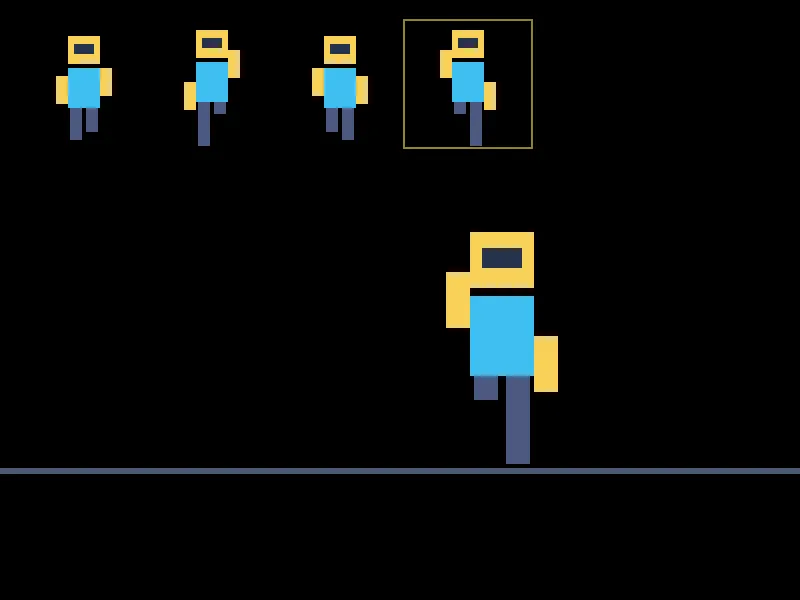
The four source frames across the top with the current one boxed, and the character drawn from that same frame at four times the size, mid-stride, walking right. One image file, one number, and the number is 4.
Then Make It Yours
- Draw your own frames. Any editor. Keep the frames square and the same size, and your code will not need a single change — which is the strongest possible argument for having written it with
64in one place rather than four. - Two animations. A second row in the sheet for jumping or standing. The quad's y is what picks the row, and that is one more number.
- Tie the speed to the movement. Walk faster, cycle faster. One division. It is a tiny change and it looks enormously better.
- Jump. A vertical speed, gravity added every frame, and a floor to stop at. That is three lines and it is where a character turns into a platformer.
- A second character. Same sheet, same quads, different position and frame number. Nothing is loaded twice, and understanding why that is true is the whole point of quads.
The walkthrough is not the submission. Getting the program running earns the credit; what you change afterward is what makes it worth reading. Hand in the folder and a sentence saying what you added, or what broke and what you did about it.