Bonus Project: Starfield

What This Is
The window becomes a ship going somewhere. A hundred and fifty stars stream past, and the ones that pass fastest are the brightest, because they are the closest. Two lines of arithmetic buy you the illusion of depth on a flat screen.
This is extra credit and it is optional. Nothing later in the course depends on it. It exists because you finished early, or because you want to build something you can show somebody.
Before You Start
You need everything through session 20. Tables, #, and going through a table with a loop. Nothing here is new — this is the smallest project on the list that would be impossible without tables, which is exactly why it sits here.
Three tables, not one. You need an x, a y and a speed for every star, and a table holds one list of values. So you keep three lists side by side and use the same index in all three: starX[7], starY[7] and starSpeed[7] are the three facts about star number seven.
Copy template-game and rename it bp-starfield. No new files, no libraries, nothing to install.
Build It
Four stages, and the whole file is printed at the end of every one. Run it after each stage — a stage that works is worth more than three stages you cannot test.
Type it rather than pasting it. The reading you do on the way is the whole point, and pasting skips all of it. When something breaks, the listing at the end of the stage is what your file should look like.
1. Fill the sky
Three empty tables at the top of the file, then one loop that fills all three:
for i = 1, 150 do starX[i] = math.random(0, 800) starY[i] = math.random(0, 600) starSpeed[i] = math.random(20, 220)endThat loop runs once, at the top of the file, not in love.update. Put it in the update by mistake and you get a hundred and fifty brand-new stars sixty times a second, which looks like static.
Draw them with a second loop in love.draw — a small white rectangle at each starX[i], starY[i]. Nothing moves yet, and it should already look like a sky.
The whole file after stage 1:
math.randomseed(os.time())
local starX = {}local starY = {}
for i = 1, 150 do starX[i] = math.random(0, 800) starY[i] = math.random(0, 600)end
function love.draw() love.graphics.setColor(1, 1, 1) for i = 1, #starX do love.graphics.rectangle("fill", starX[i], starY[i], 2, 2) endend
function love.keypressed(key) if key == "escape" then love.event.quit() endend2. Make them move
One loop in love.update, taking each star's own speed off its own x:
for i = 1, #starX do    starX[i] = starX[i] - starSpeed[i] * dt
    if starX[i] < 0 then        starX[i] = 800        starY[i] = math.random(0, 600)    endend
The wrap-around is what makes it endless. A star that leaves the left edge is not deleted — it is moved back to the right at a new height, and it becomes a different star. A hundred and fifty stars, reused forever.
The whole file after stage 2:
math.randomseed(os.time())
local starX = {}local starY = {}local starSpeed = {}
for i = 1, 150 do starX[i] = math.random(0, 800) starY[i] = math.random(0, 600) starSpeed[i] = math.random(20, 220)end
function love.update(dt) for i = 1, #starX do starX[i] = starX[i] - starSpeed[i] * dt
if starX[i] < 0 then starX[i] = 800 starY[i] = math.random(0, 600) end endend
function love.draw() love.graphics.setColor(1, 1, 1) for i = 1, #starX do love.graphics.rectangle("fill", starX[i], starY[i], 2, 2) endend
function love.keypressed(key) if key == "escape" then love.event.quit() endend3. Depth
This is the whole project. A star's speed already says how close it is, so use the same number for its brightness:
local shade = starSpeed[i] / 220love.graphics.setColor(shade, shade, shade)Dividing by the top speed turns a number between 20 and 220 into a number between roughly 0.1 and 1, which is the scale setColor wants. Slow stars come out dim, fast stars come out white.
The whole file after stage 3:
math.randomseed(os.time())
local starX = {}local starY = {}local starSpeed = {}
for i = 1, 150 do starX[i] = math.random(0, 800) starY[i] = math.random(0, 600) starSpeed[i] = math.random(20, 220)end
function love.update(dt) for i = 1, #starX do starX[i] = starX[i] - starSpeed[i] * dt
if starX[i] < 0 then starX[i] = 800 starY[i] = math.random(0, 600) end endend
function love.draw() for i = 1, #starX do local shade = starSpeed[i] / 220 love.graphics.setColor(shade, shade, shade) love.graphics.rectangle("fill", starX[i], starY[i], 2, 2) endend
function love.keypressed(key) if key == "escape" then love.event.quit() endend4. Size, for free
Use the same shade to make the near stars slightly wider than the far ones. One number, three jobs.
The Whole Program
Every stage above, finished and in one piece. This is the exact file the picture below came from — nothing is left out and nothing is abbreviated.
math.randomseed(os.time())
local starX = {}local starY = {}local starSpeed = {}
for i = 1, 150 do starX[i] = math.random(0, 800) starY[i] = math.random(0, 600) starSpeed[i] = math.random(20, 220)end
function love.update(dt) for i = 1, #starX do starX[i] = starX[i] - starSpeed[i] * dt
if starX[i] < 0 then starX[i] = 800 starY[i] = math.random(0, 600) end endend
function love.draw() for i = 1, #starX do local shade = starSpeed[i] / 220 love.graphics.setColor(shade, shade, shade) love.graphics.rectangle("fill", starX[i], starY[i], 1 + shade * 3, 2) endend
function love.keypressed(key) if key == "escape" then love.event.quit() endendWhat Success Looks Like
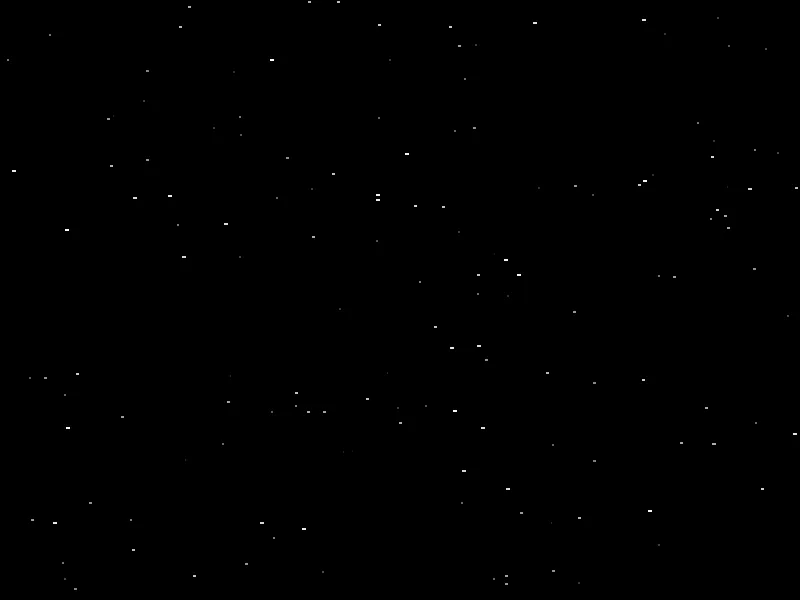
A still picture cannot show the motion, so look at the brightness instead. The bright wide dots are the fast ones and they are the ones that will cross the screen while you watch. The faint ones barely crawl.
Then Make It Yours
- Turn. Steer the whole field with Left and Right by adding a little to every star's y as well as taking off its x. The near stars should swing further than the far ones, and if you use
shadeagain you get that for nothing. - Go to warp. Hold a key and multiply every speed. Then draw each star as a short line from where it is to where it was, instead of a dot. That is a fourth table and it is worth the trouble.
- Color the stars. Real ones are not white. Three more tables, or one number per star that you turn into a color.
- Fly through it. Put a ship in the middle that the field moves around. Now it is a game with no enemies, which is one enemy short of a game.
- Count them. Change 150 to 5000 and find where your computer starts to struggle. Then work out what is actually expensive: the arithmetic, or the drawing.
The walkthrough is not the submission. Getting the program running earns the credit; what you change afterward is what makes it worth reading. Hand in the folder and a sentence saying what you added, or what broke and what you did about it.