Activity 1.1: Welcome to AP CSP

Activity 1.1
Welcome to AP CSP
Key Concepts
Programs
Arguments
Compiler Errors
You Will Not Understand Most of Today's Code
By the end of the hour: your name on screen, in a program you changed yourself.
Most of the file will still be a mystery.
That is deliberate. Nothing here counts as taught until we teach it.
The File Has Parts You Meet Later
int screenWidth = 800;int screenHeight = 600;These are variables. Activity 1.5 owns them.
Leave them alone today. You will be told when a line becomes yours.
Seventy Questions and One Program
70 multiple-choice questions. 120 minutes. 70% of your score.
One minute and forty-three seconds each.
The other 30% is one program you write this year, scored out of six.
Nine Hours Are Yours by Rule
The College Board requires nine hours of class time to build it.
Not a courtesy. A rule.
Without it, a student with no computer at home loses 30% of a computer science score to something that is not computer science.
The Code Has to Be Yours
Read anything. Ask anybody. Credit what you borrow.
Code you submit is written by you, not generated for you.
On the exam program, unacknowledged work scores zero on the whole task.
Somebody Else Wrote the Window
Opening a window and redrawing it sixty times a second is hard work.
A library called Raylib does it. You do not.
Today it is scaffolding. You own what appears on the screen.
One Line Draws the Text
Raylib.DrawText("Hello, World!", 320, 285, 24, Color.SkyBlue);Five arguments: what to say, how far across, how far down, how big, what color.
One Line Draws the Text
Raylib.DrawText("Hello, World!", 320, 285, 24, Color.SkyBlue);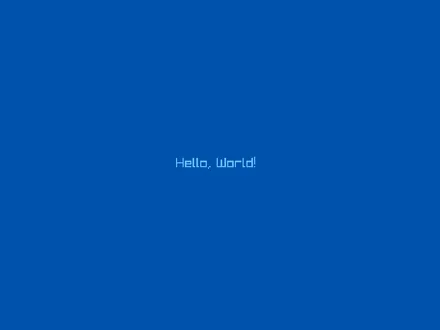
Change one argument and the screen changes. Predict before you run.
Break It on Purpose
Raylib.DrawText("Hello, World!", 320, 285, 24, Color.SkyBlue)1-1-welcome.cs(15,66): error CS1002: ; expectedThe build failed. Fix the build errors and run again.One missing semicolon. Line 15, column 66 — exactly where it belonged.
One Mistake, Three Errors
Raylib.DrawText("Hello, World!, 320, 285, 24, Color.SkyBlue);1-1-welcome.cs(15,21): error CS1010: Newline in constant1-1-welcome.cs(15,66): error CS1003: Syntax error, ',' expected1-1-welcome.cs(16,24): error CS1026: ) expectedThe build failed. Fix the build errors and run again.One quotation mark deleted. The last error blames line 16 — a correct line you never touched.
Fix the First Error. Run Again.
1-1-welcome.cs(15,21): error CS1010: Newline in constant1-1-welcome.cs(15,66): error CS1003: Syntax error, ',' expected1-1-welcome.cs(16,24): error CS1026: ) expectedThe build failed. Fix the build errors and run again.The rest are usually the compiler losing its place after the real mistake.
Working down the whole list is how a beginner breaks a program that was nearly fine.
When You Are Stuck, Say What You See
“It doesn't work” cannot be helped.
What you expected. What happened. The exact message.
Those three sentences solve a good share of problems before anybody else reads them.
Today's Objectives
- Installing the workspace and running both templates
- Running a program you did not write
- Predicting and testing changes to text, position, size, and color
- Reading a compiler error and restoring a working program
Key Terms
- Program
- Instructions a computer carries out in order.
- Argument
- A value handed to an instruction inside its parentheses.
- Compiler
- Turns your C# into something the machine can run, and refuses if the text breaks the rules.
- Compiler error
- A message naming the rule you broke, with a line and column.
- Library
- Someone else's code, used by yours.
'F' → Fullscreen
Build
Work through the tasks in order. Task 1 gets the tools onto your machine; everything after that happens in one file named 1-1-welcome.
Nothing today asks you to write C# from scratch. You are changing values inside a program that already runs, which is the fastest honest way to find out what the pieces do.
Task 1: Get It Running
- Work through Setting Up Your Workspace from the top.
- Run the console template. It should ask for your name and then greet you by name.
- Run the game template. A window should open with light blue text on black.
- Close the window. Do not move on until both templates run.
If something fails, the setup page has a section for each thing that commonly goes wrong. Work that list first — then ask, with the exact message that is on your screen.
Task 2: Run a Program You Did Not Write
- Make your own copy of the game template, named 1-1-welcome.
- Run it, and leave the window open for a moment.
- Find the one line that puts words on the screen.
- Find the one line that decides the background is black.
Two lines are highlighted below. They are the only lines you touch today. Read the rest, notice that it is unfamiliar, and leave it alone.
#:package Raylib-cs@8.0.0
using Raylib_cs;
int screenWidth = 800;int screenHeight = 600;
Raylib.InitWindow(screenWidth, screenHeight, "Hello, Raylib!");Raylib.SetTargetFPS(60);
while (!Raylib.WindowShouldClose()){ Raylib.BeginDrawing(); Raylib.ClearBackground(Color.Black); Raylib.DrawText("Hello, World!", 320, 285, 24, Color.SkyBlue); Raylib.EndDrawing();}
Raylib.CloseWindow();Task 3: Predict, Then Change Four Things
- Write your predictions down before you run anything. For each change below, say what you expect to see.
- Change the text to your own name in capitals. Run it.
- Change the first number to move the text sideways. Run it.
- Change the second number to move it up or down. Run it.
- Change the font size to something much larger. Run it.
- Change the color. Run it.
- Find the threshold. Raise the font size step by step until your name no longer fits inside the window. Write down the largest size that still fits completely.
One change at a time, and run after each one. Five changes made together give you one result and no way to tell which change caused what.
Any of these names work in place of Color.SkyBlue:
Black · White · RayWhite · Gray · DarkGray · LightGray · Red · Maroon · Green · DarkGreen · Lime · Blue · DarkBlue · SkyBlue · Yellow · Gold · Orange · Pink · Purple · Violet · Beige · Brown · Magenta
#:package Raylib-cs@8.0.0
using Raylib_cs;
int screenWidth = 800;int screenHeight = 600;
Raylib.InitWindow(screenWidth, screenHeight, "Hello, Raylib!");Raylib.SetTargetFPS(60);
while (!Raylib.WindowShouldClose()){ Raylib.BeginDrawing(); Raylib.ClearBackground(Color.Black); Raylib.DrawText("ANTHONY", 300, 300, 48, Color.RayWhite); Raylib.EndDrawing();}
Raylib.CloseWindow();Text is drawn from its top-left corner, not from its middle. A larger font size grows down and to the right, so text that fit a moment ago can run off the edge. That is not a mistake in your program — it is what those numbers mean, and it is why the threshold exists.
Your threshold is not the same as your neighbor's. A longer name runs out of room sooner, so the number you write down depends on your own name and where you put it. There is nothing to copy here.
Task 4: Make It Yours
- Change the window title to something of your own.
- Change the background color.
- Add a second line of text under your name — your class, your period, anything true.
- Add a circle and a rectangle.
- Move the shapes until the layout looks deliberate rather than accidental.
Two new instructions, and their arguments follow the same pattern:
| Instruction | Arguments, in order |
|---|---|
DrawText | text, left, top, font size, color |
DrawCircle | center across, center down, radius, color |
DrawRectangle | left, top, width, height, color |
Order matters here, and it will catch you once. Whatever is drawn later covers what was drawn earlier. Put a shape after your name and it sits on top of it.
#:package Raylib-cs@8.0.0
using Raylib_cs;
int screenWidth = 800;int screenHeight = 600;
Raylib.InitWindow(screenWidth, screenHeight, "Welcome");Raylib.SetTargetFPS(60);
while (!Raylib.WindowShouldClose()){ Raylib.BeginDrawing(); Raylib.ClearBackground(Color.DarkBlue);
Raylib.DrawCircle(400, 200, 90, Color.Gold); Raylib.DrawRectangle(250, 380, 300, 8, Color.RayWhite);
Raylib.DrawText("ANTHONY", 300, 300, 48, Color.RayWhite); Raylib.DrawText("AP CSP - Period 3", 300, 420, 20, Color.SkyBlue);
Raylib.EndDrawing();}
Raylib.CloseWindow();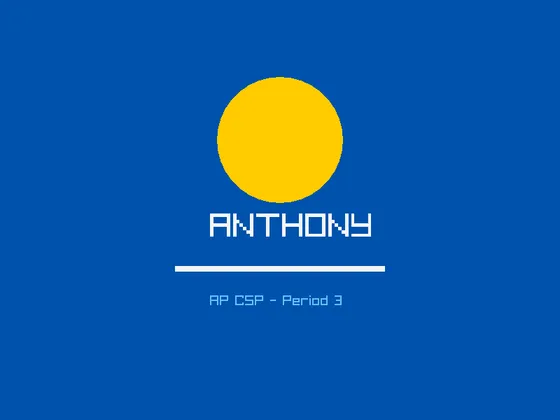
Your name and your period, not these. The shapes and the colors are yours to choose too — this is what the four instructions above produce.
Task 5: Break It on Purpose
- Delete the semicolon at the end of the line that draws your name. Run it.
- Copy the error message down exactly, including the numbers in the parentheses.
- Put the semicolon back, and confirm the program runs again.
- Now delete the closing quotation mark after your name. Run it.
- Copy down all of the errors this time.
- Fix only the quotation mark. Run it, and confirm every error is gone.
That second break produces three errors from one mistake, and the last of them names a line you never edited. Fix the first error, then run again — do not work down the list. Once the compiler loses its place, everything it says after the real mistake is a guess.
Nothing you can type here will damage your computer. A program that will not build simply does not run. Breaking something on purpose, while you still know exactly what you broke, is the cheapest way to learn what these messages mean.
Challenge (Optional)
- Make the circle larger without moving its center.
- Draw a rectangle behind your name so the text sits on a colored band. You will have to think about the order of the lines.
- Give the window a different size, and find out what happens to text positioned past its edge.
- Build the whole thing again from the template, without looking at Task 4.
Checkpoint
Before you submit, check all five:
- Both templates ran during Task 1.
- Your window shows your name and a second line of text.
- Your window has at least one circle, one rectangle, and a background that is not black.
- You can point at the single line responsible for each thing on the screen.
- You have both error messages written down, exactly as they appeared.
The fourth one is the one that matters. A window that looks right is easy to produce by changing numbers until something happens. Being able to name the line that drew each piece is the difference between that and understanding it.
Reflection
Answer the following questions before submitting your work.
- Which line draws your name? Of the numbers in that line, which one moved the text sideways, and which one changed its size?
- You changed this program without understanding the line that begins with
while. What did you actually have to understand in order to make your changes work? - Deleting one quotation mark produced three errors, and the last one named a line you never edited. What should you do first when a run produces a list of errors, and why does that work?
Submit
Submit four things to the dropbox:
- Your 1-1-welcome program file.
- A screenshot of your window.
- Your written predictions from Task 3, with a note beside any that turned out wrong.
- Both error messages from Task 5, copied exactly.
A wrong prediction is worth as much as a right one here, as long as you wrote it down first and then said what actually happened. Predictions edited afterward to match the result are the one thing that defeats the exercise.
Also assigned today: the syllabus quiz, online, due any time in the next week.