Activity 1.10: Raylib Lab 2 — Variables Driving a Drawing
HomeworkBuilt at home. Verified in class at the start of the next session.

What You're Building
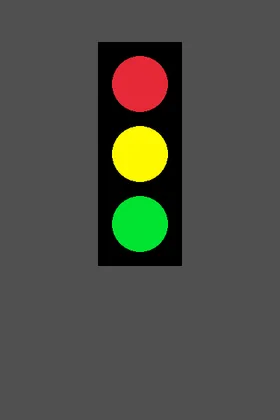
gap = 100
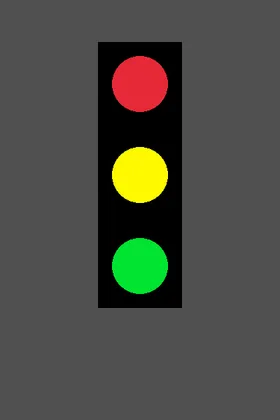
gap = 130
The picture on the left is Lab 1's stoplight. Not a redrawing of it — the same image file, because the program you finish today produces it pixel for pixel.
The picture on the right is the point. It is the same program after one number changed. Every lamp moved and the housing grew to fit, and you will not have touched a single coordinate to do it.
Activity 1.10
Raylib Lab 2 — Variables Driving a Drawing
Key Concepts
What a Literal Costs You
One Name, Many Places
Numbers Derived From Other Numbers
You Already Found the Problem
Raylib.DrawRectangle(140, 60, 120, 320, Color.Black);Raylib.DrawCircle(200, 120, 40, Color.Red);Raylib.DrawCircle(200, 220, 40, Color.Yellow);Raylib.DrawCircle(200, 320, 40, Color.Green);Add a fourth lamp. Move the light 50 pixels down.
Nobody's count was one. Today it becomes one.
Same Picture, Different Program
Four names, and two of the three lamps stop being positions at all — they become offsets.
Same Picture, Different Program
int lampX = 200;int firstLampY = 120;int lampRadius = 40;int gap = 100;
Raylib.DrawCircle(lampX, firstLampY, lampRadius, Color.Red);Raylib.DrawCircle(lampX, firstLampY + gap, lampRadius, Color.Yellow);Raylib.DrawCircle(lampX, firstLampY + 2 * gap, lampRadius, Color.Green);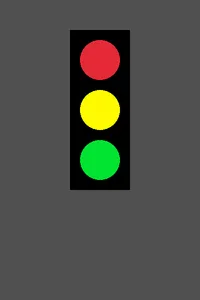
Nothing moved. That is the result we wanted.
A picture that changed would mean the rewrite broke something.
Now One Number Moves Three Lamps
Change the gap. Touch no coordinate.
Now One Number Moves Three Lamps
int gap = 130;   // was 100
Raylib.DrawCircle(lampX, firstLampY, lampRadius, Color.Red);Raylib.DrawCircle(lampX, firstLampY + gap, lampRadius, Color.Yellow);Raylib.DrawCircle(lampX, firstLampY + 2 * gap, lampRadius, Color.Green);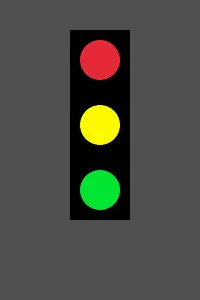
But the Housing Cannot Count
Its height is still a literal. It does not know anything moved.
But the Housing Cannot Count
int gap = 130;
// the housing is still a literalRaylib.DrawRectangle(140, 60, 120, 320, Color.Black);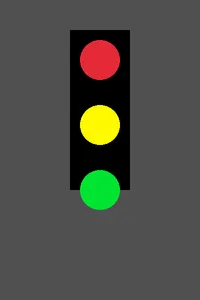
So Let It Measure Itself
Two gaps between three lamps, a radius at each end, and a little padding.
So Let It Measure Itself
int housingHeight = 2 * gap + 2 * lampRadius + 2 * padding;
Raylib.DrawRectangle(housingX, housingY, housingWidth, housingHeight, Color.Black);
Centering Without Counting
Nobody typed 280. The window got wider and the light stayed in the middle.
Centering Without Counting
int screenWidth = 560;   // was 400
int lampX = screenWidth / 2;int housingX = lampX - housingWidth / 2;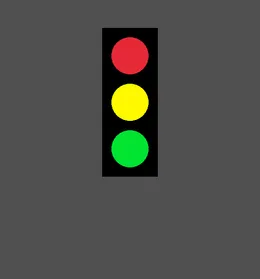
Today's Objectives
- Replacing a repeated literal with a named variable
- Computing one value from another instead of typing it
- Verifying a rewrite by confirming the output did not change
- Making a single edit change the whole drawing
Key Terms
- Literal
- A value typed directly into the program, like
320. - Magic number
- A literal whose meaning is not written down anywhere. The thing you are removing today.
- Derived value
- A value calculated from other values rather than typed in.
- Single source of truth
- One place a fact is written, so it can never disagree with itself.
'F' → Fullscreen
Build
Make a copy of your finished Lab 1 program, named 1-10-stoplight. Work in the copy. You will want the original to compare against.
Run your program after every task. For Tasks 1 through 3 the window should look exactly the same every single time. That is how you know each step was correct.
How to read the code blocks. Each task's code block shows your whole program, from line 1, as it should look when that task is finished.
You never start a new file and you never delete your work. The green lines marked with a + are the ones you add or change for that task — everything else is already in your file. Do not type the + sign.
Task 1: The Starting Point
- Strip your copy back to the housing and the three lamps, matching the code below. Leave out the pole and the sign from Lab 1's Task 3 — they come back at the end if you want them.
- Run it. Confirm you get the picture at the top of this page.
- Count the numbers between
BeginDrawingandEndDrawing. Write the count down. You are going to compare against it later.
#:package Raylib-cs@8.0.0
using Raylib_cs;
int screenWidth = 400;int screenHeight = 600;
Raylib.InitWindow(screenWidth, screenHeight, "Stoplight");Raylib.SetTargetFPS(60);
while (!Raylib.WindowShouldClose()){ Raylib.BeginDrawing(); Raylib.ClearBackground(Color.DarkGray);
Raylib.DrawRectangle(140, 60, 120, 320, Color.Black); Raylib.DrawCircle(200, 120, 40, Color.Red); Raylib.DrawCircle(200, 220, 40, Color.Yellow); Raylib.DrawCircle(200, 320, 40, Color.Green);
Raylib.EndDrawing();}
Raylib.CloseWindow();Task 2: Name the Lamps
- Add the four declarations, then rewrite the three
DrawCirclecalls to use them. - The housing keeps its literal numbers for now. One thing at a time.
- Run it. The picture must not change. If it did, one of your four numbers is wrong — and because the old version is still on disk, you can compare directly.
- Only
firstLampYappears as a bare number in aDrawCirclecall. The other two lamps are calculated.
#:package Raylib-cs@8.0.0
using Raylib_cs;
int screenWidth = 400;int screenHeight = 600;
int lampX = 200;int firstLampY = 120;int lampRadius = 40;int gap = 100;
Raylib.InitWindow(screenWidth, screenHeight, "Stoplight");Raylib.SetTargetFPS(60);
while (!Raylib.WindowShouldClose()){ Raylib.BeginDrawing(); Raylib.ClearBackground(Color.DarkGray);
Raylib.DrawRectangle(140, 60, 120, 320, Color.Black); Raylib.DrawCircle(lampX, firstLampY, lampRadius, Color.Red); Raylib.DrawCircle(lampX, firstLampY + gap, lampRadius, Color.Yellow); Raylib.DrawCircle(lampX, firstLampY + 2 * gap, lampRadius, Color.Green);
Raylib.EndDrawing();}
Raylib.CloseWindow();Task 3: Let the Housing Measure Itself
- Add
padding, then the four housing values, then rewriteDrawRectangleto use them. - Replace
lampX's literal200withscreenWidth / 2while you are here. - Run it. Still identical. Every one of those four expressions has to come out to the number it replaced: 120, 320, 140, and 60.
- Now the payoff. Change
gapto 130 and run it. Compare against the second picture at the top of this page. - Set
gapback to 100 before you submit.
#:package Raylib-cs@8.0.0
using Raylib_cs;
int screenWidth = 400;int screenHeight = 600;
int lampRadius = 40;int padding = 20;int gap = 100;
int lampX = screenWidth / 2;int firstLampY = 120;
int housingWidth = 2 * (lampRadius + padding);int housingHeight = 2 * gap + 2 * lampRadius + 2 * padding;int housingX = lampX - housingWidth / 2;int housingY = firstLampY - lampRadius - padding;
Raylib.InitWindow(screenWidth, screenHeight, "Stoplight");Raylib.SetTargetFPS(60);
while (!Raylib.WindowShouldClose()){ Raylib.BeginDrawing(); Raylib.ClearBackground(Color.DarkGray);
Raylib.DrawRectangle(housingX, housingY, housingWidth, housingHeight, Color.Black); Raylib.DrawCircle(lampX, firstLampY, lampRadius, Color.Red); Raylib.DrawCircle(lampX, firstLampY + gap, lampRadius, Color.Yellow); Raylib.DrawCircle(lampX, firstLampY + 2 * gap, lampRadius, Color.Green);
Raylib.EndDrawing();}
Raylib.CloseWindow();Challenge (Optional): The Fourth Lamp, Again
- Add a fourth lamp below the green one, evenly spaced with the rest, and make the housing grow to hold it.
- You will need one new
DrawCircleline, andhousingHeightwill need to account for three gaps instead of two. - Compare that against the count you wrote down in Lab 1. That difference is the entire reason this lab exists.
Checkpoint
- With
gapat 100, your window is identical to the first picture on this page. - No
DrawCircleorDrawRectanglecall contains a bare coordinate number any more. - Changing
gapalone moves the lamps and resizes the housing. - You can name what every one of your variables is measuring.
- Be ready for this in class: you will be asked to make one small change to the drawing on the spot.
Reflection
Answer the following questions before submitting your work.
- Tasks 2 and 3 both left the picture exactly as it was. Explain why an unchanged picture was the result you wanted, and what it would have meant if the picture had changed.
- Changing
gapby itself moves two lamps and resizes the housing. Trace that chain: name every value that recalculates as a result, and say why each one had to. - In Lab 1 you counted the numbers you had to change to add a fourth lamp. What would that count be now? Describe one situation outside of this stoplight where the same argument would apply.
Submit
Submit three things to the dropbox:
- Your 1-10-stoplight program file, with
gapset back to 100. - Two screenshots: your window at
gap = 100and atgap = 130. - Your three reflection answers.