Activity 1.14: Raylib Lab 3 — Decisions You Can See

What You're Building
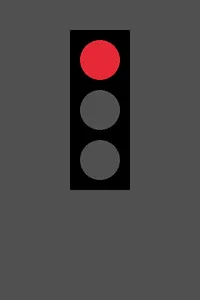
state = 1
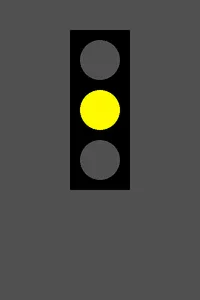
state = 2
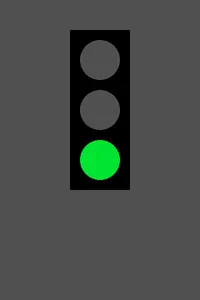
state = 3
One program. Three pictures. Nothing about the drawing code changes between them — the lamps are in the same places, the housing is the same size, and every circle is drawn every single time.
What changes is one number, and an if. Lab 2 let one variable move every lamp. Lab 3 lets one variable decide which lamp is on, and by the end you will be changing it with the spacebar while the program runs.
'F' → Fullscreen
Build
Start from your finished Lab 2 program, not an empty file. Save a copy named 1-14-stoplight so Lab 2 stays intact — you will want it again.
How to read the code blocks. Each task's code block shows your whole program, from line 1, as it should look when that task is finished.
The green lines marked with a + are the ones you add or change for that task — everything else is already in your file. Do not type the + sign.
Task 1: One Lamp That Can Be Off
- Add the
statevariable, the threeColorvariables, and oneif. - Then change all three
DrawCirclecalls so their last argument is the matching variable —redLamp,yellowLamp,greenLamp— instead ofColor.Redand friends. Miss this and nothing you do to the variables will show up. - Run it. The red lamp is on, and the other two are dark because nothing ever brightens them.
- Change
stateto 2 and run again. All three lamps go dark. That is correct for now — there is only oneif, and its condition is false. - Set it back to 1 before you continue.
#:package Raylib-cs@8.0.0
using Raylib_cs;
int screenWidth = 400;int screenHeight = 600;
int lampRadius = 40;int padding = 20;int gap = 100;
int lampX = screenWidth / 2;int firstLampY = 120;
int housingWidth = 2 * (lampRadius + padding);int housingHeight = 2 * gap + 2 * lampRadius + 2 * padding;int housingX = lampX - housingWidth / 2;int housingY = firstLampY - lampRadius - padding;
int state = 1;
Raylib.InitWindow(screenWidth, screenHeight, "Stoplight");Raylib.SetTargetFPS(60);
while (!Raylib.WindowShouldClose()){ Color redLamp = Color.DarkGray; Color yellowLamp = Color.DarkGray; Color greenLamp = Color.DarkGray;
if (state == 1) { redLamp = Color.Red; }
Raylib.BeginDrawing(); Raylib.ClearBackground(Color.DarkGray);
Raylib.DrawRectangle(housingX, housingY, housingWidth, housingHeight, Color.Black); Raylib.DrawCircle(lampX, firstLampY, lampRadius, redLamp); Raylib.DrawCircle(lampX, firstLampY + gap, lampRadius, yellowLamp); Raylib.DrawCircle(lampX, firstLampY + 2 * gap, lampRadius, greenLamp);
Raylib.EndDrawing();}
Raylib.CloseWindow();Task 2: The Chain
- Turn the single
ifinto a three-branch chain. - Test all three states by editing
state: 1, then 2, then 3. Each should light exactly one lamp, and your screen should match the three pictures at the top of this page. - Now try
state = 7. Write down which lamp lights, and why. It is not a bug, and it is not nothing. - Set it back to 1.
#:package Raylib-cs@8.0.0
using Raylib_cs;
int screenWidth = 400;int screenHeight = 600;
int lampRadius = 40;int padding = 20;int gap = 100;
int lampX = screenWidth / 2;int firstLampY = 120;
int housingWidth = 2 * (lampRadius + padding);int housingHeight = 2 * gap + 2 * lampRadius + 2 * padding;int housingX = lampX - housingWidth / 2;int housingY = firstLampY - lampRadius - padding;
int state = 1;
Raylib.InitWindow(screenWidth, screenHeight, "Stoplight");Raylib.SetTargetFPS(60);
while (!Raylib.WindowShouldClose()){ Color redLamp = Color.DarkGray; Color yellowLamp = Color.DarkGray; Color greenLamp = Color.DarkGray;
if (state == 1) { redLamp = Color.Red; } else if (state == 2) { yellowLamp = Color.Yellow; } else { greenLamp = Color.Green; }
Raylib.BeginDrawing(); Raylib.ClearBackground(Color.DarkGray);
Raylib.DrawRectangle(housingX, housingY, housingWidth, housingHeight, Color.Black); Raylib.DrawCircle(lampX, firstLampY, lampRadius, redLamp); Raylib.DrawCircle(lampX, firstLampY + gap, lampRadius, yellowLamp); Raylib.DrawCircle(lampX, firstLampY + 2 * gap, lampRadius, greenLamp);
Raylib.EndDrawing();}
Raylib.CloseWindow();Task 3: Make It Change
- Add the two
ifstatements that advancestateand wrap it back around. - Run it and press space. Red, yellow, green, red again.
- Add
Console.WriteLine($"state = {state}");just below the wrap, so you can watch the number as well as the light. - These two ifs are deliberately not a chain. Make the second one an
else if, run it, and press space past green a few times. - The light will look completely fine. Watch the console instead. The probe prints on every frame — sixty lines a second — so it scrolls past fast. Press space once past green, then close the window straight away, and the line you want will be near the bottom.
- Write down the one number that appears there and never appeared before, then put the
else ifback to anif.
#:package Raylib-cs@8.0.0
using Raylib_cs;
int screenWidth = 400;int screenHeight = 600;
int lampRadius = 40;int padding = 20;int gap = 100;
int lampX = screenWidth / 2;int firstLampY = 120;
int housingWidth = 2 * (lampRadius + padding);int housingHeight = 2 * gap + 2 * lampRadius + 2 * padding;int housingX = lampX - housingWidth / 2;int housingY = firstLampY - lampRadius - padding;
int state = 1;
Raylib.InitWindow(screenWidth, screenHeight, "Stoplight");Raylib.SetTargetFPS(60);
while (!Raylib.WindowShouldClose()){ if (Raylib.IsKeyPressed(KeyboardKey.Space)) { state = state + 1; }
if (state > 3) { state = 1; }
Color redLamp = Color.DarkGray; Color yellowLamp = Color.DarkGray; Color greenLamp = Color.DarkGray;
if (state == 1) { redLamp = Color.Red; } else if (state == 2) { yellowLamp = Color.Yellow; } else { greenLamp = Color.Green; }
Raylib.BeginDrawing(); Raylib.ClearBackground(Color.DarkGray);
Raylib.DrawRectangle(housingX, housingY, housingWidth, housingHeight, Color.Black); Raylib.DrawCircle(lampX, firstLampY, lampRadius, redLamp); Raylib.DrawCircle(lampX, firstLampY + gap, lampRadius, yellowLamp); Raylib.DrawCircle(lampX, firstLampY + 2 * gap, lampRadius, greenLamp);
Raylib.EndDrawing();}
Raylib.CloseWindow();Task 4: Break It on Purpose
Two changes, one at a time. Screenshot or describe what you see each time, and put it back before the next.
- Delete every
elsefrom the color chain, so it becomes three separateifstatements. Then change the second condition tostate == 1as well, and run it withstate = 1. - Put the chain back. Now delete the final
elseblock only — keep the first two branches asifandelse if— and run it withstate = 3.
For each one, say what a driver at this intersection would do if a real light looked like that. One of the two is dangerous in a way the other is not.
Challenge (Optional): The Fourth State
- Real lights have a flashing-red mode. Add
state = 4as a fourth case that lights the red lamp, and change the wrap so 4 is reachable. - Do not add a fourth
Colorvariable. Two different states can brighten the same lamp. - Write a comment saying which line you had to change to make 4 reachable, and what would have happened if you had forgotten it.
Checkpoint
Your two broken versions from Task 4 should look like this. If yours looked different, you changed something else as well.
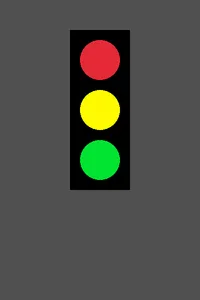
Task 4, change 1 — separate ifs
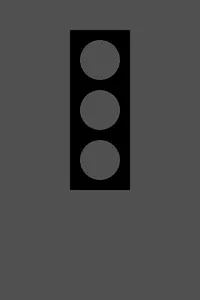
Task 4, change 2 — no final else
Look hard at the one on the left, because you have seen it before. It is not a redrawing of Lab 1's stoplight — it is the same image file. The picture you were proud of in Activity 1.7 is what a broken Lab 3 looks like, and the only thing that changed in between is that a stoplight is now supposed to decide.
- Each of states 1, 2, and 3 lights exactly one lamp, and the other two are dark gray
- Space advances the light and it wraps from green back to red
- You have written down which lamp
state = 7lit, and why - You have written down the number that appeared in the console with the
else ifwrap, and can say why the light still looked right - Both Task 4 pictures are recorded, with what a driver would do at each
Reflection
Answer these on your own before submitting your work.
- The three lamps are drawn on every frame no matter what. So what is the
ifactually changing? - A chain and three separate
ifstatements gave the same picture for every valid state. Explain why the chain is still the better choice here. stateis an ordinaryint, but the program behaves differently depending on what it holds. What does that let this program do that Lab 2's could not?
Submit
Submit four things to the dropbox:
- Your 1-14-stoplight program file, with the spacebar working.
- Your
state = 7answer, and the number the console showed when the wrap became anelse if. - Your two Task 4 results, with what a driver would do at each.
- Your three reflection answers.