Session 4: CNC Safety Certification

Session 4
CNC Safety Certification
The Printer Moved on Its Own, Too
In Session 3, a hot nozzle laid down plastic while you watched. Nothing on it could hurt you through the door.
A router does the same thing with a cutter spinning up to 10,000 times a minute, and the Genmitsu has no door.
Two Routers, Two Certifications
The Genmitsu cuts practice parts and small cabinet parts. The ShopBot cuts the big panels.
Same rule as Unit 1: shown, practiced supervised, then cleared, one machine at a time. Today is the Genmitsu. Your group's ShopBot practice comes in Session 13.
1. Hands Out While It Moves
Not to brush chips away, not to hold a lifting corner. If it needs touching, pause it, and wait for the spindle to stop.
2. Clamp It, Then Push It
Stock held by clamps you checked yourself, with a push. Every clamp sits outside the toolpath: a bit that hits a clamp breaks, and the pieces fly.
3. Zero Every Job
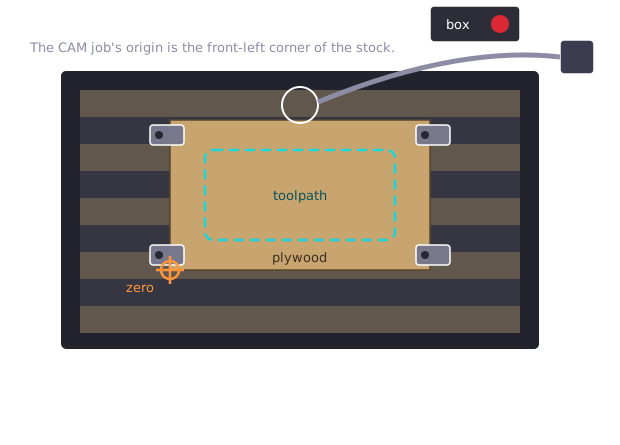
The machine starts wherever you told it zero is. Wrong corner, and the first cut lands off the stock, in a clamp, or in the bed.
The Probe Touches 20 mm Up
Z zero has to be the top of your stock, exactly. The probe finds it: set the puck on the stock, clip the wire to the bit, and the machine lowers the bit until it touches the puck's metal top.
The puck is 20 mm tall. If you set Z to zero right where the bit touched, where would the job cut?
The Probe Touches 20 mm Up
In the air, 20 mm above the wood. The bit touched the top of the puck, not the stock.
So right after probing, you tell the machine where it really is. In Candle's console, type G10 L20 P1 Z20: "the bit is 20 mm above zero." Now zero is the stock's top.
Never press Zero Z after that. It undoes it.
4. Touch the E-Stop Before You Start
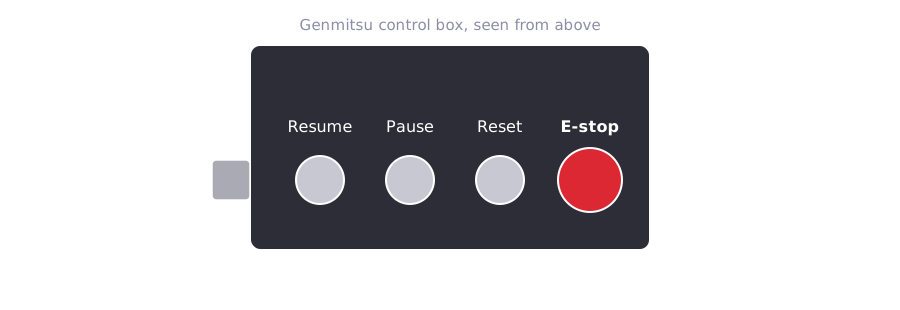
4. Touch the E-Stop Before You Start
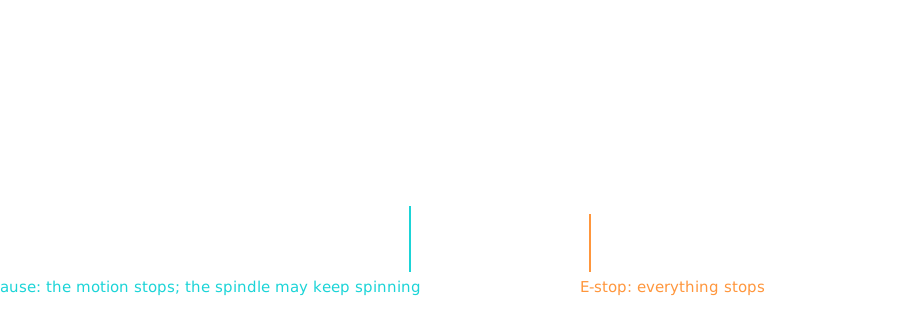
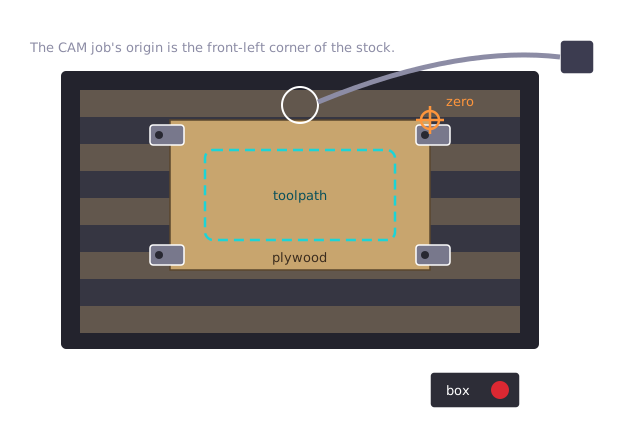
The box isn't bolted to the machine. It goes in front, where you stand, every time.
5. Never Walk Away
A bit snaps, a clamp loosens, the dust hose falls off. Someone watches every second of every cut, close enough to reach the E-stop.
6. Glasses On, Vacuum On
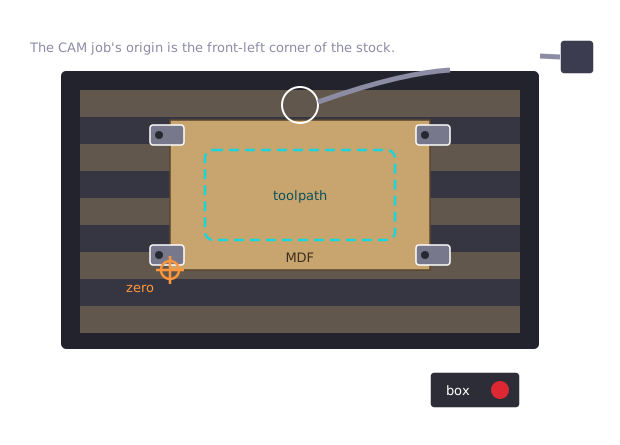
Before the spindle starts, not partway through. MDF dust is fine enough to breathe deep into your lungs.
These Bits Are Tiny

A 3 mm bit cuts 12 mm plywood in many shallow passes. Push it too deep or too fast and it snaps, which is why glasses come before the spindle.
The Air Cut
Before a real cut, run the whole job with the bit lifted well above the stock, and watch where it goes.
If the path crosses a clamp, you find out with nothing broken. Then zero Z again on the stock, or the real cut happens in the air too.
Alarm Means Home, Not Unlock
Every time Candle connects, the Genmitsu's controller restarts and shows Alarm. It's telling you it doesn't know where it is.
Unlock makes the alarm go away, but the machine still doesn't know where it is. Home is the fix: it drives to its switches and finds out.
Alarm Means Home, Not Unlock
It happened in this shop. A job finished on a machine that had been unlocked instead of homed, and its last move went to where the machine thought home was. The bit dug into the finished part and dragged the board out of its clamp.
Unlock is only for backing off a limit switch you've hit. Then Home, right away.
After an E-Stop
Twist the E-stop to release it, press Reset, and home the machine again. Then check your zero before anything restarts.
Then tell your instructor. Every E-stop gets a sentence about why.
Today
- Watch the demo on both routers and fill in the startup cards
- Spot the problem in five setups while you wait
- Your group's supervised practice on the Genmitsu
- The certification quiz on Blackbaud: 100%, retake until you get there
Next Time
Session 5: CAD Assemblies
Opens by breaking your Session 3 brackets.
'F' → Fullscreen
Build
Nobody runs either router alone today. Practice happens one group at a time, with your instructor at the machine.
Step 1: The Demo and the Startup Cards
Your instructor runs both routers from power-on to E-stop. On your sheet, write each machine's startup sequence in order, in your own words. You'll use these cards every time you cut.
For the Genmitsu, the demo follows this order:
- Control box in front of the machine. Glasses on. Vacuum on, hose on the dust shoe.
- Power on and connect in Candle. When it shows Alarm, click Home, not Unlock.
- Clamp the stock with every clamp outside the toolpath, then push-test it.
- Jog to the front-left corner of the stock and Zero XY.
- Z-probe: puck flat on the stock with the bit over its metal top, clip on the bit. Probe, then type
G10 L20 P1 Z20in the console. Put the puck and clip away. - Air cut, then zero Z again on the stock.
- Run the job, watching it the whole time, within reach of the E-stop.
Step 2: Spot the Problem
While other groups practice, find the one problem in each setup. Say what would happen, then the fix. In every setup, the CAM job's origin is the front-left corner of the stock.
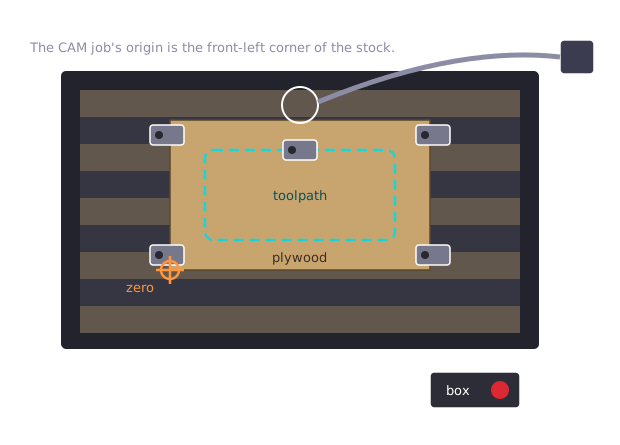
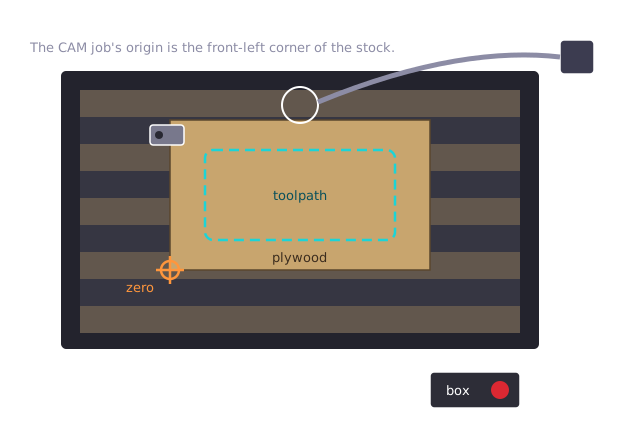
Step 3: Supervised Practice on the Genmitsu
When it's your group's turn:
- Once per group: place the control box, home, clamp, and push-test.
- Each of you: jog to the corner and Zero XY, run the Z-probe, start the air cut and Pause it, then Resume.
- Each of you: press the E-stop, then recover: release it, Reset, Home, and check the zero.
Step 4: The Certification Quiz
On Blackbaud. Passing is 100%, and you can retake it until you get there. Nobody runs a cut until they've passed it and finished supervised practice on that machine.
Checkpoint
Before you're cleared to use the Genmitsu on your own, all four must be true:
- Both startup cards are filled in, in order
- Your instructor initialed your supervised practice on the Genmitsu
- You found the problem in all five setups
- You passed the certification quiz at 100%
The ShopBot needs its own supervised practice, during your group's Session 13 cut.
Reflection
Answer these on your own, at home. Reflections are individual, even when the rest of the session was team work.
- You practiced on the Genmitsu today. Why doesn't that clear you to run the ShopBot?
- Session 5 moves to CAD, where you'll model panels that have to fit together. Now that you've seen these machines run, name one thing about how they cut that should change how you model a part.
Submit
Submit your sheet with both startup cards, the five setups, your initialed practice, and your reflection.