Activity 2.9 worked hard to get an accurate number. Today you throw most of that precision away on purpose.
if light < DARK:
# something is in the way
An alarm does not care whether the light is 4,000 or 4,200. It cares about one thing: has it crossed the line?
Where Does the Line Go?
Nowhere in the datasheet. Nobody can tell you the right number for your room, your sensor, and your lighting.
Terminal window
bright room : 41200
covered : 3800
-> pick something in between
You measure both ends and pick the middle. That is the whole method, and it is how real sensor thresholds get chosen.
The Photocell Is Half a Divider
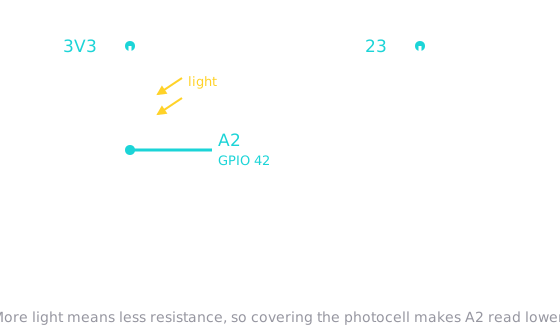
A photocell is a resistor that changes with light. On its own a changing resistance does nothing you can read — the board only measures voltage.
Pair it with a fixed 10K resistor and you get the same arrangement as the potentiometer in 2.8: two resistors in series, and you read the point between them. Light moves the voltage instead of your hand.
Sound Is Just a Fast Square Wave
speaker.freq(880)# 880 times a second = the pitch
speaker.duty_u16(32768)# half on, half off = sound
speaker.duty_u16(0)# never on = silence
PWM switches a pin on and off very fast. Set how often it switches and you set the pitch. Set the fraction of time it is on and you set whether there is any sound at all.
Remember This Pin Trick
Frequency is pitch. You will meet PWM again in Activity 2.12, where the same tool controls how fast a motor turns — but there it is the on-fraction that matters, not the rate.
Today's Objectives
Reading a photocell as a light sensor
Choosing a threshold from measured readings rather than guessing
Sounding the speaker with PWM, where frequency is pitch
Triggering an alarm when a reading crosses the line
Key Terms
Threshold
A chosen value that turns a range of readings into a yes-or-no decision.
Voltage Divider
Two resistors in series; the voltage at the point between them depends on their ratio.
PWM
Pulse-width modulation — switching a pin on and off rapidly. Its rate sets pitch; its on-fraction sets power.
Latch
Remembering that something happened, so an alarm keeps sounding after the cause has passed.
'F' → Fullscreen
Build
Leave everything from 2.8 and 2.9 wired. Create a new MicroPython program named 2-10-alarm.
Task 1: Read the Light
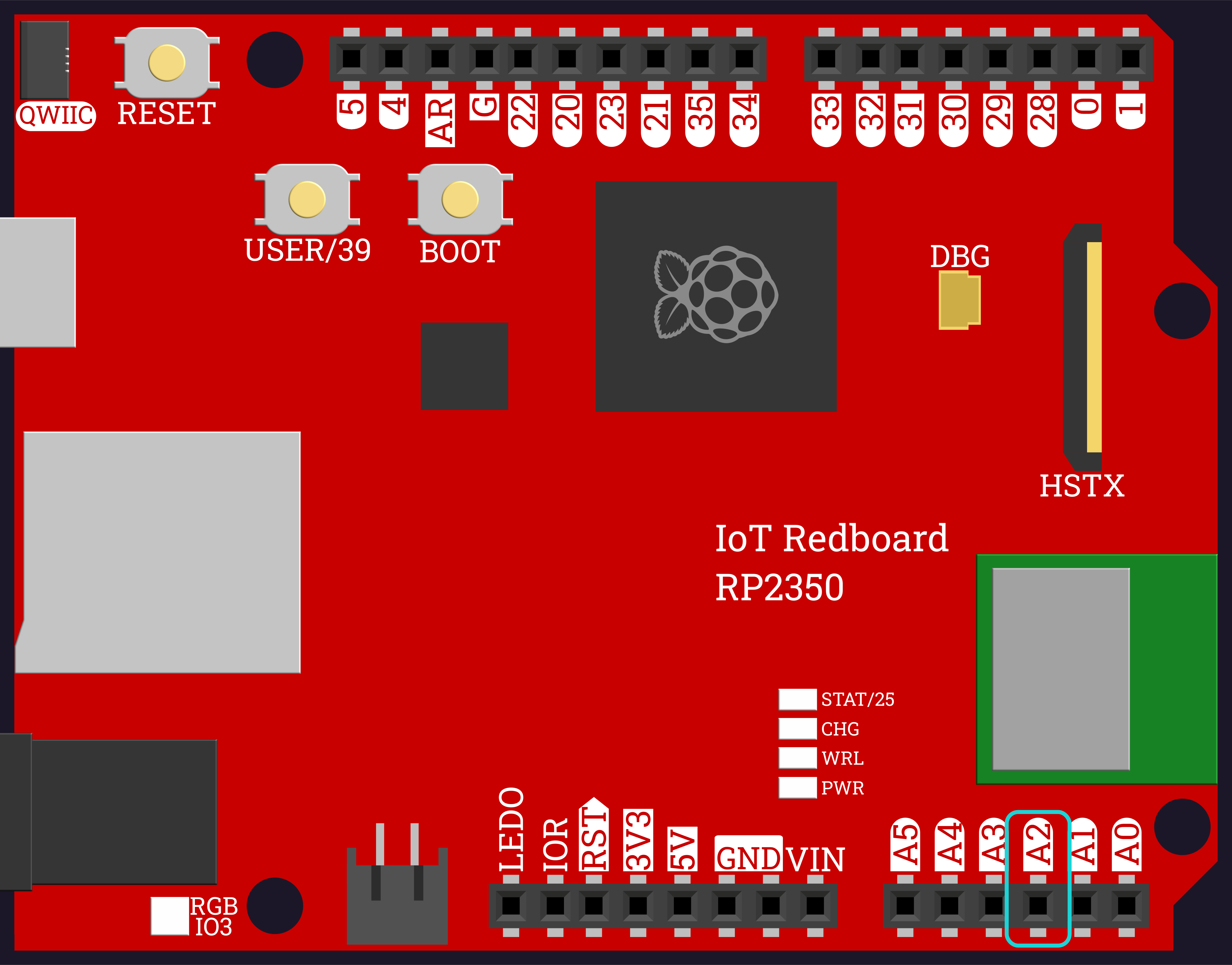
Wire the photocell and a 10K resistor in series between 3V3 and GND, with A2 connected to the point between them.
Print the raw reading and wave your hand over the sensor.
[PHOTO PLACEHOLDER — Task 1: Photocell and Speaker Added to the Breadboard]
Thresholds and Alarms
1
from machine import Pin, ADC
2
import time
3
4
light_sensor =ADC(Pin(42))
5
6
whileTrue:
7
print(light_sensor.read_u16())
8
time.sleep(0.2)
Task 2: Measure Both Ends
Reuse read_average() from 2.9 so the reading holds still.
Write down two numbers: the reading in normal room light, and the reading with the sensor fully covered.
Pick a threshold somewhere between them and write that down too.
Put your threshold nearer the covered value than the bright one. An alarm that fires when someone walks past the window is worse than one that needs a proper blocking.
Thresholds and Alarms
1
from machine import Pin, ADC
2
import time
3
4
light_sensor =ADC(Pin(42))
5
6
7
defread_average(sensor,samples):
8
total =0
9
for i inrange(samples):
10
total = total + sensor.read_u16()
11
time.sleep(0.01)
12
return total // samples
13
14
15
whileTrue:
16
print("light:", read_average(light_sensor,10))
17
time.sleep(0.3)
Task 3: Make a Noise
Wire the speaker through a 330Ω resistor to GPIO 23.
Write beep(speaker, hz, seconds) that sets a pitch, turns the sound on, waits, then silences it.
Play three different pitches to prove it works.
The resistor matters. A speaker connected straight to a pin will try to draw far more current than the pin can give.
Thresholds and Alarms
1
from machine import Pin, ADC, PWM
2
import time
3
4
light_sensor =ADC(Pin(42))
5
speaker =PWM(Pin(23))
6
7
8
defread_average(sensor,samples):
9
total =0
10
for i inrange(samples):
11
total = total + sensor.read_u16()
12
time.sleep(0.01)
13
return total // samples
14
15
16
defbeep(speaker,hz,seconds):
17
speaker.freq(hz)
18
speaker.duty_u16(32768)
19
time.sleep(seconds)
20
speaker.duty_u16(0)
21
22
23
beep(speaker,440,0.3)
24
beep(speaker,660,0.3)
25
beep(speaker,880,0.3)
Task 4: Sound the Alarm
Put your measured threshold in a named constant, DARK.
Beep whenever the reading falls below it.
Test it by covering the sensor.
Thresholds and Alarms
1
from machine import Pin, ADC, PWM
2
import time
3
4
light_sensor =ADC(Pin(42))
5
speaker =PWM(Pin(23))
6
7
DARK =12000
8
ALARM_HZ =880
9
10
11
defread_average(sensor,samples):
12
total =0
13
for i inrange(samples):
14
total = total + sensor.read_u16()
15
time.sleep(0.01)
16
return total // samples
17
18
19
defbeep(speaker,hz,seconds):
20
speaker.freq(hz)
21
speaker.duty_u16(32768)
22
time.sleep(seconds)
23
speaker.duty_u16(0)
24
25
26
whileTrue:
27
light =read_average(light_sensor,10)
28
if light < DARK:
29
print("Beam broken!")
30
beep(speaker, ALARM_HZ,0.2)
31
time.sleep(0.05)
Task 5: Latch It, Then Reset It
An alarm that stops the moment the intruder moves on is useless. Make it keep sounding once triggered.
Flash the LED array along with the beep.
Press the button to re-arm.
The trick is a variable that remembers. armed starts True, becomes False when the beam breaks, and only the button puts it back.
Aim a laser diode across the room at the photocell instead of relying on room light.
Re-measure both ends — a laser on the sensor reads far brighter than a lit room, so your threshold will need to change.
Never aim the laser at anyone's eyes. Point it at the wall, then bring the sensor to the beam.
Checkpoint
Your finished program should behave like this:
Terminal window
Armed.
Beam broken!
Re-armed.
Beam broken!
Nothing happens in normal room light, however long you leave it running
Covering the sensor triggers the alarm within about a second
The alarm keeps sounding after you uncover the sensor
Pressing the button silences it and re-arms
Walking past the sensor does not set it off
Reflection
Answer the following questions before submitting your work.
Activity 2.9 worked hard to get an accurate temperature. This activity throws most of that precision away. Explain what a threshold does to a reading, and why an alarm does not need the exact value.
Nobody could tell you what number to use for DARK. Describe how you actually chose yours, and why the same number would not work in a different room.
Without the armed variable, the alarm stops as soon as the sensor is uncovered. Explain how one True/False variable changes the behavior, and why that is what an alarm should do.
Submit
Submit the required files to the appropriate dropbox.