Activity 2.12: Motors and the Driver
Motion & Autonomy — Days 1 and 2 of 4

'F' → Fullscreen
Build
The bench circuit comes down today. The driver needs pins the LED array has been using, and the robot is a different object. Keep the OLED — it comes with you.
Tasks 1 to 3 are the first session; tasks 4 to 6 are the second. Create a new MicroPython program named 2-12-motors.
Task 1: One Motor, One Direction
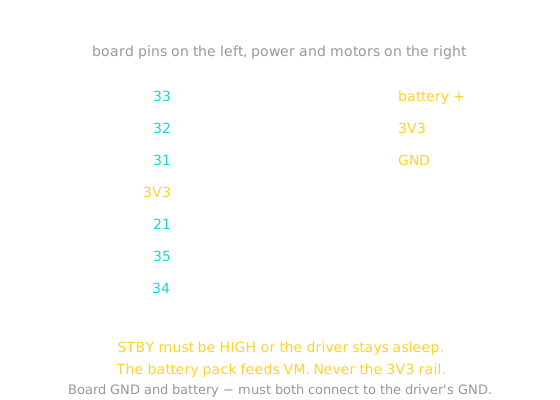
- Wire the driver. There are eleven connections and every one matters — work down the diagram and check each off.
- Connect one gearmotor to the
AO1/AO2outputs. - Set the direction pins, set the speed, wait two seconds, stop.
Two connections cause almost every failure here. STBY must be HIGH or the driver ignores you completely and silently. And the battery's minus must share a ground with the board, or the driver has no common reference and behaves erratically.
from machine import Pin, PWMimport time
a_in1 = Pin(31, Pin.OUT)a_in2 = Pin(32, Pin.OUT)a_pwm = PWM(Pin(33))a_pwm.freq(1000)
SPEED = 40000
a_in1.value(1)a_in2.value(0)a_pwm.duty_u16(SPEED)time.sleep(2)a_pwm.duty_u16(0)Task 2: Now the Other Way
- After running forward, swap which direction pin is HIGH and run again.
- Watch the shaft reverse without touching the speed.
from machine import Pin, PWMimport time
a_in1 = Pin(31, Pin.OUT)a_in2 = Pin(32, Pin.OUT)a_pwm = PWM(Pin(33))a_pwm.freq(1000)
SPEED = 40000
a_in1.value(1)a_in2.value(0)a_pwm.duty_u16(SPEED)time.sleep(2)
a_in1.value(0)a_in2.value(1)time.sleep(2)
a_pwm.duty_u16(0)Task 3: Wrap It, With a Sign
- Write
motor(in1, in2, pwm, speed)where a positive speed goes forward, a negative speed goes backward, and zero stops. - Use it to run forward, then backward, then stop.
Note what -speed is doing: the duty cycle can never be negative, so the function has to flip the sign back after it has used it to pick the direction.
from machine import Pin, PWMimport time
a_in1 = Pin(31, Pin.OUT)a_in2 = Pin(32, Pin.OUT)a_pwm = PWM(Pin(33))a_pwm.freq(1000)
SPEED = 40000
def motor(in1, in2, pwm, speed): if speed > 0: in1.value(1) in2.value(0) pwm.duty_u16(speed) elif speed < 0: in1.value(0) in2.value(1) pwm.duty_u16(-speed) else: in1.value(0) in2.value(0) pwm.duty_u16(0)
motor(a_in1, a_in2, a_pwm, SPEED)time.sleep(2)motor(a_in1, a_in2, a_pwm, -SPEED)time.sleep(2)motor(a_in1, a_in2, a_pwm, 0)Task 4: The Second Motor
- Wire the left motor to
BO1/BO2and its three control pins. - Run both motors forward at once.
- Hold the robot off the ground for this one.
Both wheels turning forward will very likely not drive straight. That is not a bug, and it is the first thing the Final Project asks you to deal with.
from machine import Pin, PWMimport time
a_in1 = Pin(31, Pin.OUT)a_in2 = Pin(32, Pin.OUT)a_pwm = PWM(Pin(33))a_pwm.freq(1000)
b_in1 = Pin(21, Pin.OUT)b_in2 = Pin(35, Pin.OUT)b_pwm = PWM(Pin(34))b_pwm.freq(1000)
SPEED = 40000
def motor(in1, in2, pwm, speed): if speed > 0: in1.value(1) in2.value(0) pwm.duty_u16(speed) elif speed < 0: in1.value(0) in2.value(1) pwm.duty_u16(-speed) else: in1.value(0) in2.value(0) pwm.duty_u16(0)
motor(a_in1, a_in2, a_pwm, SPEED)motor(b_in1, b_in2, b_pwm, SPEED)time.sleep(2)motor(a_in1, a_in2, a_pwm, 0)motor(b_in1, b_in2, b_pwm, 0)Task 5: One Call for Both Wheels
- Write
drive(left, right)that takes a speed for each wheel. - Write
stop()as well — you will use it constantly.
from machine import Pin, PWMimport time
a_in1 = Pin(31, Pin.OUT)a_in2 = Pin(32, Pin.OUT)a_pwm = PWM(Pin(33))a_pwm.freq(1000)
b_in1 = Pin(21, Pin.OUT)b_in2 = Pin(35, Pin.OUT)b_pwm = PWM(Pin(34))b_pwm.freq(1000)
SPEED = 40000
def motor(in1, in2, pwm, speed): if speed > 0: in1.value(1) in2.value(0) pwm.duty_u16(speed) elif speed < 0: in1.value(0) in2.value(1) pwm.duty_u16(-speed) else: in1.value(0) in2.value(0) pwm.duty_u16(0)
def drive(left, right): motor(b_in1, b_in2, b_pwm, left) motor(a_in1, a_in2, a_pwm, right)
def stop(): drive(0, 0)
drive(SPEED, SPEED)time.sleep(1)stop()Task 6: Four Maneuvers
- Drive forward, then backward, then spin one way, then spin the other, then stop.
- Work out the two numbers for each maneuver before you write it.
from machine import Pin, PWMimport time
a_in1 = Pin(31, Pin.OUT)a_in2 = Pin(32, Pin.OUT)a_pwm = PWM(Pin(33))a_pwm.freq(1000)
b_in1 = Pin(21, Pin.OUT)b_in2 = Pin(35, Pin.OUT)b_pwm = PWM(Pin(34))b_pwm.freq(1000)
SPEED = 40000
def motor(in1, in2, pwm, speed): if speed > 0: in1.value(1) in2.value(0) pwm.duty_u16(speed) elif speed < 0: in1.value(0) in2.value(1) pwm.duty_u16(-speed) else: in1.value(0) in2.value(0) pwm.duty_u16(0)
def drive(left, right): motor(b_in1, b_in2, b_pwm, left) motor(a_in1, a_in2, a_pwm, right)
def stop(): drive(0, 0)
drive(SPEED, SPEED)time.sleep(1)
drive(-SPEED, -SPEED)time.sleep(1)
drive(-SPEED, SPEED)time.sleep(0.6)
drive(SPEED, -SPEED)time.sleep(0.6)
stop()Challenge (Optional): Slow Is Harder Than Fast
- Find the lowest
SPEEDat which your wheels still turn reliably from a standing start. - Try it on the desk and on carpet. The number will differ, and knowing why is worth more than the number.
Checkpoint
- One motor turns, stops, and reverses on command
motor()with a negative speed runs backward, and with zero stops dead- Both wheels run together, held off the ground
drive(-SPEED, SPEED)spins the robot rather than driving it- Every program you run ends with the motors stopped
Reflection
Answer the following questions before submitting your work.
- Every other component this unit has used was powered straight from a pin. Explain why a motor cannot be, and what the driver actually does about it.
- Direction needs two pins rather than one. Explain why one pin is not enough, using the three things a motor can be doing.
- You used PWM for the speaker in 2.10 and for the motors here. Describe what changed about which part of the signal you cared about, and why the same tool does both jobs.
Submit
Submit the required files to the appropriate dropbox.