Activity 2.13: Ultrasonic Distance
Motion & Autonomy — Day 3 of 4

'F' → Fullscreen
Build
Keep the motor driver wired — session 16 needs both. Create a new MicroPython script named 2-13-distance.
Task 1: Time the Echo
- Wire the sensor:
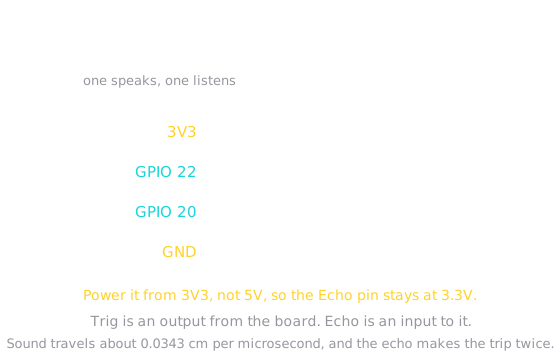
VCCto3V3,GNDtoGND,Trigto GPIO 22,Echoto GPIO 20. - Send a 10-microsecond pulse on
Trig, then time how longEchostays HIGH. - Print the raw number of microseconds and move your hand towards and away from the sensor.
Power it from 3V3 rather than 5V. These GPIO pins expect 3.3V signals, and the Echo pin answers at whatever voltage the sensor runs on.
from machine import Pin, time_pulse_usimport time
trigger = Pin(22, Pin.OUT)echo = Pin(20, Pin.IN)
while True: trigger.value(0) time.sleep_us(2) trigger.value(1) time.sleep_us(10) trigger.value(0) duration = time_pulse_us(echo, 1, 30000) print("echo lasted", duration, "microseconds") time.sleep(0.5)Task 2: Into Centimeters
- Divide the duration by 58 and print centimeters instead.
- Check it against a ruler. Hold something at 20cm and see what you get.
Work out where 58 comes from before you accept it. Sound covers 0.0343cm per microsecond, and the echo travels the distance twice.
from machine import Pin, time_pulse_usimport time
trigger = Pin(22, Pin.OUT)echo = Pin(20, Pin.IN)
while True: trigger.value(0) time.sleep_us(2) trigger.value(1) time.sleep_us(10) trigger.value(0) duration = time_pulse_us(echo, 1, 30000) print(duration // 58, "cm") time.sleep(0.5)Task 3: When Nothing Comes Back
- Point the sensor at the ceiling. The reading will be nonsense or the program will stall.
- Move the whole measurement into
read_distance(), and return-1when the timer gives up. - Print a readable message instead of a meaningless number.
from machine import Pin, time_pulse_usimport time
trigger = Pin(22, Pin.OUT)echo = Pin(20, Pin.IN)
TIMEOUT_US = 30000
def read_distance(): trigger.value(0) time.sleep_us(2) trigger.value(1) time.sleep_us(10) trigger.value(0) duration = time_pulse_us(echo, 1, TIMEOUT_US) if duration < 0: return -1 return duration // 58
while True: cm = read_distance() if cm < 0: print("nothing in range") else: print(cm, "cm") time.sleep(0.5)Task 4: Steady the Reading
- Write
read_average_distance(samples)that takes several readings and averages the good ones. - Skip the failures rather than letting a
-1drag the average down. - Return
-1only if every reading failed.
Same idea as the temperature sensor in 2.9, with one new wrinkle: here some readings are not merely noisy but entirely absent, so you have to count how many were usable.
from machine import Pin, time_pulse_usimport time
trigger = Pin(22, Pin.OUT)echo = Pin(20, Pin.IN)
TIMEOUT_US = 30000
def read_distance(): trigger.value(0) time.sleep_us(2) trigger.value(1) time.sleep_us(10) trigger.value(0) duration = time_pulse_us(echo, 1, TIMEOUT_US) if duration < 0: return -1 return duration // 58
def read_average_distance(samples): total = 0 good = 0 for i in range(samples): cm = read_distance() if cm > 0: total = total + cm good = good + 1 time.sleep(0.02) if good == 0: return -1 return total // good
while True: cm = read_average_distance(5) if cm < 0: print("nothing in range") else: print(cm, "cm") time.sleep(0.3)Task 5: Put It on the Screen
- Bring the OLED and
show()back from Activity 2.11. - Display the distance on the glass so you can read it while walking around with the robot.
from machine import Pin, time_pulse_usimport qwiic_large_oledimport time
trigger = Pin(22, Pin.OUT)echo = Pin(20, Pin.IN)
TIMEOUT_US = 30000
oled = qwiic_large_oled.QwiicLargeOled()oled.begin()
def read_distance(): trigger.value(0) time.sleep_us(2) trigger.value(1) time.sleep_us(10) trigger.value(0) duration = time_pulse_us(echo, 1, TIMEOUT_US) if duration < 0: return -1 return duration // 58
def read_average_distance(samples): total = 0 good = 0 for i in range(samples): cm = read_distance() if cm > 0: total = total + cm good = good + 1 time.sleep(0.02) if good == 0: return -1 return total // good
def show(oled, line1, line2): oled.clear(oled.PAGE) oled.print(line1) oled.print(line2) oled.display()
while True: cm = read_average_distance(5) if cm < 0: show(oled, "Distance", "out of range") else: show(oled, "Distance", str(cm) + " cm") time.sleep(0.3)Challenge (Optional): Find the Blind Spots
- Work out the closest and furthest distances your sensor reports reliably.
- Try a soft object like a jumper, and a hard flat one like a book. Try holding the book at an angle.
- Write down what fools it. The Final Project will thank you.
Checkpoint
Moving your hand towards and away from the sensor should print something like:
24 cm23 cmnothing in range41 cm- A book held at 20cm reads within a couple of centimeters of 20
- Moving your hand closer makes the number fall smoothly
- Pointing at the ceiling reports out of range rather than a wild number
- The program never stalls, whatever you point it at
Reflection
Answer the following questions before submitting your work.
- Explain where the number 58 comes from, using the speed of sound and the path the echo takes.
- Activity 2.7 timed a reaction in milliseconds; this activity times an echo in microseconds. Explain why the finer unit is necessary here and was not there.
read_average_distance()counts how many readings were usable instead of just dividing bysamples. Explain what would go wrong with the simpler version.
Submit
Submit the required files to the appropriate dropbox.