Activity 2.4 used three LEDs. Today you add two more and make the whole row animate — lights that move, fill, and flash on command.
The Problem With Five Variables
led1 =Pin(28, Pin.OUT)
led2 =Pin(29, Pin.OUT)
led3 =Pin(30, Pin.OUT)
led4 =Pin(31, Pin.OUT)
led5 =Pin(32, Pin.OUT)
Five separate names. To do anything to all of them you write five lines — and to make a light move, you write a lot more than five.
You Have Seen This Problem Before
Back in Activity 1.18, score1, score2, and score3 became a list. The same fix works here.
leds =[
Pin(28, Pin.OUT),
Pin(29, Pin.OUT),
Pin(30, Pin.OUT),
]
A list can hold anything — numbers, strings, and objects, like the Pin objects you have been making since 2.3.
One Loop, Every LED
for led in leds:
led.value(1)
Exactly the traversal loop from Activity 1.20 — except each led is a real pin on a real board, so this loop lights up hardware.
What Is an Animation, Really?
An animation is nothing more than a pattern of on and off, separated by pauses. Change the pattern and you change the effect:
Chase — one light on at a time, moving down the row
Fill — each light joins the ones before it
Blink All — the whole row together
You already built Fill in 2.4. It was the countdown.
Functions Calling Functions
defblink_all(leds,wait,times):
for i inrange(times):
all_on(leds)
time.sleep(wait)
all_off(leds)
time.sleep(wait)
blink_all() does not touch a single pin itself — it calls all_on() and all_off(). Small functions stack into bigger ones.
Note the Unused Loop Variable
for i in range(times): — and i is never used, exactly like the liftoff blink in Activity 2.4. The loop is counting repetitions, nothing more.
Today's Objectives
Storing a group of Pin objects in a list
Traversing the array with a for loop to build an animation
Calling one function from inside another
Letting the user pick an animation from a menu
Key Terms
LED Array
A row of LEDs treated as one group instead of as separate lights.
List of Objects
A list whose elements are objects rather than plain numbers or strings — here, one Pin per LED.
Animation
A pattern of on/off states separated by pauses, producing the illusion of movement.
'F' → Fullscreen
Build
Create a new MicroPython program named 2-6-led-array.
Task 1: Wire the Array and Light It Up
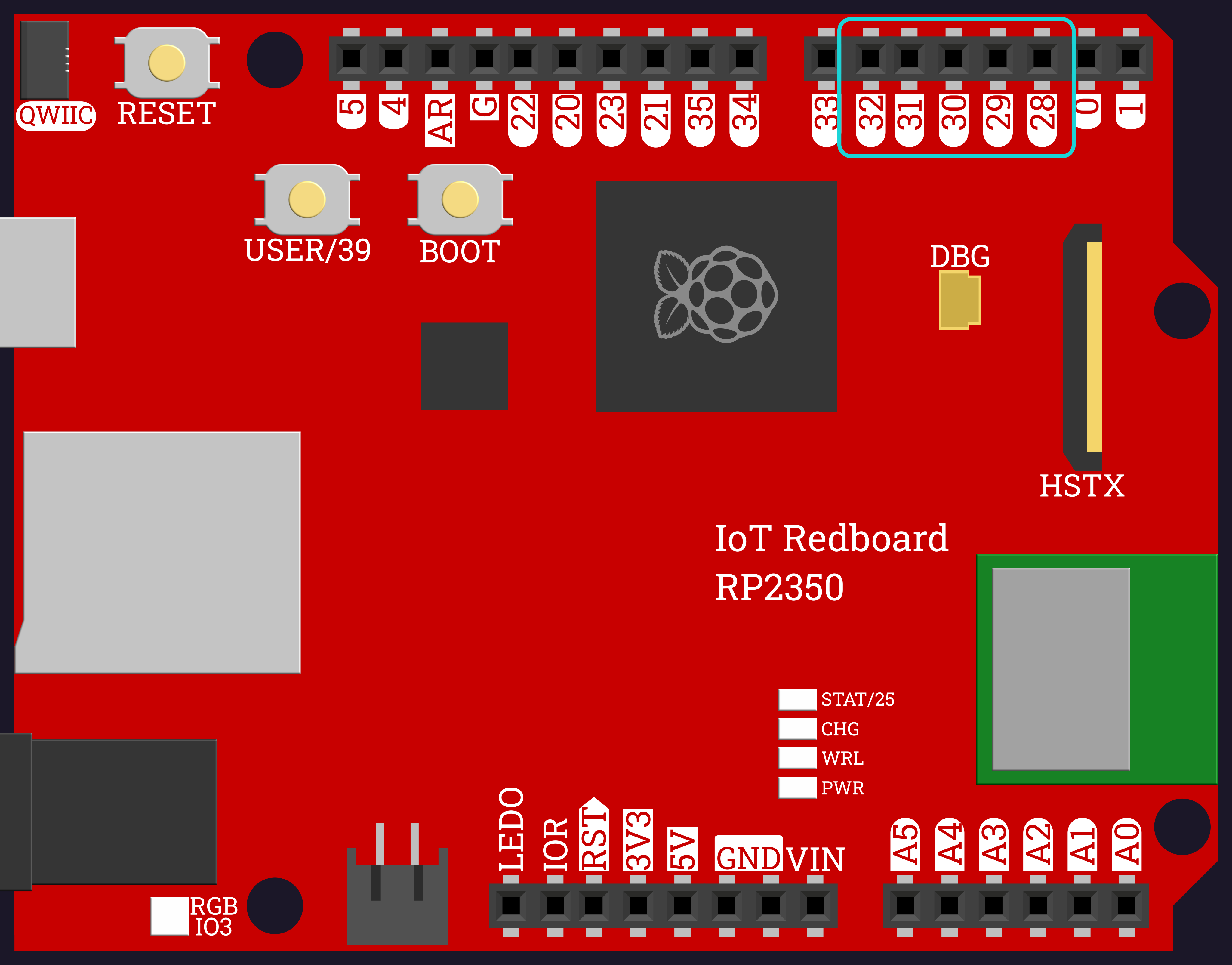
Keep Activity 2.4's three LEDs and add two more, with their own resistors, on GPIO 31 and 32.
Store all five Pin objects in one list named leds.
Turn every LED on with a single for loop, to prove all five are wired correctly.
The two new pins sit immediately to the left of 30 in the same block on the top header, so the five you need run 32, 31, 30, 29, 28 reading left to right:
Plug them in physically left to right in list order. The order the LEDs sit in your breadboard is the order the animation appears to move. If your chase looks like it is jumping around instead of sweeping, the wiring order does not match the list order — the code is probably fine.
[PHOTO PLACEHOLDER — Task 1: Five LEDs Wired in a Row, All Lit]
LED Array Animation
1
from machine import Pin
2
import time
3
4
leds =[
5
Pin(28, Pin.OUT),
6
Pin(29, Pin.OUT),
7
Pin(30, Pin.OUT),
8
Pin(31, Pin.OUT),
9
Pin(32, Pin.OUT),
10
]
11
12
for led in leds:
13
led.value(1)
Task 2: The Chase
Change the loop so each LED turns on, pauses briefly, then turns off before the next one lights.
Adjust the pause until the movement reads as a single light traveling down the row.
LED Array Animation
1
from machine import Pin
2
import time
3
4
leds =[
5
Pin(28, Pin.OUT),
6
Pin(29, Pin.OUT),
7
Pin(30, Pin.OUT),
8
Pin(31, Pin.OUT),
9
Pin(32, Pin.OUT),
10
]
11
12
for led in leds:
13
led.value(1)
14
time.sleep(0.1)
15
led.value(0)
[PHOTO PLACEHOLDER — Task 2: Chase Mid-Sweep, One LED Lit]
Task 3: Two Animations, Two Functions
Write all_off(leds), which turns every LED off.
Move your chase into a function chase(leds, wait).
Add a second animation fill(leds, wait), where each LED stays lit as the next joins — then clears.
Run one after the other.
LED Array Animation
1
from machine import Pin
2
import time
3
4
leds =[
5
Pin(28, Pin.OUT),
6
Pin(29, Pin.OUT),
7
Pin(30, Pin.OUT),
8
Pin(31, Pin.OUT),
9
Pin(32, Pin.OUT),
10
]
11
12
13
defall_off(leds):
14
for led in leds:
15
led.value(0)
16
17
18
defchase(leds,wait):
19
for led in leds:
20
led.value(1)
21
time.sleep(wait)
22
led.value(0)
23
24
25
deffill(leds,wait):
26
for led in leds:
27
led.value(1)
28
time.sleep(wait)
29
all_off(leds)
30
31
32
chase(leds,0.1)
33
fill(leds,0.2)
Task 4: Blink All
Write all_on(leds) to match all_off(leds).
Write blink_all(leds, wait, times) that flashes the whole row a given number of times — by calling all_on() and all_off(), not by touching pins directly.
LED Array Animation
1
from machine import Pin
2
import time
3
4
leds =[
5
Pin(28, Pin.OUT),
6
Pin(29, Pin.OUT),
7
Pin(30, Pin.OUT),
8
Pin(31, Pin.OUT),
9
Pin(32, Pin.OUT),
10
]
11
12
13
defall_on(leds):
14
for led in leds:
15
led.value(1)
16
17
18
defall_off(leds):
19
for led in leds:
20
led.value(0)
21
22
23
defchase(leds,wait):
24
for led in leds:
25
led.value(1)
26
time.sleep(wait)
27
led.value(0)
28
29
30
deffill(leds,wait):
31
for led in leds:
32
led.value(1)
33
time.sleep(wait)
34
all_off(leds)
35
36
37
defblink_all(leds,wait,times):
38
for i inrange(times):
39
all_on(leds)
40
time.sleep(wait)
41
all_off(leds)
42
time.sleep(wait)
43
44
45
chase(leds,0.1)
46
fill(leds,0.2)
47
blink_all(leds,0.2,5)
Task 5: The Animation Menu
Replace the three fixed calls with a menu that prints the options and reads the user's choice.
Run the matching animation, then show the menu again — the same sentinel while pattern you used for the task-list app in Activity 1.20.
Quit cleanly on q, turning every LED off on the way out.
LED Array Animation
1
from machine import Pin
2
import time
3
4
leds =[
5
Pin(28, Pin.OUT),
6
Pin(29, Pin.OUT),
7
Pin(30, Pin.OUT),
8
Pin(31, Pin.OUT),
9
Pin(32, Pin.OUT),
10
]
11
12
13
defall_on(leds):
14
for led in leds:
15
led.value(1)
16
17
18
defall_off(leds):
19
for led in leds:
20
led.value(0)
21
22
23
defchase(leds,wait):
24
for led in leds:
25
led.value(1)
26
time.sleep(wait)
27
led.value(0)
28
29
30
deffill(leds,wait):
31
for led in leds:
32
led.value(1)
33
time.sleep(wait)
34
all_off(leds)
35
36
37
defblink_all(leds,wait,times):
38
for i inrange(times):
39
all_on(leds)
40
time.sleep(wait)
41
all_off(leds)
42
time.sleep(wait)
43
44
45
all_off(leds)
46
47
running =True
48
while running:
49
print()
50
print("1 - Chase")
51
print("2 - Fill")
52
print("3 - Blink All")
53
print("q - Quit")
54
choice =input("Pick an animation: ")
55
56
if choice =="1":
57
chase(leds,0.1)
58
elif choice =="2":
59
fill(leds,0.2)
60
elif choice =="3":
61
blink_all(leds,0.2,5)
62
elif choice =="q":
63
running =False
64
else:
65
print("Not an option.")
66
67
all_off(leds)
68
print("Goodbye.")
Challenge (Optional): Bounce
Add a fourth animation that sweeps down the row and then back again, without repeating the LED at each end twice.
You will need to walk the list backwards, which means reaching for a position number instead of for led in leds: — look at leds[0] and leds[4] on the circuit diagram above.
Checkpoint
When you run your script:
The menu should appear, listing three animations and a quit option
Chase should show one light sweeping cleanly from one end of the row to the other
Fill should light each LED in turn, each staying on, then clear the whole row
Blink All should flash all five together five times
An unrecognized choice should print a message and show the menu again, not crash
q should turn every LED off and end the program
Reflection
Answer the following questions before submitting your work.
What did putting the five Pin objects in a list let you do that five separate variables would not?
blink_all() never calls .value() itself. Explain what it does instead, and why that is easier to read than turning five pins on and off inside it.
Your chase() and fill() functions contain almost the same loop. What single difference makes one look like a moving light and the other look like a bar filling up?
Submit
Submit the required files to the appropriate dropbox.

![Circuit diagram showing five LEDs, each with its own resistor, wired to GPIO 28 through 32 and sharing a common ground, labeled with their list positions leds[0] through leds[4]](/_astro/five-led-array-circuit-diagram.DIYqa4wa_1F2z3d.svg)