Activity 2.7: Reaction Timer
Digital Input & Timing — Day 1 of 2

'F' → Fullscreen
Build
Keep Activity 2.6's five-LED array wired exactly as it is. Create a new MicroPython script named 2-7-reaction-timer.
Task 1: Wire the Button and Read It
- Wire one push button between the
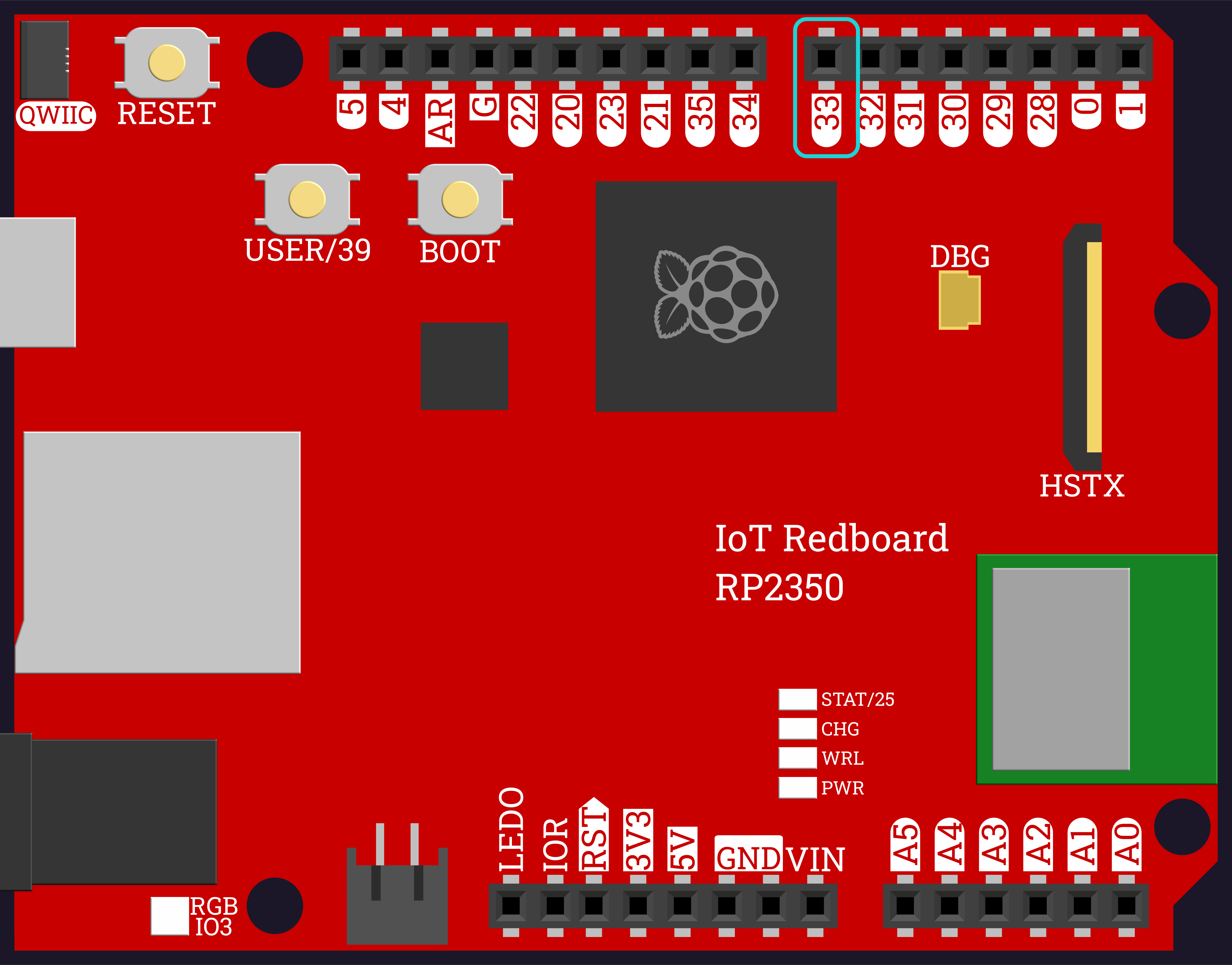
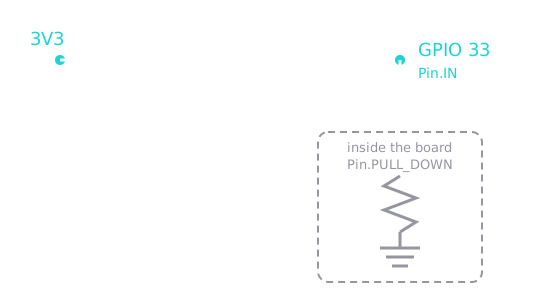
3V3pin and GPIO 33. - Create the button as an input pin with an internal pull-down.
- Light the whole array while the button is held, and turn it off when released.
GPIO 33 is the last pin in the block you have been using — immediately to the left of 32:
No extra resistor is needed. The board already contains one, and Pin.PULL_DOWN is how you switch it on:
from machine import Pin
leds = [ Pin(28, Pin.OUT), Pin(29, Pin.OUT), Pin(30, Pin.OUT), Pin(31, Pin.OUT), Pin(32, Pin.OUT),]button = Pin(33, Pin.IN, Pin.PULL_DOWN)
def all_on(leds): for led in leds: led.value(1)
def all_off(leds): for led in leds: led.value(0)
while True: if button.value() == 1: all_on(leds) else: all_off(leds)Task 2: Time the Press
- Import
time. - When the button goes down, record the tick count. When it comes back up, record it again.
- Print how many milliseconds the button was held.
The inner while loop does nothing at all on purpose — pass just means "keep checking." The program sits there until the button comes back up.
from machine import Pinimport time
leds = [ Pin(28, Pin.OUT), Pin(29, Pin.OUT), Pin(30, Pin.OUT), Pin(31, Pin.OUT), Pin(32, Pin.OUT),]button = Pin(33, Pin.IN, Pin.PULL_DOWN)
def all_on(leds): for led in leds: led.value(1)
def all_off(leds): for led in leds: led.value(0)
while True: if button.value() == 1: start = time.ticks_ms() all_on(leds) while button.value() == 1: pass stop = time.ticks_ms() all_off(leds) print("You held it for", time.ticks_diff(stop, start), "ms")Task 3: The Reaction Test
- Import
random. - Replace the held-button loop with a single test: wait a random 2–5 seconds, then light the whole array as the GO signal.
- Start timing at GO, stop when the button is pressed, and print the reaction time.
The delay has to be random. A fixed pause lets you anticipate the GO, and then you are measuring your counting, not your reflexes.
from machine import Pinimport timeimport random
leds = [ Pin(28, Pin.OUT), Pin(29, Pin.OUT), Pin(30, Pin.OUT), Pin(31, Pin.OUT), Pin(32, Pin.OUT),]button = Pin(33, Pin.IN, Pin.PULL_DOWN)
def all_on(leds): for led in leds: led.value(1)
def all_off(leds): for led in leds: led.value(0)
all_off(leds)print("Get ready...")time.sleep(random.uniform(2, 5))
all_on(leds)start = time.ticks_ms()while button.value() == 0: passstop = time.ticks_ms()all_off(leds)
print("Reaction time:", time.ticks_diff(stop, start), "ms")Task 4: Return the Time
- Move the whole test into a function
measure_reaction(leds, button). - Instead of printing inside the function,
returnthe measured time so the caller decides what to do with it. - Add
wait_for_release(button)at the start, so a still-held button from the last go does not ruin the next one.
from machine import Pinimport timeimport random
leds = [ Pin(28, Pin.OUT), Pin(29, Pin.OUT), Pin(30, Pin.OUT), Pin(31, Pin.OUT), Pin(32, Pin.OUT),]button = Pin(33, Pin.IN, Pin.PULL_DOWN)
def all_on(leds): for led in leds: led.value(1)
def all_off(leds): for led in leds: led.value(0)
def wait_for_release(button): while button.value() == 1: pass
def measure_reaction(leds, button): all_off(leds) wait_for_release(button) print("Get ready...") time.sleep(random.uniform(2, 5)) all_on(leds) start = time.ticks_ms() while button.value() == 0: pass stop = time.ticks_ms() all_off(leds) return time.ticks_diff(stop, start)
print("Reaction time:", measure_reaction(leds, button), "ms")Task 5: Five Attempts
- Run five attempts in a loop, collecting each reaction time in a list.
- After the fifth, report the best time and the average.
This is the accumulator pattern from Activity 1.21, with one addition: tracking the smallest value you have seen so far.
from machine import Pinimport timeimport random
leds = [ Pin(28, Pin.OUT), Pin(29, Pin.OUT), Pin(30, Pin.OUT), Pin(31, Pin.OUT), Pin(32, Pin.OUT),]button = Pin(33, Pin.IN, Pin.PULL_DOWN)
def all_on(leds): for led in leds: led.value(1)
def all_off(leds): for led in leds: led.value(0)
def wait_for_release(button): while button.value() == 1: pass
def measure_reaction(leds, button): all_off(leds) wait_for_release(button) print("Get ready...") time.sleep(random.uniform(2, 5)) all_on(leds) start = time.ticks_ms() while button.value() == 0: pass stop = time.ticks_ms() all_off(leds) return time.ticks_diff(stop, start)
times = []attempt = 1while attempt <= 5: print() print("Attempt", attempt) result = measure_reaction(leds, button) print("Reaction time:", result, "ms") times.append(result) attempt = attempt + 1
print()best = times[0]total = 0for t in times: total = total + t if t < best: best = tprint("Best:", best, "ms")print("Average:", total // len(times), "ms")Task 6: Catch the False Start
- Write
pressed_early(button, seconds)that waits the given time but reports back immediately if the button is pressed during it. - If the player jumps early, return
-1instead of a time, print a warning, and make them redo that attempt.
Notice why this has to be a while loop and not a for loop: a false start must not use up one of the five attempts, so the counter only moves forward on a real result.
from machine import Pinimport timeimport random
leds = [ Pin(28, Pin.OUT), Pin(29, Pin.OUT), Pin(30, Pin.OUT), Pin(31, Pin.OUT), Pin(32, Pin.OUT),]button = Pin(33, Pin.IN, Pin.PULL_DOWN)
def all_on(leds): for led in leds: led.value(1)
def all_off(leds): for led in leds: led.value(0)
def wait_for_release(button): while button.value() == 1: pass
def pressed_early(button, seconds): steps = int(seconds * 100) for i in range(steps): if button.value() == 1: return True time.sleep(0.01) return False
def measure_reaction(leds, button): all_off(leds) wait_for_release(button) print("Get ready...") if pressed_early(button, random.uniform(2, 5)): return -1 all_on(leds) start = time.ticks_ms() while button.value() == 0: pass stop = time.ticks_ms() all_off(leds) return time.ticks_diff(stop, start)
times = []attempt = 1while attempt <= 5: print() print("Attempt", attempt) result = measure_reaction(leds, button) if result == -1: print("Too early! That one does not count.") else: print("Reaction time:", result, "ms") times.append(result) attempt = attempt + 1
print()best = times[0]total = 0for t in times: total = total + t if t < best: best = tprint("Best:", best, "ms")print("Average:", total // len(times), "ms")Challenge (Optional): Two-Player Duel
- Add a second button on GPIO 34 and light the array as before — whoever presses first wins the round.
- Report both reaction times and the margin between them.
Checkpoint
Your finished program should behave like this:
Attempt 1Get ready...Reaction time: 210 ms
Attempt 2Get ready...Too early! That one does not count.
Attempt 2Get ready...Reaction time: 260 ms
Best: 210 msAverage: 235 ms- The array stays dark during "Get ready..." and lights all at once as the GO signal
- Reaction times land somewhere around 150–400 ms — a reading of 2 ms means you were already holding the button
- Pressing before GO prints the warning and repeats the same attempt number
- After five real attempts, the best and average are reported
Reflection
Answer the following questions before submitting your work.
- What does
Pin.PULL_DOWNdo, and what would an unpressed input pin read without it? - Your functions in Activities 2.5 and 2.6 never used
return. Why didmeasure_reaction()need one? - A false start does not use up one of the five attempts. Explain how the
whileloop makes that possible, and why aforloop would have made it harder.
Submit
Submit the required files to the appropriate dropbox.