Activity 2.8: Analog Input
The Messy Real World — Day 1 of 4

'F' → Fullscreen
Build
Leave Activity 2.6's five-LED array exactly as it is. Create a new MicroPython program named 2-8-analog-input.
Task 1: Read the Knob
- Wire the potentiometer: its two outer legs to
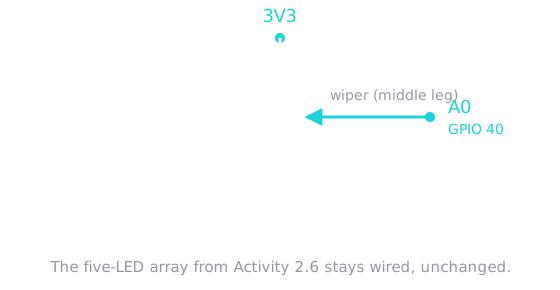
3V3andGND, its middle leg toA0. - Create it as an
ADCand print the reading in a loop. - Turn the knob slowly and watch the numbers move.
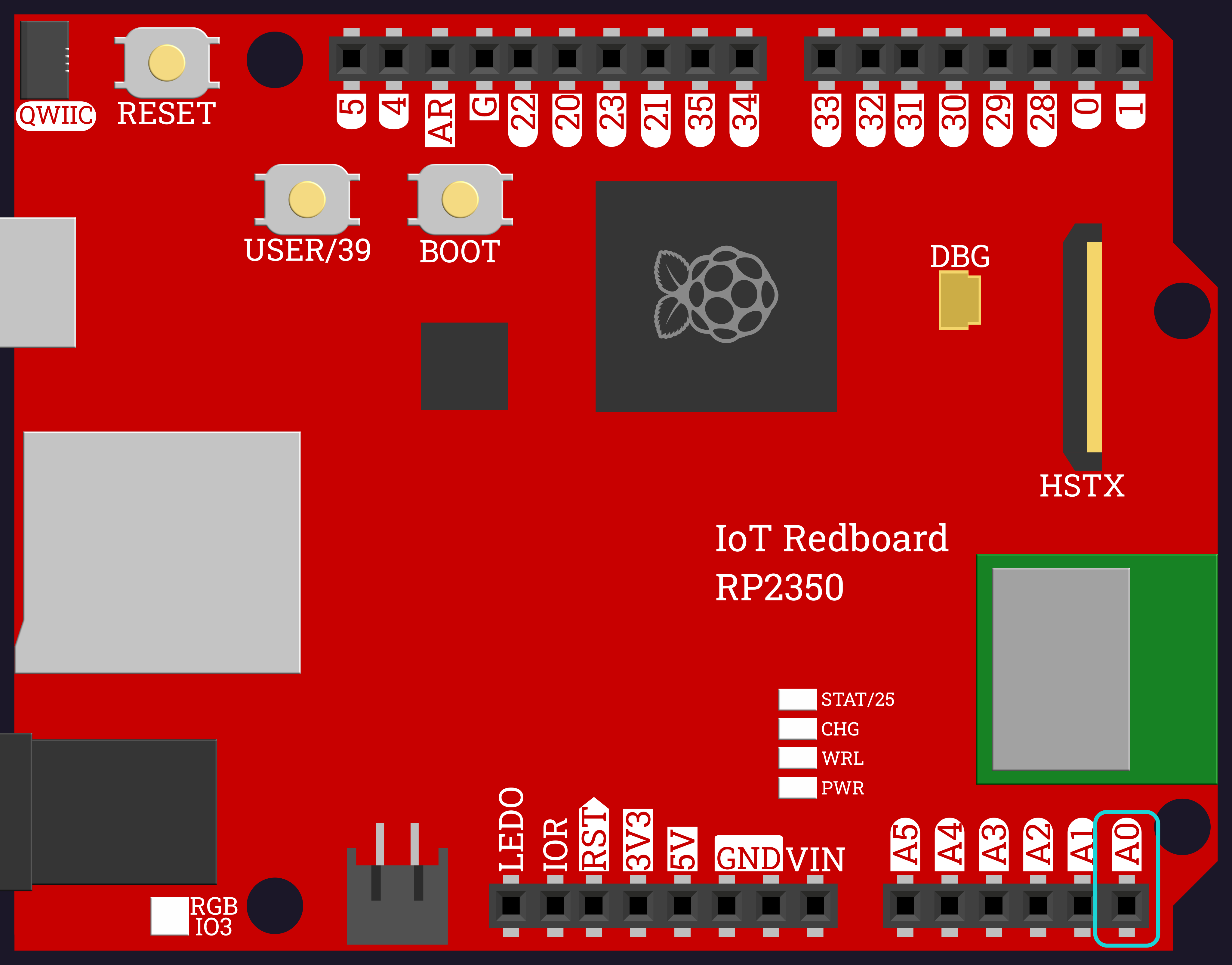
The analog pins are the six on the bottom header, labeled A0 through A5. A0 is at the far right:
It does not matter which outer leg goes to 3V3 and which to GND — swapping them just reverses which way you turn the knob to get a bigger number.
from machine import Pin, ADCimport time
pot = ADC(Pin(40))
while True: print(pot.read_u16()) time.sleep(0.2)Task 2: Find Its Real Range
- Track the lowest and highest readings you have seen, the same way you tracked your best reaction time in 2.7.
- Turn the knob all the way in both directions.
- Write down the two numbers you actually get. You will need them next session.
Do not assume the answer. A knob turned fully one way may not read 0, and fully the other way may not read 65535. Find out what your knob does.
from machine import Pin, ADCimport time
pot = ADC(Pin(40))
lowest = 65535highest = 0
while True: reading = pot.read_u16() if reading < lowest: lowest = reading if reading > highest: highest = reading print("now:", reading, " lowest:", lowest, " highest:", highest) time.sleep(0.2)Task 3: Scale the Reading
- Bring the five-LED array into this script.
- Write
bar_height(reading, led_count)that converts a reading into a whole number of LEDs. - Print the reading and the height side by side, and check the height climbs 0, 1, 2, 3, 4, 5 as you turn.
from machine import Pin, ADCimport time
leds = [ Pin(28, Pin.OUT), Pin(29, Pin.OUT), Pin(30, Pin.OUT), Pin(31, Pin.OUT), Pin(32, Pin.OUT),]pot = ADC(Pin(40))
def bar_height(reading, led_count): return reading * (led_count + 1) // 65536
while True: reading = pot.read_u16() print("reading:", reading, " bar:", bar_height(reading, len(leds))) time.sleep(0.2)Task 4: Light the Bar
- Write
show_bar(leds, count)that lights the firstcountLEDs and turns the rest off. - Call it every time round the loop, so the bar follows the knob live.
This is the function that needs leds[i]. Work out for yourself why for led in leds: cannot do it before you read the code below.
from machine import Pin, ADCimport time
leds = [ Pin(28, Pin.OUT), Pin(29, Pin.OUT), Pin(30, Pin.OUT), Pin(31, Pin.OUT), Pin(32, Pin.OUT),]pot = ADC(Pin(40))
def bar_height(reading, led_count): return reading * (led_count + 1) // 65536
def show_bar(leds, count): for i in range(len(leds)): if i < count: leds[i].value(1) else: leds[i].value(0)
while True: reading = pot.read_u16() height = bar_height(reading, len(leds)) show_bar(leds, height) print("reading:", reading, " bar:", height) time.sleep(0.1)Challenge (Optional): The Knob Sets the Speed
- Bring your
chase()function over from Activity 2.6. - Use the knob to set the pause length instead of the bar height, so turning it speeds the animation up and slows it down.
- A pause between about
0.02and0.5seconds works well — scale the reading into that range.
Checkpoint
Turning the knob from one end to the other should print something like this, and move the bar with it:
reading: 148 bar: 0reading: 11302 bar: 1reading: 24907 bar: 2reading: 38455 bar: 3reading: 51100 bar: 4reading: 65216 bar: 5- The bar follows the knob smoothly, with no jumps of more than one LED
- Fully one way gives no LEDs lit; fully the other gives all five
- The printed height never goes below 0 or above 5
- Holding the knob still leaves the reading roughly — but perhaps not exactly — steady
Reflection
Answer the following questions before submitting your work.
- Activity 2.3 said a digital pin has exactly two states. How is an analog pin different, and why did the reading have to be scaled before the LED array could show it?
- Every animation in 2.6 used
for led in leds:, butshow_bar()needsleds[i]. Explain what the bar graph asks for that a plain traversal cannot give. - In Task 2 you recorded your knob's real lowest and highest readings. Were they exactly 0 and 65535? What would go wrong in a program that simply assumed they were?
Submit
Submit the required files to the appropriate dropbox.