Activity 2.9: Sensors Lie
The Messy Real World — Day 2 of 4

'F' → Fullscreen
Build
Leave the five-LED array and the potentiometer wired. Create a new MicroPython program named 2-9-temperature.
Task 1: Read the Raw Sensor
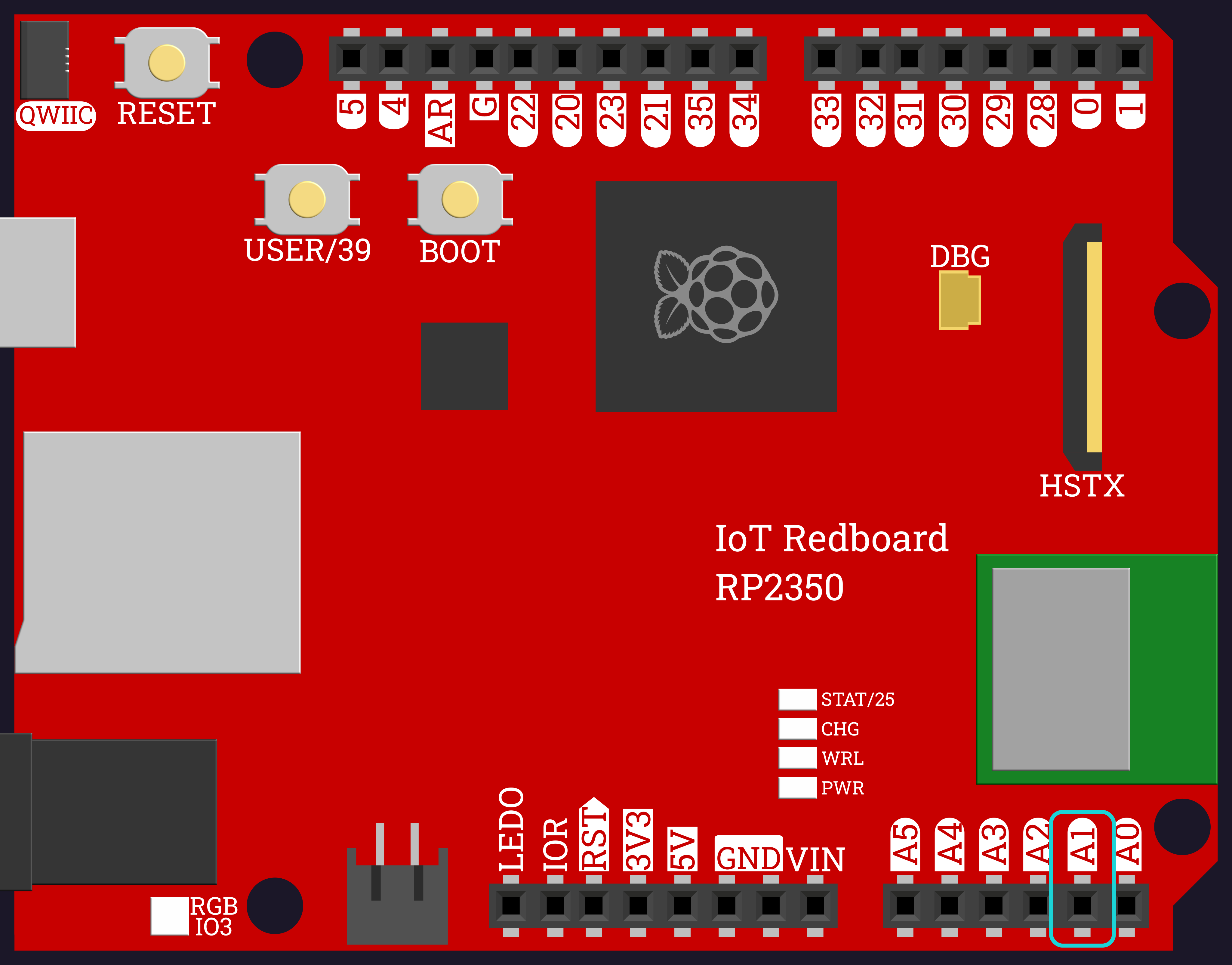
- Wire the TMP36 to
A1, with its outer legs on3V3andGND. - Print the raw reading in a loop.
- Do not touch anything. Watch the number change anyway.
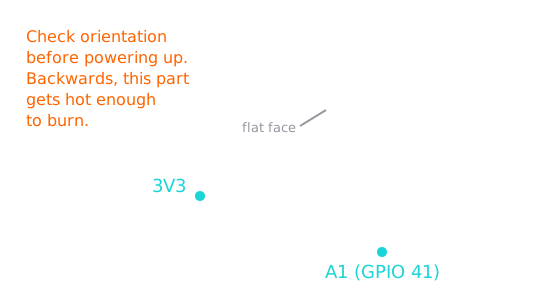
Check the orientation twice before you plug in the power. A TMP36 wired backwards gets hot enough to burn your fingers. The flat face tells you which way round it goes.
from machine import Pin, ADCimport time
temp_sensor = ADC(Pin(41))
while True: print(temp_sensor.read_u16()) time.sleep(0.2)Task 2: Steady It
- Write
read_average(sensor, samples)that adds up several readings and returns their mean. - Print one raw sample and the twenty-sample average side by side.
- Watch which one holds still.
from machine import Pin, ADCimport time
temp_sensor = ADC(Pin(41))
def read_average(sensor, samples): total = 0 for i in range(samples): total = total + sensor.read_u16() time.sleep(0.01) return total // samples
while True: print("one sample:", temp_sensor.read_u16(), " average of 20:", read_average(temp_sensor, 20)) time.sleep(0.5)Task 3: Turn Counts Into Degrees
- Write
to_volts(reading), using the fact that 65535 counts spans 3.3V. - Write
to_celsius(volts)from the sensor's rule: 10mV per degree, with a 500mV offset. - Print all three numbers together, so you can see the chain.
from machine import Pin, ADCimport time
temp_sensor = ADC(Pin(41))
def read_average(sensor, samples): total = 0 for i in range(samples): total = total + sensor.read_u16() time.sleep(0.01) return total // samples
def to_volts(reading): return reading / 65535 * 3.3
def to_celsius(volts): return (volts - 0.5) * 100
while True: raw = read_average(temp_sensor, 20) volts = to_volts(raw) print("raw:", raw, " volts:", round(volts, 3), " C:", round(to_celsius(volts), 1)) time.sleep(1)Task 4: Argue With the Wall
- Compare your number against a real thermometer in the room. Write both down.
- If they disagree, work out by how much, and put that correction in
OFFSET. - Re-run and check that you now agree.
An offset is a blunt instrument — it assumes your sensor is wrong by the same amount at every temperature, which may not be true. It is still what real instruments do, and it is honest as long as you know that is the assumption you made.
from machine import Pin, ADCimport time
temp_sensor = ADC(Pin(41))
OFFSET = 0.0
def read_average(sensor, samples): total = 0 for i in range(samples): total = total + sensor.read_u16() time.sleep(0.01) return total // samples
def to_volts(reading): return reading / 65535 * 3.3
def to_celsius(volts): return (volts - 0.5) * 100
while True: raw = read_average(temp_sensor, 20) celsius = to_celsius(to_volts(raw)) + OFFSET print("raw:", raw, " volts:", round(to_volts(raw), 3), " C:", round(celsius, 1)) time.sleep(1)Task 5: Temperature on the Bar
- Bring the array and
show_bar()back in from Activity 2.8. - Write a more general
scale(value, low, high, steps)that works on any range, not just 0–65535. - Pick a
COOLandWARMtemperature to span, and drive the bar from the reading. - Warm the sensor with your fingers and watch the bar climb.
from machine import Pin, ADCimport time
leds = [ Pin(28, Pin.OUT), Pin(29, Pin.OUT), Pin(30, Pin.OUT), Pin(31, Pin.OUT), Pin(32, Pin.OUT),]temp_sensor = ADC(Pin(41))
OFFSET = 0.0COOL = 18WARM = 30
def read_average(sensor, samples): total = 0 for i in range(samples): total = total + sensor.read_u16() time.sleep(0.01) return total // samples
def to_volts(reading): return reading / 65535 * 3.3
def to_celsius(volts): return (volts - 0.5) * 100
def scale(value, low, high, steps): if value <= low: return 0 if value >= high: return steps return int((value - low) / (high - low) * (steps + 1))
def show_bar(leds, count): for i in range(len(leds)): if i < count: leds[i].value(1) else: leds[i].value(0)
while True: raw = read_average(temp_sensor, 20) celsius = to_celsius(to_volts(raw)) + OFFSET show_bar(leds, scale(celsius, COOL, WARM, len(leds))) print("C:", round(celsius, 1), " bar:", scale(celsius, COOL, WARM, len(leds))) time.sleep(1)Challenge (Optional): Highest and Lowest of the Day
- Track the warmest and coolest temperatures seen since the program started, the way you tracked your knob's range in 2.8.
- Print all three: now, high, low.
Checkpoint
Your finished program should print something close to this, and hold steady:
raw: 14298 volts: 0.72 C: 22.0raw: 14301 volts: 0.72 C: 22.0raw: 14522 volts: 0.731 C: 23.1- The averaged reading changes by only a count or two when nothing is happening
- Your temperature agrees with a real thermometer to within a degree or so
- Pinching the sensor makes the number climb within a few seconds, then fall again when released
- The bar climbs as the sensor warms and never goes below empty or above full
Reflection
Answer the following questions before submitting your work.
- Yesterday the knob had no units and you decided what its reading meant. The TMP36 claims to measure something real. Explain why that makes the raw number less trustworthy rather than more.
- One degree is worth about 198 counts, and a still sensor wobbles by a few hundred. Use those two numbers to explain why averaging twenty samples was worth doing.
- Your calculated temperature probably disagreed with the wall thermometer. Name two different things that could cause that, and describe how you would tell which one it was.
Submit
Submit the required files to the appropriate dropbox.