Activity 2.10: Game States

The Idea
Your game has no beginning and no end. It starts mid-battle before the window has finished appearing, and when your third life goes it quietly puts everything back and carries on as though nothing happened. Both problems are the same problem: the game is always in exactly one situation, and nothing in your code says which.
The fix is a single variable holding a string.
A state machine is one variable and two questions
local gameState = "menu" will hold one of "menu", "playing", or "gameover". Two places ask what it says.
function love.update(dt)  if gameState ~= "playing" then    return  end
  -- the entire game, exactly as it wasend
function love.draw()  -- the world, always
  if gameState == "menu" then    -- a title  elseif gameState == "gameover" then    -- a score and a prompt  endend
That is the whole technique. No library, no table of transition rules, no pattern with a name in a book. Strings compare by value in Lua, so gameState == "gameover" does exactly what it looks like, and a string beats a number here purely because you can read it — nobody has ever debugged gameState == 2 happily.
Two lines, not sixty
The guard on love.update is an early return, and the reason matters. Wrapping the sixty-line body in an if would indent every line of it, so your next diff shows sixty changed lines of which none actually changed. Two lines at the top say the same thing and leave the rest of the function alone.
Notice that only update is gated. love.draw keeps running in every state, which is why the game-over screen can sit on top of your frozen final moment for free. Stopping the simulation and stopping the picture are different decisions, and separating them is most of what a state machine buys you.
isDown is a question; keypressed is a doorbell
This is the one genuinely new LÖVE concept on the page, and it is the difference between a menu that works and a menu you never see.
-- A question, asked every frame: true sixty times a secondfunction love.update(dt)  if love.keyboard.isDown("space") then    fire()  endend
-- A doorbell, rung once, at the moment the key goes downfunction love.keypressed(key) if key == "space" then startGame() endendlove.keyboard.isDown reports a condition: it is true on all sixty frames of a one-second keypress. That is exactly right for holding left, and exactly wrong for a menu. love.keypressed is an event: LÖVE calls it once, when the key goes down, and does not call it again until you let go and press it again. Key repeat is off unless you switch it on with love.keyboard.setKeyRepeat(true).
Getting this wrong has a memorable symptom. You die with space held down, because you were shooting. If the restart is written with isDown, the very next frame sees space still down and starts a new game. I measured it: the game-over screen is on screen for one frame, 0.0167 seconds, and the player has no idea they died. The menu at startup does not appear at all.
The rule is general and outlives this game. Continuous actions want state; moments want events. Walking, steering, and holding fire are state. Jumping, pausing, confirming, and firing one shot per press are events.
Restarting is not setting gameState back
Task 1 flips the variable and nothing else, which is the honest first attempt and it is broken. lives is still zero, the enemies from your last run are still falling, and invuln is still counting down from whenever it last ran out. Under the harness the restarted game shows zero life icons and ends on the next thing you touch.
The reliable fix is one function that owns every value belonging to a single run, called from love.load and from the restart. If those two paths set the game up differently, the second game you play is not the same game as the first, and the difference will be a variable you forgot rather than one you chose.
-- Belongs to the program. Made once, in love.load.local shiplocal fontlocal spawnEvery = 0.8local gameState = "menu"
-- Belongs to one run. Made again every time a run starts.local playerlocal bulletslocal scorelocal lives
The state block splits in two, and the split is the point. Where a variable is declared now tells you how long it lives: the top group is made once and lasts as long as the program, the bottom group is made fresh for every run. Nothing enforces this — it is a convention that makes the forgotten-variable bug visible instead of invisible.
Rebuilding the player as a whole new table is easier than putting its fields back one at a time, and it cannot leave a field behind. The bare local player is nil until resetGame runs, the same shape ship has had since Activity 2.4.
Text in the middle of the window
love.graphics.printf("GAME OVER", 0, 220, love.graphics.getWidth(), "center")printf takes a width to work within and an alignment. Give it the whole window and "center" and it centers the line for you, so you never measure text and the title stays centered if the window changes size. The 0 is the left edge of that width, not the left edge of the text.
Dimming the world, and one fact about alpha
love.graphics.setColor(0, 0, 0, 0.7)love.graphics.rectangle("fill", 0, 0, love.graphics.getWidth(), love.graphics.getHeight())
love.graphics.setColor(1, 1, 1)
A fourth argument to setColor is alpha, on the same 0 to 1 scale as the colors. A black rectangle over the whole window at 0.7 leaves your game faintly visible underneath, which is why the game-over screen is worth looking at.
Alpha is not carried over. LÖVE's source defaults the fourth argument to 1 whenever you leave it out, so the plain three-argument setColor(1, 1, 1) on the next line puts you back to fully opaque without your having to think about it. This is the one piece of graphics state that does not behave the way Activity 2.2 taught you to expect, and it behaves the more convenient way.
The font, meanwhile, is as sticky as ever. drawOverlay switches to the big font and switches back, and if it forgets the second half your score reads at forty-eight points from the next frame onward.
Build
enemy.lua and collision.lua are untouched again. Everything here is main.lua.
Task 1: Three states and a doorbell
- Add
local gameState = "menu"to the state block. - Guard
love.updatewith an early return. Do not indent the body. - Replace the silent reset with
gameState = "gameover"when the last life goes. - Write
love.keypressed. Space starts a game from either non-playing state; escape quits. LÖVE does not quit on escape by default — that only happens on its error screen, so this is yours to write. - Draw the title and the game-over prompt after the HUD, so they sit on top of everything.
- Play it, die, and restart. You will land in a game with no lives that ends immediately. That is not your mistake, it is Task 2.
-- main.lua
local Enemy = require("enemy")local collision = require("collision")
local shiplocal fontlocal player = { x = 400, y = 500, size = 40, speed = 300 }local bullets = {}local fireCooldown = 0local enemies = {}local spawnTimer = 0local spawnEvery = 0.8local score = 0local lives = 3local invuln = 0local gameState = "menu"
function love.load() love.graphics.setBackgroundColor(0.05, 0.05, 0.1) math.randomseed(os.time()) ship = love.graphics.newImage("ship.png") font = love.graphics.newFont(20) love.graphics.setFont(font)end
function love.keypressed(key) if key == "escape" then love.event.quit() elseif key == "space" and gameState ~= "playing" then gameState = "playing" endend
function love.update(dt) if gameState ~= "playing" then return end
if love.keyboard.isDown("left", "a") then player.x = player.x - player.speed * dt end if love.keyboard.isDown("right", "d") then player.x = player.x + player.speed * dt end
local half = player.size / 2 player.x = math.max(half, math.min(love.graphics.getWidth() - half, player.x))
fireCooldown = fireCooldown - dt invuln = invuln - dt
if love.keyboard.isDown("space") and fireCooldown <= 0 then table.insert(bullets, { x = player.x, y = player.y - 30, size = 6, speed = 500 }) fireCooldown = 0.15 end
for i = #bullets, 1, -1 do local b = bullets[i] b.y = b.y - b.speed * dt if b.y < -20 then table.remove(bullets, i) end end
spawnTimer = spawnTimer - dt if spawnTimer <= 0 then table.insert(enemies, Enemy.new(math.random(40, love.graphics.getWidth() - 40))) spawnTimer = spawnEvery end
for i = #enemies, 1, -1 do local e = enemies[i] e:update(dt) if e.y > love.graphics.getHeight() + 20 then table.remove(enemies, i) end end
if invuln <= 0 then for i = #enemies, 1, -1 do if collision.overlaps(enemies[i], player) then table.remove(enemies, i) lives = lives - 1 invuln = 2 if lives <= 0 then gameState = "gameover" end break end end end
for i = #enemies, 1, -1 do for j = #bullets, 1, -1 do if collision.overlaps(enemies[i], bullets[j]) then table.remove(bullets, j) enemies[i].hp = enemies[i].hp - 1 if enemies[i].hp <= 0 then table.remove(enemies, i) score = score + 1 end break end end endend
local function drawHud() love.graphics.setColor(1, 1, 1) love.graphics.print("Score: " .. score, 10, 12)
for i = 1, lives do local x = love.graphics.getWidth() - 24 - (i - 1) * 30 love.graphics.draw(ship, x, 24, 0, 1, 1, ship:getWidth() / 2, ship:getHeight() / 2) endend
function love.draw() local blink = invuln > 0 and math.floor(invuln * 10) % 2 == 1
if not blink then love.graphics.setColor(1, 1, 1) love.graphics.draw(ship, player.x, player.y, 0, 2, 2, ship:getWidth() / 2, ship:getHeight() / 2) end
love.graphics.setColor(1, 0.9, 0.3) for _, b in ipairs(bullets) do love.graphics.rectangle("fill", b.x - 2, b.y - 8, 4, 16) end
for _, e in ipairs(enemies) do e:draw() end
drawHud()
if gameState == "menu" then love.graphics.setColor(1, 1, 1) love.graphics.printf("SKYNEST", 0, 220, love.graphics.getWidth(), "center") love.graphics.printf("Press space to play", 0, 300, love.graphics.getWidth(), "center") elseif gameState == "gameover" then love.graphics.setColor(1, 1, 1) love.graphics.printf("GAME OVER", 0, 220, love.graphics.getWidth(), "center") love.graphics.printf("Press space to play again", 0, 300, love.graphics.getWidth(), "center") endendTask 2: One place that starts a game
- Split the state block: assets and settings keep their values, and everything that belongs to a single run becomes a bare
localwith no initializer. - Write
resetGame()abovelove.loadand give every one of those variables its starting value there. Build the player as a fresh table. - Call it from
love.loadand fromlove.keypressed. Two callers, one definition of what a new game is. - Restart and count the icons. Three, every time, however you got there.
-- main.lua
local Enemy = require("enemy")local collision = require("collision")
local shiplocal fontlocal spawnEvery = 0.8local gameState = "menu"
local playerlocal bulletslocal fireCooldownlocal enemieslocal spawnTimerlocal scorelocal liveslocal invuln
local function resetGame() player = { x = 400, y = 500, size = 40, speed = 300 } bullets = {} fireCooldown = 0 enemies = {} spawnTimer = 0 score = 0 lives = 3 invuln = 0end
function love.load() love.graphics.setBackgroundColor(0.05, 0.05, 0.1) math.randomseed(os.time()) ship = love.graphics.newImage("ship.png") font = love.graphics.newFont(20) love.graphics.setFont(font) resetGame()end
function love.keypressed(key) if key == "escape" then love.event.quit() elseif key == "space" and gameState ~= "playing" then resetGame() gameState = "playing" endend
function love.update(dt) if gameState ~= "playing" then return end
if love.keyboard.isDown("left", "a") then player.x = player.x - player.speed * dt end if love.keyboard.isDown("right", "d") then player.x = player.x + player.speed * dt end
local half = player.size / 2 player.x = math.max(half, math.min(love.graphics.getWidth() - half, player.x))
fireCooldown = fireCooldown - dt invuln = invuln - dt
if love.keyboard.isDown("space") and fireCooldown <= 0 then table.insert(bullets, { x = player.x, y = player.y - 30, size = 6, speed = 500 }) fireCooldown = 0.15 end
for i = #bullets, 1, -1 do local b = bullets[i] b.y = b.y - b.speed * dt if b.y < -20 then table.remove(bullets, i) end end
spawnTimer = spawnTimer - dt if spawnTimer <= 0 then table.insert(enemies, Enemy.new(math.random(40, love.graphics.getWidth() - 40))) spawnTimer = spawnEvery end
for i = #enemies, 1, -1 do local e = enemies[i] e:update(dt) if e.y > love.graphics.getHeight() + 20 then table.remove(enemies, i) end end
if invuln <= 0 then for i = #enemies, 1, -1 do if collision.overlaps(enemies[i], player) then table.remove(enemies, i) lives = lives - 1 invuln = 2 if lives <= 0 then gameState = "gameover" end break end end end
for i = #enemies, 1, -1 do for j = #bullets, 1, -1 do if collision.overlaps(enemies[i], bullets[j]) then table.remove(bullets, j) enemies[i].hp = enemies[i].hp - 1 if enemies[i].hp <= 0 then table.remove(enemies, i) score = score + 1 end break end end endend
local function drawHud() love.graphics.setColor(1, 1, 1) love.graphics.print("Score: " .. score, 10, 12)
for i = 1, lives do local x = love.graphics.getWidth() - 24 - (i - 1) * 30 love.graphics.draw(ship, x, 24, 0, 1, 1, ship:getWidth() / 2, ship:getHeight() / 2) endend
function love.draw() local blink = invuln > 0 and math.floor(invuln * 10) % 2 == 1
if not blink then love.graphics.setColor(1, 1, 1) love.graphics.draw(ship, player.x, player.y, 0, 2, 2, ship:getWidth() / 2, ship:getHeight() / 2) end
love.graphics.setColor(1, 0.9, 0.3) for _, b in ipairs(bullets) do love.graphics.rectangle("fill", b.x - 2, b.y - 8, 4, 16) end
for _, e in ipairs(enemies) do e:draw() end
drawHud()
if gameState == "menu" then love.graphics.setColor(1, 1, 1) love.graphics.printf("SKYNEST", 0, 220, love.graphics.getWidth(), "center") love.graphics.printf("Press space to play", 0, 300, love.graphics.getWidth(), "center") elseif gameState == "gameover" then love.graphics.setColor(1, 1, 1) love.graphics.printf("GAME OVER", 0, 220, love.graphics.getWidth(), "center") love.graphics.printf("Press space to play again", 0, 300, love.graphics.getWidth(), "center") endendTask 3: Screens worth looking at
- Add a
titleFontat size 48, built inlove.loadbeside the one you already have. - Write
drawOverlay(title, subtitle): a dim full-window rectangle, the title in the big font, the subtitle in the normal one. Set the font back before you leave. - Both screens now cost one line each, and the game-over line can show the score because the score is still sitting there.
- Die on purpose and look at it. Your last frame is still visible behind the dimming, because you never stopped drawing it.
-- main.lua
local Enemy = require("enemy")local collision = require("collision")
local shiplocal fontlocal titleFontlocal spawnEvery = 0.8local gameState = "menu"
local playerlocal bulletslocal fireCooldownlocal enemieslocal spawnTimerlocal scorelocal liveslocal invuln
local function resetGame() player = { x = 400, y = 500, size = 40, speed = 300 } bullets = {} fireCooldown = 0 enemies = {} spawnTimer = 0 score = 0 lives = 3 invuln = 0end
function love.load() love.graphics.setBackgroundColor(0.05, 0.05, 0.1) math.randomseed(os.time()) ship = love.graphics.newImage("ship.png") font = love.graphics.newFont(20) titleFont = love.graphics.newFont(48) love.graphics.setFont(font) resetGame()end
function love.keypressed(key) if key == "escape" then love.event.quit() elseif key == "space" and gameState ~= "playing" then resetGame() gameState = "playing" endend
function love.update(dt) if gameState ~= "playing" then return end
if love.keyboard.isDown("left", "a") then player.x = player.x - player.speed * dt end if love.keyboard.isDown("right", "d") then player.x = player.x + player.speed * dt end
local half = player.size / 2 player.x = math.max(half, math.min(love.graphics.getWidth() - half, player.x))
fireCooldown = fireCooldown - dt invuln = invuln - dt
if love.keyboard.isDown("space") and fireCooldown <= 0 then table.insert(bullets, { x = player.x, y = player.y - 30, size = 6, speed = 500 }) fireCooldown = 0.15 end
for i = #bullets, 1, -1 do local b = bullets[i] b.y = b.y - b.speed * dt if b.y < -20 then table.remove(bullets, i) end end
spawnTimer = spawnTimer - dt if spawnTimer <= 0 then table.insert(enemies, Enemy.new(math.random(40, love.graphics.getWidth() - 40))) spawnTimer = spawnEvery end
for i = #enemies, 1, -1 do local e = enemies[i] e:update(dt) if e.y > love.graphics.getHeight() + 20 then table.remove(enemies, i) end end
if invuln <= 0 then for i = #enemies, 1, -1 do if collision.overlaps(enemies[i], player) then table.remove(enemies, i) lives = lives - 1 invuln = 2 if lives <= 0 then gameState = "gameover" end break end end end
for i = #enemies, 1, -1 do for j = #bullets, 1, -1 do if collision.overlaps(enemies[i], bullets[j]) then table.remove(bullets, j) enemies[i].hp = enemies[i].hp - 1 if enemies[i].hp <= 0 then table.remove(enemies, i) score = score + 1 end break end end endend
local function drawHud() love.graphics.setColor(1, 1, 1) love.graphics.print("Score: " .. score, 10, 12)
for i = 1, lives do local x = love.graphics.getWidth() - 24 - (i - 1) * 30 love.graphics.draw(ship, x, 24, 0, 1, 1, ship:getWidth() / 2, ship:getHeight() / 2) endend
local function drawOverlay(title, subtitle) love.graphics.setColor(0, 0, 0, 0.7) love.graphics.rectangle("fill", 0, 0, love.graphics.getWidth(), love.graphics.getHeight())
love.graphics.setColor(1, 1, 1) love.graphics.setFont(titleFont) love.graphics.printf(title, 0, 220, love.graphics.getWidth(), "center")
love.graphics.setFont(font) love.graphics.printf(subtitle, 0, 300, love.graphics.getWidth(), "center")end
function love.draw() local blink = invuln > 0 and math.floor(invuln * 10) % 2 == 1
if not blink then love.graphics.setColor(1, 1, 1) love.graphics.draw(ship, player.x, player.y, 0, 2, 2, ship:getWidth() / 2, ship:getHeight() / 2) end
love.graphics.setColor(1, 0.9, 0.3) for _, b in ipairs(bullets) do love.graphics.rectangle("fill", b.x - 2, b.y - 8, 4, 16) end
for _, e in ipairs(enemies) do e:draw() end
drawHud()
if gameState == "menu" then drawOverlay("SKYNEST", "Press space to play") elseif gameState == "gameover" then drawOverlay("GAME OVER", "Score " .. score .. " - press space to play again") endendChallenge (Optional)
- Add a paused state on the p key. Update already returns for anything that is not
"playing", so pausing costs you one branch inlove.keypressedand one inlove.draw. That is the early return paying for itself. Note that pause must not callresetGame, so the one-branch keypressed needs splitting. - Keep a best score across runs. The interesting part is not the code, it is deciding that
bestScorebelongs in the top half of the state block and never insideresetGame. It is the same lifetime question as everything else on this page. - Add a
"ready"state that counts three, two, one before play starts. It needs a timer counted down in update, which means update can no longer return on every non-playing state — the guard becomes a choice rather than a gate. - Make escape return to the menu while playing and quit only from the menu. Two lines, and it is how nearly every game you have played behaves.
Check Your Work
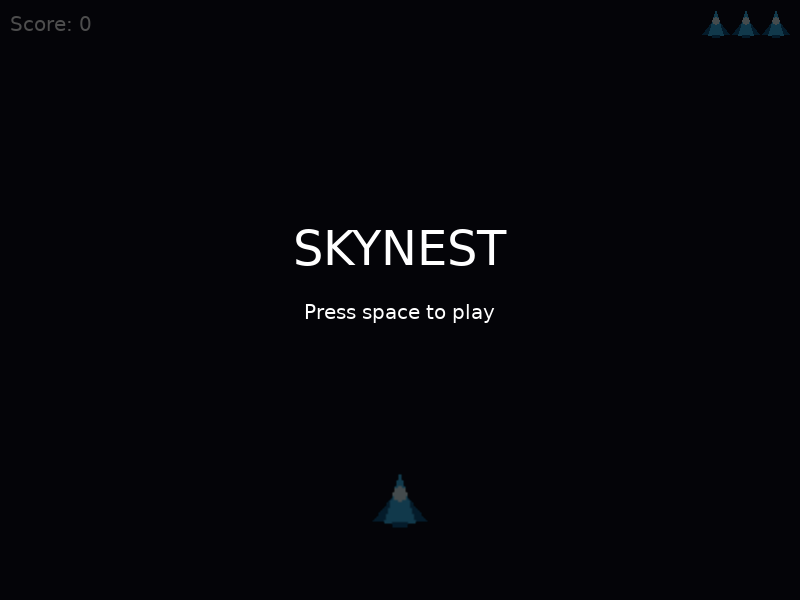
The menu. The HUD is under the overlay rather than hidden by it, which is why the score is dimmed instead of missing.
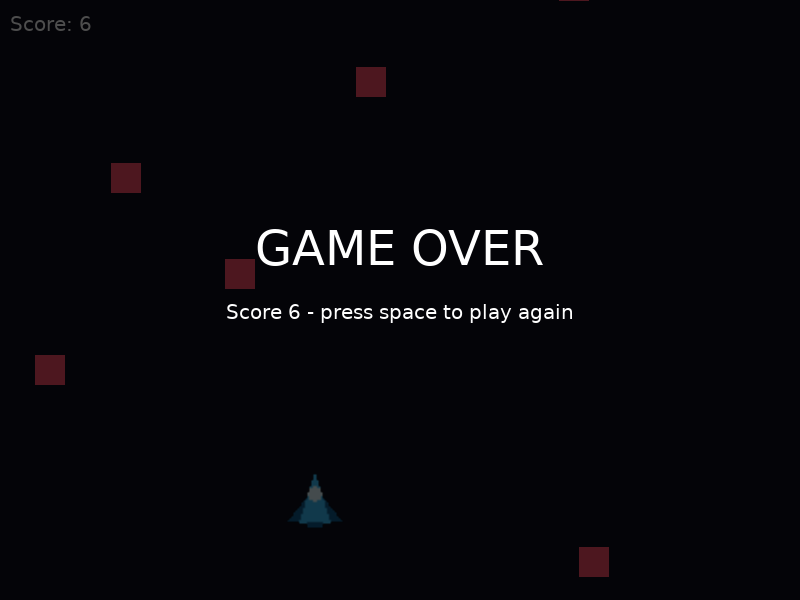
Game over. The world behind the text is frozen because update returns early, and the life icons are gone because the loop now runs from 1 to 0.
- The game opens on a title over a dimmed, motionless field. Nothing spawns and nothing falls until you press space.
- Your third life ends the run. GAME OVER appears over your frozen last moment, with the score you finished on.
- Space starts a fresh run: three icons, score zero, an empty sky.
- Escape quits from anywhere.
If you never see the game-over screen, the restart is reading isDown rather than waiting for keypressed. If the second game has no lives, resetGame is not being called from love.keypressed. If the world vanishes behind solid black, the overlay's setColor is missing its fourth argument. And if your score suddenly renders enormous, drawOverlay never set the font back.
One thing worth noticing before you move on: the game is finished. It begins, it can be lost, and it can be played again. Everything after this activity makes it better rather than more complete.