Activity 2.2: Drawing to the Screen

The Idea
Two facts about the canvas, and then some shapes.
The origin is the top-left, and y grows downward. A larger y is lower on the screen. This trips everyone once and then never again.
Colors run from 0 to 1, not 0 to 255. This is the single most common thing to get wrong, because most of the internet's LÖVE code predates the change and uses 0–255.
love.graphics.setColor(1, 0.7, 0.1)Red, green, blue, and optionally alpha, each from 0 to 1. If you find a snippet online that says setColor(255, 180, 25), divide everything by 255. Passing 255 does not error — it clamps to 1, so every color comes out pure white and nothing tells you why.
Shapes
love.graphics.rectangle("fill", 100, 100, 200, 120)love.graphics.rectangle("line", 100, 100, 200, 120)love.graphics.circle("fill", 200, 160, 30)love.graphics.line(0, 0, 800, 600)rectangle(mode, x, y, width, height)— x and y are the top-left corner, not the middle.circle(mode, x, y, radius)— here x and y are the middle. The inconsistency is real and worth remembering.line(x1, y1, x2, y2, ...)— as many points as you like, joined in order.
The first argument is always "fill" or "line" — solid or outline. Draw the fill first and the outline second, or the fill covers the outline.
Drawing is a state machine
This is the part that behaves unlike anything in Unit 1. setColor does not draw anything and does not belong to any shape. It changes a setting that stays changed until something changes it back.
love.graphics.setColor(1, 0, 0)love.graphics.rectangle("fill", 10, 10, 50, 50)love.graphics.rectangle("fill", 70, 10, 50, 50)Both squares are red. One setColor, two shapes. The same is true of setLineWidth and setFont.
The bug this causes is always the same shape: something you drew is mysteriously the wrong color, because code above it set a color and never set it back. When that happens, read upward, not at the shape itself.
The habit that prevents it is to set the color immediately before every group of shapes, even when you think you already know what it is. It costs one line and saves a hunt.
Background, and why the screen is not smeared
setBackgroundColor belongs in love.load, not in draw — it is a setting, not a drawing call. LÖVE wipes the window to that color before every single love.draw.
Which means each frame is drawn from scratch. Nothing you drew last frame is still there. That sounds wasteful and is the reason animation works at all: to move something, you do not move it — you draw it somewhere else next frame. Activity 2.3 is entirely built on that.
Finding the middle
love.graphics.getWidth() and getHeight() report the window size. Use them instead of typing 800 and 600, so that changing conf.lua does not silently break your layout.
Build
Keep working in the same skynest folder. You are drawing an instrument panel.
Task 1: A filled rectangle
- Clear out Activity 2.1's text and counter.
- Set a blue color and fill a rectangle at 100, 100.
- Keep the dark background in
love.load.
-- main.lua
function love.load() love.graphics.setBackgroundColor(0.05, 0.05, 0.1)end
function love.draw() love.graphics.setColor(0.2, 0.6, 0.9) love.graphics.rectangle("fill", 100, 100, 200, 120)endTask 2: Outline it, then add a reactor
- Draw a white outline at exactly the same position and size. Set the line width to 3 first.
- Add an orange filled circle in the middle of the panel. Work out its center from the rectangle's numbers rather than guessing.
- Set the color before each shape. Then, once it works, delete one of the
setColorlines and see which shape changes. That is the state machine.
-- main.lua
function love.load() love.graphics.setBackgroundColor(0.05, 0.05, 0.1)end
function love.draw() love.graphics.setColor(0.2, 0.6, 0.9) love.graphics.rectangle("fill", 100, 100, 200, 120)
love.graphics.setColor(1, 1, 1) love.graphics.setLineWidth(3) love.graphics.rectangle("line", 100, 100, 200, 120)
love.graphics.setColor(1, 0.7, 0.1) love.graphics.circle("fill", 200, 160, 30)endTask 3: A label, centered by arithmetic
- Set the color back to white and print a label below the panel.
- Position it using
love.graphics.getWidth() / 2rather than a hard-coded 400. - Then change the window width in conf.lua and run again. The label follows; the panel does not. That is the difference the function makes.
-- main.lua
function love.load() love.graphics.setBackgroundColor(0.05, 0.05, 0.1)end
function love.draw() love.graphics.setColor(0.2, 0.6, 0.9) love.graphics.rectangle("fill", 100, 100, 200, 120)
love.graphics.setColor(1, 1, 1) love.graphics.setLineWidth(3) love.graphics.rectangle("line", 100, 100, 200, 120)
love.graphics.setColor(1, 0.7, 0.1) love.graphics.circle("fill", 200, 160, 30)
love.graphics.setColor(1, 1, 1) love.graphics.print("REACTOR NOMINAL", love.graphics.getWidth() / 2 - 55, 260)endChallenge (Optional)
- Subtracting 55 to center the text is a guess. Replace it with a real measurement using
love.graphics.getFont():getWidth(text), and it will be exact for any string. - Draw the panel from a table —
local panel = { x = 100, y = 100, w = 200, h = 120 }— and use its fields everywhere. Activity 1.10, and it is how every object in the rest of this unit is stored. - Write a
drawPanel(x, y, w, h)function and call it three times at different positions. Yourlove.drawbecomes three lines.
Check Your Work
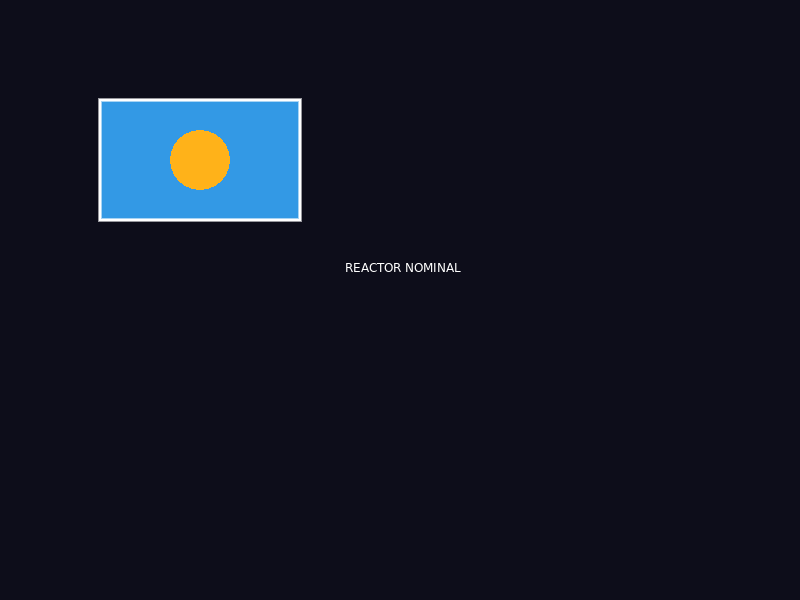
Four shapes and a label, drawn in the order the code lists them. The outline sits on top of the fill because it is drawn second.
On a near-black background you should have:
- A blue filled rectangle with a crisp white outline.
- An orange circle centered inside it.
- A white label centered under the panel.
If everything is white, you used 0–255 values. If the outline is missing, it was drawn before the fill and got covered. If the circle is off-center, check that you added half the width and height to the rectangle's corner.