Activity 2.5: Many Things at Once

The Idea
So far the game has one of everything. A shooter needs an unknown number of bullets, appearing and disappearing constantly, and that is a list of tables — Activity 1.9 holding Activity 1.10. No new Lua at all.
local bullets = {}
table.insert(bullets, { x = 400, y = 470, size = 6, speed = 500 })
Each bullet is a small record with its own position and speed. The list starts empty and grows. This one pattern is the rest of the unit — enemies, particles and pickups are all the same shape.
Move the whole flock by looping over the list and updating each table, and draw them by looping again. Neither loop cares how many there are.
Firing once per press
Activity 2.3 used isDown, which is true on every frame the key is held. Use that to fire and one tap produces thirty bullets.
function love.keypressed(key) if key == "space" then -- fires exactly once, however long the key is held endendlove.keypressed is a fourth callback, and LÖVE calls it once, at the moment a key goes down. It is the right tool for anything that should happen per press: firing, pausing, confirming a menu.
Polling for continuous things, events for discrete things. Movement wants isDown; a jump wants keypressed. Choosing the wrong one is the cause of most "why did it do that fifty times" bugs.
The loop that matters
Bullets leave the top of the screen and must be thrown away, or the list grows forever and the game slowly dies. Here is the exact situation Activity 1.9 warned about.
for i = #bullets, 1, -1 do local b = bullets[i] b.y = b.y - b.speed * dt if b.y < -20 then table.remove(bullets, i) endendBackwards, because you are removing. Remove item 3 going forwards and everything shifts down while your counter goes up, so item 4 lands in slot 3 and is skipped — you get a bullet that will not die. Going backwards, the only positions that move are ones you have already passed.
Move and remove in the same loop. Two separate loops would work, but this way each bullet is visited once and the removal test uses the position you just computed.
Note b.y < -20 rather than b.y < 0. A bullet is drawn from its center, so at y=0 half of it is still visible. Giving it a little margin means things vanish offscreen rather than winking out in view.
A weapon that fires while held
Tapping space for every shot gets old. What you want is to hold it and fire at a fixed rate — which needs a cooldown, and that is a number you count down with dt.
fireCooldown = fireCooldown - dt
if love.keyboard.isDown("space") and fireCooldown <= 0 then  table.insert(bullets, { x = player.x, y = player.y - 30, size = 6, speed = 500 })  fireCooldown = 0.15end
Count down every frame; when it reaches zero and the key is held, fire and set it back. 0.15 means about six shots a second, on any machine, because the countdown is in seconds rather than frames.
This is the accumulator pattern, and it is worth naming because Activity 2.6 uses it again for spawning enemies. Any "every so often" in a game is a number and a dt.
It does not matter that the cooldown goes slightly negative before you notice — the test is <= 0, and resetting to a fixed value each time keeps the rate honest.
Build
Same skynest folder. Move the ship to the bottom of the screen — this is a vertical shooter now.
Task 1: Fire bullets into a list
- Rename your ship table to player and start it near the bottom. Drop the up and down movement; left and right is enough.
- Add an empty bullets list.
- Add
love.keypressedand insert a bullet on space, positioned at the ship's nose. - Draw every bullet with an
ipairsloop. They will not move yet — you should get a growing trail of stationary marks.
-- main.lua
local shiplocal player = { x = 400, y = 500, size = 40, speed = 300 }local bullets = {}
function love.load() love.graphics.setBackgroundColor(0.05, 0.05, 0.1) ship = love.graphics.newImage("ship.png")end
function love.keypressed(key) if key == "space" then table.insert(bullets, { x = player.x, y = player.y - 30, size = 6, speed = 500 }) endend
function love.update(dt) if love.keyboard.isDown("left", "a") then player.x = player.x - player.speed * dt end if love.keyboard.isDown("right", "d") then player.x = player.x + player.speed * dt end
local half = player.size / 2 player.x = math.max(half, math.min(love.graphics.getWidth() - half, player.x))end
function love.draw() love.graphics.setColor(1, 1, 1) love.graphics.draw(ship, player.x, player.y, 0, 2, 2, ship:getWidth() / 2, ship:getHeight() / 2)
love.graphics.setColor(1, 0.9, 0.3) for _, b in ipairs(bullets) do love.graphics.rectangle("fill", b.x - 2, b.y - 8, 4, 16) endendTask 2: Move them, and throw them away
- Add a backwards loop in update that moves each bullet up and removes it once it is off the top.
- Print the live bullet count so you can watch the list drain.
- Then change the loop to go forwards and hold space. Bullets will start surviving that should have died, and the count will creep up. Change it back once you have seen it.
-- main.lua
local shiplocal player = { x = 400, y = 500, size = 40, speed = 300 }local bullets = {}
function love.load() love.graphics.setBackgroundColor(0.05, 0.05, 0.1) ship = love.graphics.newImage("ship.png")end
function love.keypressed(key) if key == "space" then table.insert(bullets, { x = player.x, y = player.y - 30, size = 6, speed = 500 }) endend
function love.update(dt) if love.keyboard.isDown("left", "a") then player.x = player.x - player.speed * dt end if love.keyboard.isDown("right", "d") then player.x = player.x + player.speed * dt end
local half = player.size / 2 player.x = math.max(half, math.min(love.graphics.getWidth() - half, player.x))
for i = #bullets, 1, -1 do local b = bullets[i] b.y = b.y - b.speed * dt if b.y < -20 then table.remove(bullets, i) end endend
function love.draw() love.graphics.setColor(1, 1, 1) love.graphics.draw(ship, player.x, player.y, 0, 2, 2, ship:getWidth() / 2, ship:getHeight() / 2)
love.graphics.setColor(1, 0.9, 0.3) for _, b in ipairs(bullets) do love.graphics.rectangle("fill", b.x - 2, b.y - 8, 4, 16) end
love.graphics.setColor(1, 1, 1) love.graphics.print("Bullets: " .. #bullets, 10, 10)endTask 3: Hold to fire
- Add a fireCooldown variable starting at 0.
- Delete
love.keypressedentirely and fire from update instead, gated on the cooldown. - Tune the interval. 0.15 feels like a weapon; 0.02 feels like a mistake, and both are one number.
- Try removing the
fireCooldown = 0.15reset and watch what a weapon with no cooldown does to the count.
-- main.lua
local shiplocal player = { x = 400, y = 500, size = 40, speed = 300 }local bullets = {}local fireCooldown = 0
function love.load() love.graphics.setBackgroundColor(0.05, 0.05, 0.1) ship = love.graphics.newImage("ship.png")end
function love.update(dt) if love.keyboard.isDown("left", "a") then player.x = player.x - player.speed * dt end if love.keyboard.isDown("right", "d") then player.x = player.x + player.speed * dt end
local half = player.size / 2 player.x = math.max(half, math.min(love.graphics.getWidth() - half, player.x))
fireCooldown = fireCooldown - dt if love.keyboard.isDown("space") and fireCooldown <= 0 then table.insert(bullets, { x = player.x, y = player.y - 30, size = 6, speed = 500 }) fireCooldown = 0.15 end
for i = #bullets, 1, -1 do local b = bullets[i] b.y = b.y - b.speed * dt if b.y < -20 then table.remove(bullets, i) end endend
function love.draw() love.graphics.setColor(1, 1, 1) love.graphics.draw(ship, player.x, player.y, 0, 2, 2, ship:getWidth() / 2, ship:getHeight() / 2)
love.graphics.setColor(1, 0.9, 0.3) for _, b in ipairs(bullets) do love.graphics.rectangle("fill", b.x - 2, b.y - 8, 4, 16) end
love.graphics.setColor(1, 1, 1) love.graphics.print("Bullets: " .. #bullets, 10, 10)endChallenge (Optional)
- Fire two bullets at once, angled slightly apart, by giving each a horizontal speed as well and adding it in the update loop.
- Make the cooldown a closure from the bonus material in Activity 1.8 —
makeCooldown(0.15)returning a function you call each frame. It keeps the timer out of your top-level variables. - Give bullets a lifetime in seconds instead of an offscreen test, counting down with dt and removing at zero. Which of the two is better depends on whether bullets can ever travel sideways.
Check Your Work
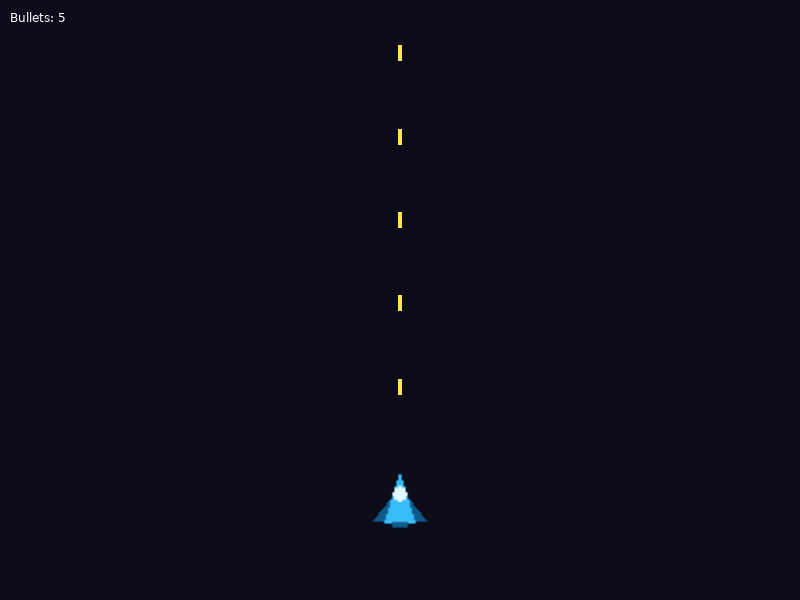
Five bullets in flight from one held key. The even spacing is the 0.15-second cooldown made visible.
- The ship sits near the bottom and slides left and right.
- Holding space produces a steady stream of yellow bullets, evenly spaced.
- The bullet count rises while you fire and settles at a constant number rather than climbing forever. That number is your fire rate multiplied by the time a bullet takes to cross the screen.
If the count only ever grows, the removal is missing or the loop runs forwards. If bullets appear in bursts, you are still using keypressed. If they fly off in a solid line, the cooldown is not being reset.